

Writing install media with dd works until one mistyped device path wipes the wrong drive. That risk is exactly why many people install balenaEtcher on Ubuntu: its guided three-step workflow and post-write validation make USB and SD card jobs much harder to botch.
The current upstream .deb installs cleanly on Ubuntu 24.04 and 22.04. Ubuntu 26.04 is still blocked by stale dependency metadata in balenaEtcher’s package: the library is present, but the package name in the upstream .deb is still old. You can download the installer from any shell, but the application itself still needs an active graphical desktop session to open.
Install balenaEtcher on Ubuntu
balenaEtcher’s old Ubuntu repository is gone, so the supported Linux path is the official GitHub releases page and its current amd64 .deb package.
balenaEtcher 2.1.4 installs on Ubuntu 24.04 and 22.04. On Ubuntu 26.04, APT rejects the upstream
.debbecause its control file still asks forlibgdk-pixbuf2.0-0. Resolute ships the same library under the renamed packagelibgdk-pixbuf-2.0-0, so the blocker is the outdated dependency name in balenaEtcher’s package metadata.
Update Ubuntu before installing balenaEtcher on Ubuntu
Refresh package metadata first so APT resolves the local .deb against current Ubuntu libraries.
sudo apt update && sudo apt upgradeThese commands use
sudofor tasks that need root privileges. If your account is not set up for sudo yet, follow the guide to add a new user to sudoers on Ubuntu.
Install curl on Ubuntu if it is missing
Ubuntu desktops usually already have curl, but minimal installs and reused virtual machines do not always include it. This workflow only needs curl, not both curl and wget.
sudo apt install -y curlOn Ubuntu 24.04 and 22.04, balenaEtcher also pulls
libgdk-pixbuf2.0-0from the Universe component. If APT later says that package is unavailable, enable Universe and Multiverse on Ubuntu first and then rerun the install.
Download the latest balenaEtcher .deb package on Ubuntu
This command asks GitHub for the newest balenaEtcher release and downloads the current amd64 .deb automatically, so you do not need to edit version numbers by hand.
curl -fsSL https://api.github.com/repos/balena-io/etcher/releases/latest | grep -oE '"browser_download_url": "[^"]+amd64[^"]*\.deb"' | head -n 1 | cut -d '"' -f4 | xargs -I{} curl -fLO --progress-bar "{}"Confirm that the package landed in your current directory before you install it.
ls -1 balena-etcher_*.debbalena-etcher_2.1.4_amd64.deb
Install the balenaEtcher package on Ubuntu
APT can install the local file directly and pull the two extra GTK-related packages that balenaEtcher still needs on Ubuntu 24.04 and 22.04.
sudo apt install -y ./balena-etcher_*.debThe following additional packages will be installed: libgdk-pixbuf-xlib-2.0-0 libgdk-pixbuf2.0-0 The following NEW packages will be installed: balena-etcher libgdk-pixbuf-xlib-2.0-0 libgdk-pixbuf2.0-0 Setting up balena-etcher (2.1.4) ... chmod: cannot access '/opt/balenaEtcher/chrome-sandbox': No such file or directory
Verify the balenaEtcher install on Ubuntu
Check the installed version and the launcher path before you switch to the desktop.
apt-cache policy balena-etcher
command -v balena-etcher
balena-etcher:
Installed: 2.1.4
Candidate: 2.1.4
Version table:
*** 2.1.4 100
100 /var/lib/dpkg/status
/usr/bin/balena-etcher
The /var/lib/dpkg/status entry is expected here because balenaEtcher was installed from a local .deb, not from a persistent APT repository.
Open balenaEtcher on Ubuntu
The package can be downloaded and installed over SSH, but the balenaEtcher window only opens from an active graphical session such as GNOME, KDE Plasma, or Xfce.
Open balenaEtcher from the applications menu on Ubuntu
Use your desktop launcher if you prefer to stay out of the terminal after the package is installed.
- Open Activities or your desktop environment’s main applications menu.
- Search for balenaEtcher.
- Select the balenaEtcher icon to open the application.
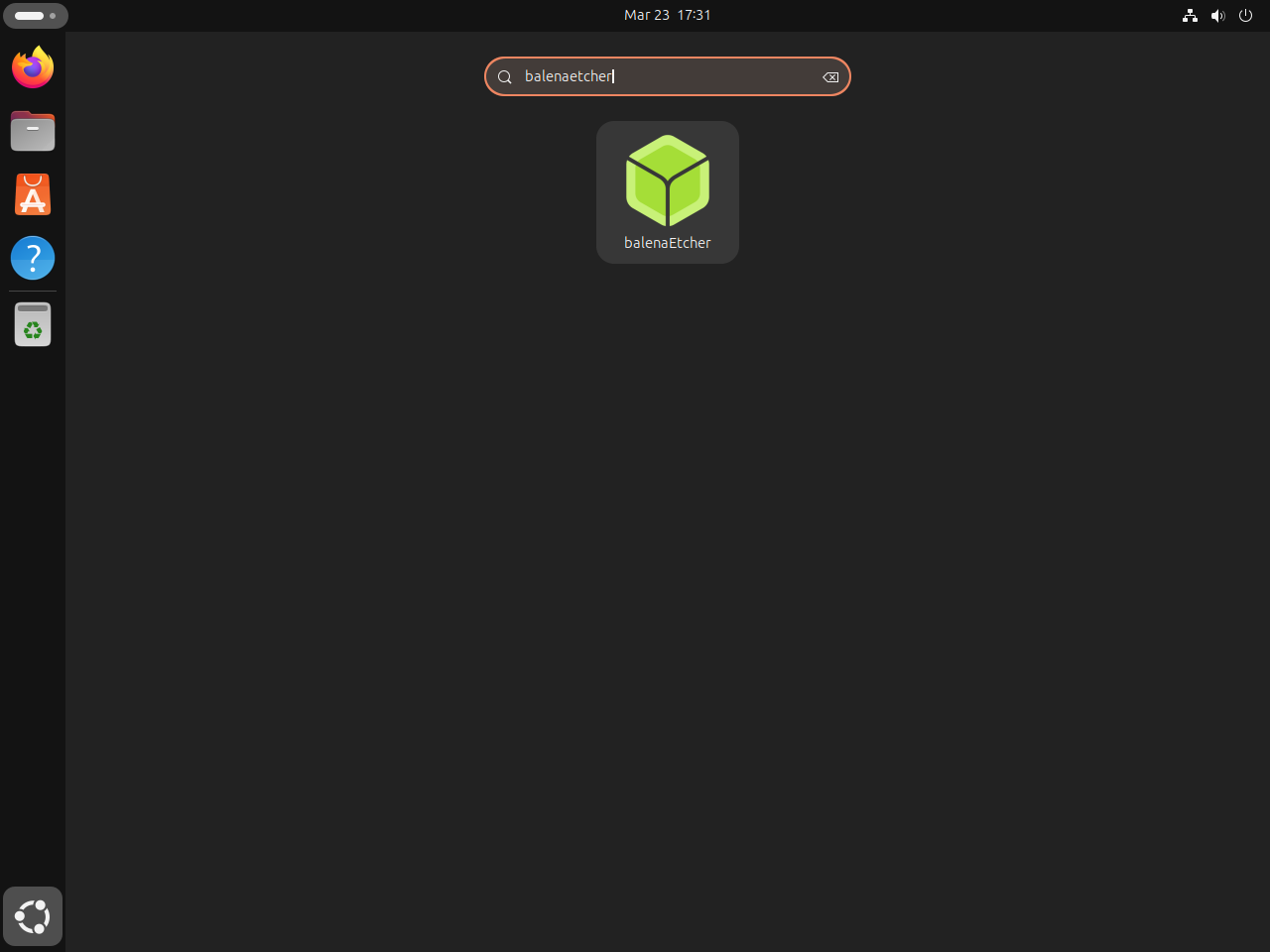
Open balenaEtcher from a terminal on Ubuntu
If you are already inside the desktop session, the same launcher is available from a terminal.
balena-etcherThe window should open with the usual three steps: Flash from file, Select target, and Flash. A plain SSH shell will not show anything graphical until you switch to a local desktop or a remote GUI session.
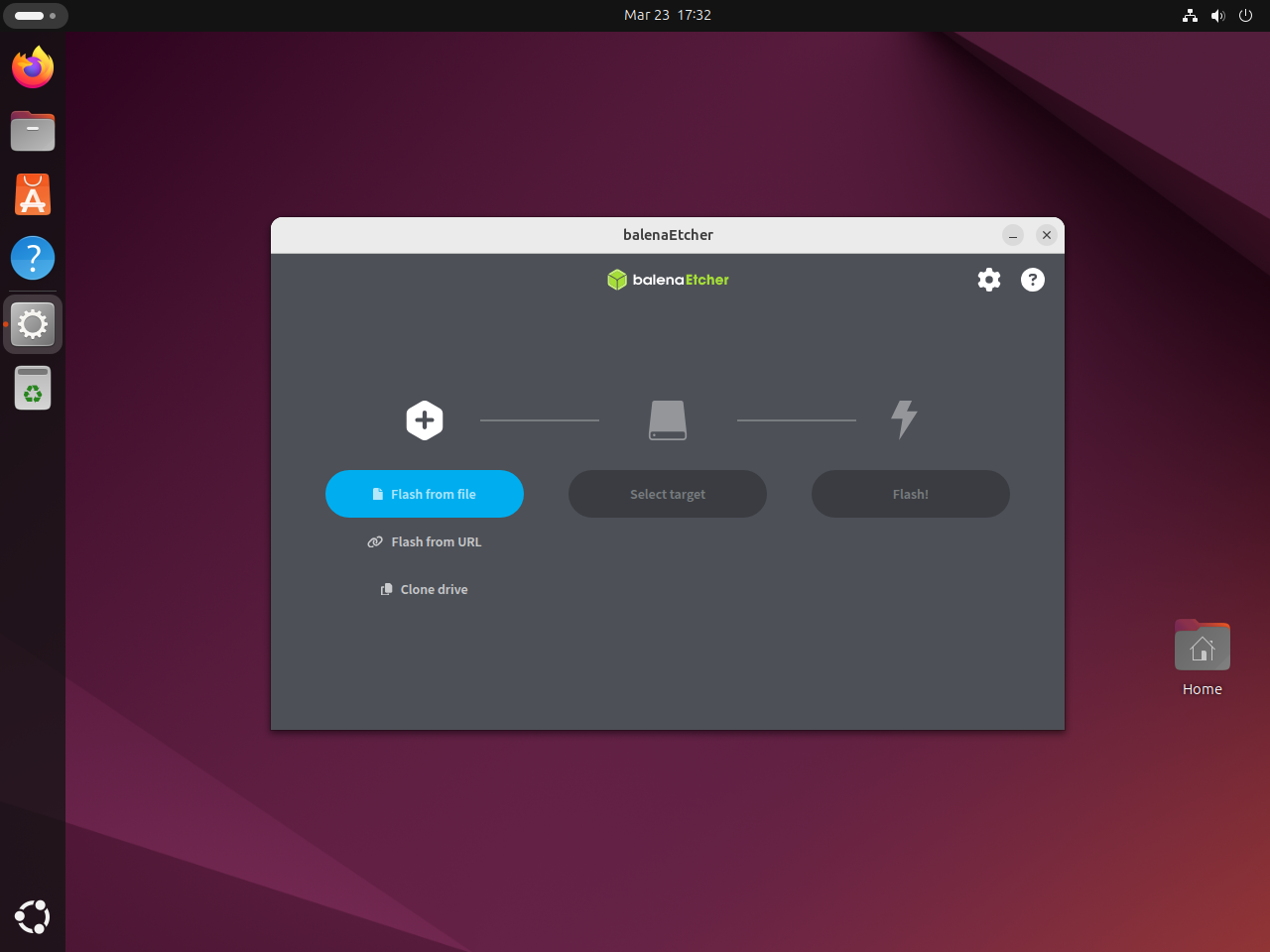
Flash images safely with balenaEtcher on Ubuntu
balenaEtcher is simple once the image file is ready. Most mistakes come from choosing the wrong target drive or using Windows installation media that needs a different tool.
Confirm the target drive before flashing with balenaEtcher on Ubuntu
Check removable devices in a terminal before you click Flash. The TRAN column should show usb for a typical USB stick.
lsblk -o NAME,SIZE,TYPE,MODEL,TRANNAME SIZE TYPE MODEL TRAN loop0 4K loop loop1 74M loop loop2 251.7M loop loop3 16.4M loop loop4 91.7M loop loop5 10.8M loop loop6 531.4M loop loop7 18.5M loop loop8 48.1M loop loop9 576K loop loop10 254.9M loop sda 125G disk VBOX HARDDISK sata ├─sda1 1M part └─sda2 125G part sr0 1024M rom VBOX CD-ROM ata
When your USB stick is attached, you should see one more disk entry with TRAN set to usb. Stop immediately if the size does not match the drive you intend to erase.
Use WoeUSB instead of balenaEtcher for Windows installer media on Ubuntu
balenaEtcher writes images byte-for-byte, which works well for Linux ISOs and appliance images, but many Windows ISOs need extra boot-media handling. If your goal is a Windows installer USB, install WoeUSB on Ubuntu instead.
Troubleshoot balenaEtcher on Ubuntu
The common Ubuntu failures are the unresolved 26.04 dependency, the cosmetic chrome-sandbox warning during installation, and expecting the GUI to open from a plain SSH shell.
Fix balenaEtcher dependency errors on Ubuntu 26.04
The current balenaEtcher package is not ready for Resolute. Check the missing dependency directly.
apt-cache policy libgdk-pixbuf2.0-0libgdk-pixbuf2.0-0: Installed: (none) Candidate: (none) Version table:
That empty candidate is why APT refuses the stock package. Ubuntu 26.04 already has the replacement package libgdk-pixbuf-2.0-0, but the upstream .deb still depends on the older package name. The clean fix has to come from an updated upstream package, so for now use Ubuntu 24.04 or 22.04 for the documented install method.
Understand the chrome-sandbox warning when installing balenaEtcher on Ubuntu
APT currently prints this warning during the package setup stage.
chmod: cannot access '/opt/balenaEtcher/chrome-sandbox': No such file or directory
The package still installs chrome-sandbox under /usr/lib/balena-etcher/ and registers the normal /usr/bin/balena-etcher launcher. This warning comes from a stale post-install path reference, not from a failed installation.
Fix a missing balenaEtcher window on Ubuntu
If the command returns without opening a window, start balenaEtcher from an active desktop session instead of a plain SSH shell. Ubuntu 24.04 and 26.04 enable AppArmor’s unprivileged user namespace restriction by default. balenaEtcher does not ship a separate AppArmor profile in the package, so if you later see a sandbox-related terminal error, wait for an upstream fix instead of forcing unsupported --no-sandbox launch flags into the desktop entry.
Update balenaEtcher on Ubuntu
balenaEtcher no longer publishes an Ubuntu repository, so updates mean replacing the local .deb with the newest release. If you do not want to repeat the download command by hand each time, add a reusable updater to /usr/local/bin.
Create a balenaEtcher update script on Ubuntu
This script checks the installed version against the latest GitHub release and only downloads when there is something new. It works in a temporary directory and cleans up after itself.
Write the script to /usr/local/bin/update-balena-etcher.
sudo tee /usr/local/bin/update-balena-etcher > /dev/null <<'SCRIPT_EOF'
#!/usr/bin/env bash
set -euo pipefail

API_URL="https://api.github.com/repos/balena-io/etcher/releases/latest"
WORK_DIR=$(mktemp -d "${TMPDIR:-/tmp}/balena-etcher-update.XXXXXX")
trap 'rm -rf "$WORK_DIR"' EXIT

for cmd in curl grep head cut sed apt-get sudo mktemp dpkg-query; do
  if ! command -v "$cmd" >/dev/null 2>&1; then
    echo "Missing required command: $cmd"
    exit 1
  fi
done

CURRENT_VERSION=$(dpkg-query -W -f='${Version}\n' balena-etcher 2>/dev/null || echo none)
DEB_URL=$(curl -fsSL "$API_URL" | grep -oE '"browser_download_url": "[^"]+amd64[^"]*\.deb"' | head -n1 | cut -d '"' -f4)

if [ -z "$DEB_URL" ]; then
  echo "Could not find the latest balenaEtcher amd64 .deb."
  exit 1
fi

DEB_FILE=${DEB_URL##*/}
LATEST_VERSION=$(printf '%s\n' "$DEB_FILE" | sed -E 's/^balena-etcher_([0-9.]+)_amd64\.deb$/\1/')

if [ -z "$LATEST_VERSION" ]; then
  echo "Could not parse the latest balenaEtcher version."
  exit 1
fi

echo "Installed version: $CURRENT_VERSION"
echo "Latest version: $LATEST_VERSION"

if [ "$CURRENT_VERSION" = "$LATEST_VERSION" ]; then
  echo "balenaEtcher is already up to date."
  exit 0
fi

cd "$WORK_DIR"
echo "Downloading $DEB_FILE..."
curl -fLO --progress-bar "$DEB_URL"

echo "Installing $DEB_FILE..."
sudo apt-get install -y "./$DEB_FILE"

NEW_VERSION=$(dpkg-query -W -f='${Version}\n' balena-etcher)
echo "balenaEtcher is now at version $NEW_VERSION."
SCRIPT_EOF
Make it executable so you can call it by name.
sudo chmod +x /usr/local/bin/update-balena-etcherRun this script manually whenever you want to check for a newer balenaEtcher release. Do not schedule it with cron or a systemd timer, because unattended package installs can interrupt desktop sessions or conflict with other APT operations.
Verify the balenaEtcher update command on Ubuntu
Because the updater lives in /usr/local/bin, you can run it from any directory once the shell can see that path.
command -v update-balena-etcher/usr/local/bin/update-balena-etcher
Later, run update-balena-etcher as your regular user. The script only uses sudo for the final APT install step.
Remove balenaEtcher from Ubuntu
Remove the package first, then let APT clean up the small dependency set it added for balenaEtcher.
sudo apt remove -y balena-etcherIf APT marks libgdk-pixbuf-xlib-2.0-0 and libgdk-pixbuf2.0-0 as no longer needed, let autoremove clean them up.
sudo apt autoremoveFind balenaEtcher user data on Ubuntu before deleting it
balenaEtcher did not create any user-data directories before first launch on the validated SSH hosts, so check your own account for real leftovers instead of deleting a guessed path.
find "$HOME/.config" "$HOME/.cache" "$HOME/.local/share" "$HOME/.var/app" -maxdepth 1 -iname '*balena*' 2>/dev/nullDelete only the exact paths that the
findcommand prints. If it prints nothing, balenaEtcher has not created per-user data for that account and there is nothing else to remove.
Verify balenaEtcher is removed from Ubuntu
Check that the package entry is gone after removal.
dpkg -l | grep balenaNo output means the balenaEtcher package itself has been removed.
balenaEtcher on Ubuntu FAQ
No. The supported Ubuntu path is the upstream balenaEtcher .deb package. On Ubuntu 24.04 and 22.04, APT may also need the Universe component enabled because libgdk-pixbuf2.0-0 comes from that repository section.
Not with the stock upstream package. Ubuntu 26.04 already has the required library, but the balenaEtcher .deb still depends on the older package name libgdk-pixbuf2.0-0 instead of Resolute’s libgdk-pixbuf-2.0-0. Until upstream updates that dependency metadata, Ubuntu 24.04 and 22.04 remain the clean documented install targets.
Usually not reliably. balenaEtcher works best with Linux ISOs, IMG files, and similar raw images. Windows installer media often needs extra boot-media handling, so WoeUSB is the better Ubuntu tool for that job.
Conclusion
balenaEtcher on Ubuntu 24.04 and 22.04 gives you a safer USB-writing workflow for Linux ISOs and IMG files, with validation built in after each flash. Keep WoeUSB on Ubuntu around for Windows installer media, and install GParted on Ubuntu if you also want to inspect or resize partitions after you write the drive.

Formatting tips for your comment
You can use basic HTML to format your comment. Useful tags currently allowed:
<code>command</code>command<strong>bold</strong><em>italic</em><blockquote>quote</blockquote>