Automatic HTTPS is the main reason many admins install Caddy on Fedora, but the appeal is broader than certificates alone. Caddy can serve static files, reverse proxy local apps, and handle PHP with a much smaller config surface than the usual Nginx or Apache starting point.
Fedora ships a working Caddy package in the default repositories, and the upstream-managed COPR repo moves faster when you want the latest release. The same commands work on Workstation, Server, and minimal Fedora installs, then the rest of the setup comes down to service management, firewall rules, and a small Caddyfile.
Install Caddy on Fedora
Refresh DNF metadata first so package installation uses current Fedora repository metadata.
sudo dnf upgrade --refreshThese commands use
sudofor package and service changes. If your account does not have sudo access yet, follow the guide to add a user to sudoers on Fedora before continuing.
Fedora’s repo is the shorter path, while the official COPR repo is the faster-moving option.
| Method | Source | Validated Fedora 44 version | Update behavior | Best fit |
|---|---|---|---|---|
| DNF package | Fedora repositories | 2.10.2 | sudo dnf upgrade --refresh | Most systems |
| COPR package | @caddy/caddy COPR | 2.11.2 | sudo dnf upgrade --refresh caddy | Readers who want the newer upstream build sooner |
Start with the Fedora package unless you specifically need the newer COPR build.
The RPM workflow uses Fedora packages. Container deployments are separate because Docker owns updates, volumes, and port publishing instead of DNF and systemd. If you plan to run Caddy as a container, set up the runtime with the guide to install Docker on Fedora, then use Caddy’s Docker Compose documentation for the container-specific file layout.
Install Caddy from Fedora Repositories
The Fedora package keeps the setup short and integrates cleanly with normal DNF maintenance.
sudo dnf install -y caddyVerify that the package is installed and that the Caddy binary is on your PATH.
rpm -q caddy
caddy version
caddy-2.10.2-5.fc44.x86_64 v2.10.2
Install the Latest Caddy Build from COPR
The official Caddy COPR is maintained by the upstream project and currently carries Caddy 2.11.2 for Fedora 44. Treat it as a third-party repository even though the package comes from the Caddy team.
Install the DNF5 plugin package first so the dnf copr command is available, then enable the COPR repo and import its OpenPGP key up front so the first package install stays non-interactive.
sudo dnf install -y dnf5-plugins
sudo dnf copr enable @caddy/caddy -y
sudo rpm --import https://download.copr.fedorainfracloud.org/results/@caddy/caddy/pubkey.gpg
If Caddy is not installed yet, install it from COPR with the normal DNF command.
sudo dnf install -y caddyIf you already installed the Fedora package and want to switch to the COPR build, upgrade it after enabling the repo.
sudo dnf upgrade --refresh -y caddyCheck the new version and confirm the package source.
caddy version
dnf info --installed caddy
Relevant output includes:
v2.11.2 h1:iOlpsSiSKqEW+SIXrcZsZ/NO74SzB/ycqqvAIEfIm64=
Version         : 2.11.2
Release         : 1.fc44
From repository : copr:copr.fedorainfracloud.org:group_caddy:caddy
Start and Verify Caddy on Fedora
Fedora leaves the Caddy service disabled after installation, so enable it explicitly before you expect it to listen on port 80.
Start the Caddy Service on Fedora
Enable the unit and start it immediately in one command.
sudo systemctl enable --now caddyConfirm that Fedora now shows the service as both active and enabled.
systemctl is-active caddy
systemctl is-enabled caddy
active enabled
Check the Local Caddy Response on Fedora
Confirm the local HTTP response before you open the server to remote traffic. If you want a broader refresher on header checks, see how to use the curl command in Linux.
curl -fsSI http://127.0.0.1Relevant output includes:
HTTP/1.1 200 OK
Content-Type: text/html; charset=utf-8
Server: Caddy
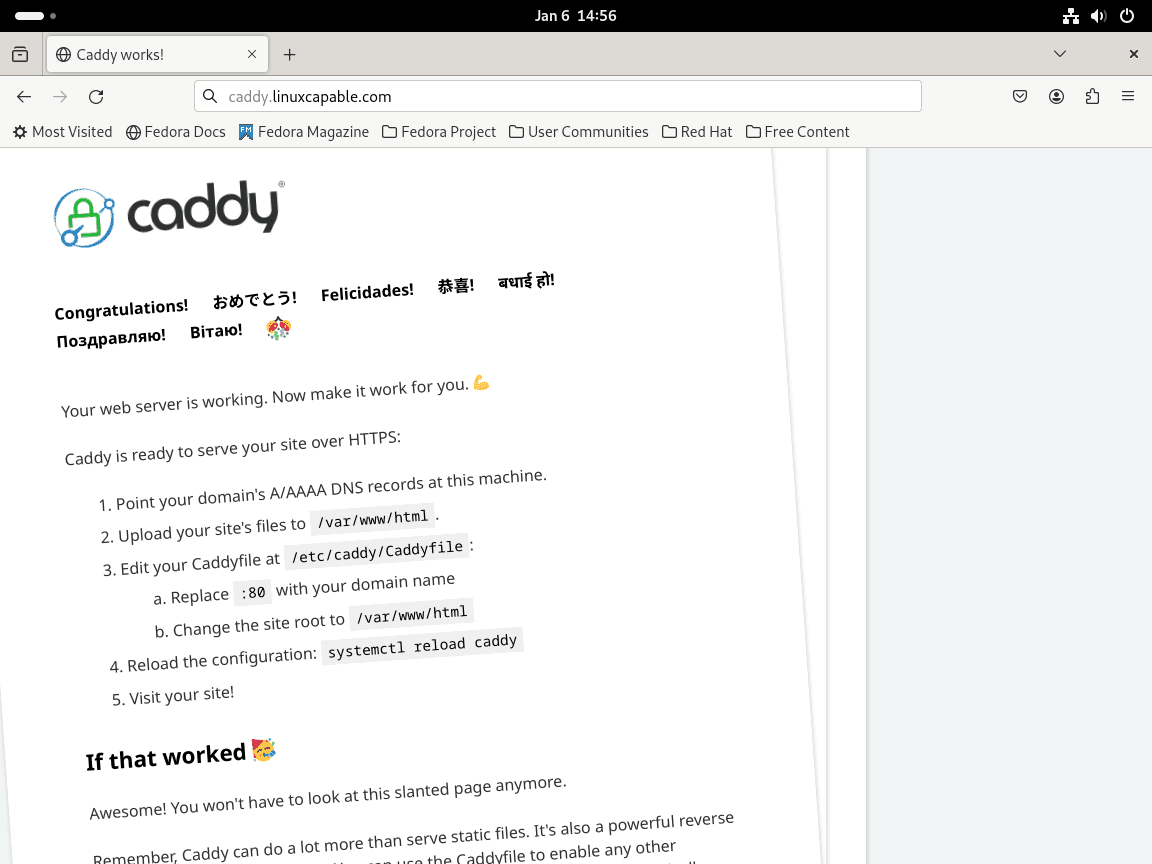
The default package serves a simple site from /usr/share/caddy, so a browser visit to http://server-ip should show the welcome page until you replace it with your own content.
Manage the Caddy Service on Fedora
Use these systemd commands when you need to stop, reload, or inspect the service later.
| Action | Command |
|---|---|
| Start Caddy | sudo systemctl start caddy |
| Stop Caddy | sudo systemctl stop caddy |
| Reload the Caddyfile | sudo systemctl reload caddy |
| Restart Caddy | sudo systemctl restart caddy |
| Check service status | systemctl status caddy |
Prefer reload when you only changed the Caddyfile and want to avoid dropping active connections.
Open Firewall Rules for Caddy on Fedora
Open the standard web services in Firewalld before you expect remote traffic to reach the host. If Firewalld is not installed or not running on this system yet, follow the guide to install Firewalld on Fedora Linux first.
Check the default zone and the active interface zones before adding rules.
firewall-cmd --get-default-zone
firewall-cmd --get-active-zones
These examples use the current default zone. If the active interface uses a different zone, add --zone=<zone> to the add, query, and removal commands.
Allow HTTP and HTTPS for Caddy on Fedora
Add the standard web services and reload the active firewall rules.
sudo firewall-cmd --permanent --add-service=http
sudo firewall-cmd --permanent --add-service=https
sudo firewall-cmd --reload
Query each service directly so the final check stays short and obvious.
firewall-cmd --query-service=http
firewall-cmd --query-service=https
yes yes
Allow a Custom Caddy Port on Fedora
Use the same pattern for a non-standard listener such as port 8080.
sudo firewall-cmd --permanent --add-port=8080/tcp
sudo firewall-cmd --reload
Verify the custom rule directly so you do not need to scan a full zone dump.
firewall-cmd --query-port=8080/tcpyes
Work with the Caddyfile on Fedora
Fedora stores the main Caddyfile at /etc/caddy/Caddyfile. Use :80 while testing locally, then replace it with a real domain name after DNS points at the server and you want Caddy to request automatic HTTPS.
Replace the default contents of /etc/caddy/Caddyfile with one complete site block, or paste the block into your existing file when you already manage more than one site.
Serve a Static Site with Caddy on Fedora
Create a small document root under /var/www. The install -d command creates the directory and sets its mode in one step.
sudo install -d -m 0755 /var/www/example.com
printf '%s\n' '<h1>Hello from Caddy</h1>' | sudo tee /var/www/example.com/index.html > /dev/null
sudo restorecon -Rv /var/www/example.com
Point a site block at that directory. Keep :80 for local checks, then replace it with your real domain when DNS and HTTPS are ready.
:80 {
    root * /var/www/example.com
    file_server
}
Reverse Proxy a Local App with Caddy on Fedora
Use a reverse proxy block when your application already listens on localhost and you want Caddy to handle the frontend HTTP or HTTPS traffic.
:80 {
    reverse_proxy 127.0.0.1:3000
}
Swap in your application’s local address and port. If SELinux blocks the backend connection, check the httpd_can_network_connect boolean.
Serve PHP Applications with Caddy on Fedora
Fedora’s php-fpm package listens on /run/php-fpm/www.sock by default, and the default pool only grants socket access to apache and nginx. Add caddy to that ACL before you point Caddy at the socket. If PHP is not installed yet, start with the guide to install PHP on Fedora Linux.
The command sequence backs up the pool file before editing it. If you want to adapt the replacement first, review the guide to use the sed command in Linux.
sudo dnf install -y php php-fpm
sudo cp -a /etc/php-fpm.d/www.conf /etc/php-fpm.d/www.conf.caddy-backup
sudo sed -i 's/^listen\.acl_users =.*/listen.acl_users = apache,nginx,caddy/' /etc/php-fpm.d/www.conf
sudo php-fpm -t
sudo systemctl enable --now php-fpm
Relevant output from the configuration test includes:
configuration file /etc/php-fpm.conf test is successful
Verify that the PHP-FPM service is active and that the default socket exists before you add the Caddy site block.
systemctl is-active php-fpm
sudo test -S /run/php-fpm/www.sock && echo php-fpm-socket-ready
active php-fpm-socket-ready
Use the default Fedora socket in your Caddyfile, then replace the document root with your own application path if you are not testing from /usr/share/caddy.
:80 {
    root * /usr/share/caddy
    php_fastcgi unix//run/php-fpm/www.sock
    file_server
}
Create a small PHP test file and confirm that Caddy can hand the request off to PHP-FPM.
printf '%s\n' '<?php echo "caddy-php-ok";' | sudo tee /usr/share/caddy/info.php > /dev/null
curl -fsS http://127.0.0.1/info.php
caddy-php-ok
Delete
/usr/share/caddy/info.phpafter the test. Leaving a PHP info page exposed reveals module, path, and environment details that do not belong on a public site.
sudo rm -f /usr/share/caddy/info.phpValidate and Reload the Caddyfile on Fedora
Check the syntax before every reload so you catch Caddyfile mistakes while the current service is still running.
sudo caddy validate --adapter caddyfile --config /etc/caddy/CaddyfileThe validator can print JSON-formatted info lines before the final success message. The final line should read:
Valid configuration
If the validator also prints Caddyfile input is not formatted; run 'caddy fmt --overwrite' to fix inconsistencies, the syntax is still fine. It just means the file needs Caddy’s formatter before you move on.
sudo caddy fmt --overwrite /etc/caddy/Caddyfile
sudo systemctl reload caddy
systemctl is-active caddy
active
Troubleshoot Caddy on Fedora
Most early Caddy problems on Fedora come down to a busy web port or SELinux blocking a backend connection.
Fix Caddy When Port 80 or 443 Is Already in Use on Fedora
If systemctl status caddy reports bind: address already in use, find the service that already owns the web port. If you want a refresher on the filter syntax, see how to use the grep command in Linux.
sudo ss -tulpn | grep -E ':(80|443) 'tcp LISTEN 0 511 0.0.0.0:80 0.0.0.0:* users:(("nginx",pid=2875,fd=8),("nginx",pid=2874,fd=8),("nginx",pid=2873,fd=8),("nginx",pid=2872,fd=8),("nginx",pid=2871,fd=8))
tcp LISTEN 0 511 [::]:80 [::]:* users:(("nginx",pid=2875,fd=9),("nginx",pid=2874,fd=9),("nginx",pid=2873,fd=9),("nginx",pid=2872,fd=9),("nginx",pid=2871,fd=9))
Stop or reconfigure the conflicting service, then start Caddy again.
sudo systemctl restart caddy
systemctl is-active caddy
active
Fix SELinux Reverse-Proxy Blocks for Caddy on Fedora
If Caddy can serve local files but reverse-proxy requests fail against another local service, check the SELinux boolean that allows web daemons to open network connections. Fedora systems can show this boolean as either on or off depending on existing web-stack changes, so check the current state before changing it.
getsebool httpd_can_network_connecthttpd_can_network_connect --> off
Enable the boolean only when the failure points to SELinux blocking Caddy’s backend connection.
sudo setsebool -P httpd_can_network_connect on
getsebool httpd_can_network_connect
httpd_can_network_connect --> on
Remove Caddy from Fedora
Stop the service first, then remove the package.
sudo systemctl disable --now caddy
sudo dnf remove -y caddy
If you enabled the upstream COPR repo while installing Caddy, remove that repository as well so future DNF runs only use Fedora’s default sources.
sudo dnf copr remove @caddy/caddy -yConfirm that the COPR repo is gone before finishing cleanup. The grep filter looks for any enabled Caddy-related repo, and the fallback echo prints a clear success line when nothing matches.
dnf repo list --enabled | grep -i caddy || echo no-caddy-copr-enabledno-caddy-copr-enabled
If the web firewall rules were added only for Caddy, remove them too. Keep these rules when Apache, Nginx, another reverse proxy, or an existing custom service still uses the same ports.
sudo firewall-cmd --permanent --remove-service=http
sudo firewall-cmd --permanent --remove-service=https
sudo firewall-cmd --permanent --remove-port=8080/tcp
sudo firewall-cmd --reload
If you enabled httpd_can_network_connect only for Caddy reverse proxying and no other web service needs outbound connections, return the boolean to the default off state.
sudo setsebool -P httpd_can_network_connect off
getsebool httpd_can_network_connect
httpd_can_network_connect --> off
If PHP-FPM was installed only for the optional PHP test, remove it separately. Keep PHP-FPM when another site or app still uses PHP.
sudo systemctl disable --now php-fpm
sudo dnf remove -y php php-fpm
If you keep PHP-FPM but want to undo only the ACL change, restore the backup made earlier and restart the service.
sudo cp -a /etc/php-fpm.d/www.conf.caddy-backup /etc/php-fpm.d/www.conf
sudo systemctl restart php-fpm
Package removal can leave saved configuration, certificate state, and the example document root created during the static-site example. Remove these paths only if you do not need existing Caddyfiles, cached certificates, or local site content.
Running
rm -rfhere permanently deletes Caddy configuration, cached certificate state, and the example document root from the static-site example.
sudo rm -rf /etc/caddy /var/lib/caddy /var/www/example.comVerify that Fedora no longer has the package installed.
rpm -q caddypackage caddy is not installed
Conclusion
Caddy is ready on Fedora for static sites, reverse proxies, and PHP front ends, so the routine setup work is out of the way. If this host will face the internet, install Fail2ban with Firewalld on Fedora Linux next, then use the Caddy documentation when you want to expand the directive set.


Formatting tips for your comment
You can use basic HTML to format your comment. Useful tags currently allowed in published comments:
<code>command</code>command<strong>bold</strong><em>italic</em><a href="https://example.com">link</a><blockquote>quote</blockquote>