A loudspeaker enclosure can look sensible on paper and still produce the wrong low-frequency response. Installing QSpeakers on Ubuntu lets you compare sealed, ported, and bandpass designs from a driver’s Thiele/Small parameters before committing material to a cabinet.
Ubuntu’s APT package offers the simplest system-managed installation, Flathub supplies the latest release in a sandbox, and a per-user source build keeps QSpeakers itself outside shared system prefixes. The source method also creates a desktop launcher and manual update helper.
Install QSpeakers on Ubuntu
Choose a QSpeakers Installation Method
| Method | Source and Version | Update Owner | Best Fit |
|---|---|---|---|
| APT | Ubuntu Universe: 1.8.5 on Ubuntu 26.04, 1.6.9 on Ubuntu 24.04, and 1.6.2 on Ubuntu 22.04 | APT | Most Ubuntu 26.04 users and anyone who prefers the simplest system-managed installation |
| Flatpak | Verified Flathub app, version 1.8.6 for x86_64 and aarch64 | Flatpak and Flathub | Users who want 1.8.6 in a sandbox or already manage desktop applications through Flathub |
| Source | Official upstream Git tags, latest stable tag 1.8.6 | update-qspeakers-source, run manually | Users who want a per-user build, a versioned install layout, or direct control of upstream updates |
Use APT on Ubuntu 26.04 unless you need version 1.8.6. Flatpak is the easier current-release option on Ubuntu 24.04 and 22.04. Choose the source build when you specifically want a local upstream build and are comfortable keeping compiler dependencies installed.
Install one method for normal use. APT and the source build both provide a
qspeakerscommand and aqspeakers.desktoplauncher, so installing them together changes which binary and launcher your account opens. Flatpak remains separate but adds another launcher and update path.
Install QSpeakers with APT
QSpeakers is available from the Universe component on Ubuntu 26.04, 24.04, and 22.04. Refresh APT metadata, then install the qspeakers package.
These commands use
sudofor system package changes. If your account does not have administrative access, follow the steps to add a user to sudoers on Ubuntu before continuing.
sudo apt update
sudo apt install qspeakers
Confirm that APT registered the installed package and print its exact Ubuntu build:
dpkg-query -W -f='${db:Status-Abbrev} ${binary:Package} ${Version}\n' qspeakersAn output line beginning with ii confirms that the package is installed. The final field contains the release-specific package version.
Install QSpeakers with Flatpak
Ubuntu does not include Flatpak on a standard installation. Complete the Flatpak setup on Ubuntu first, then add Flathub for system-wide applications if the remote is missing:
sudo flatpak remote-add --if-not-exists flathub https://dl.flathub.org/repo/flathub.flatpakrepoFlathub marks QSpeakers as verified and links the listing to the upstream project. The 1.8.6 package supports x86_64 and aarch64. Its permissions exclude network and broad home-directory access while allowing the display and graphics access the desktop app needs. Install its exact application ID:
sudo flatpak install flathub rocks.noise.qspeakersVerify the system-wide installation and confirm that Flathub owns the installed application:
flatpak info --system rocks.noise.qspeakersBuild QSpeakers from Source
This method builds the official upstream tag as your desktop user and installs each version under ~/.local/opt/qspeakers. A stable current link selects one active version, and a failed build leaves the existing version unchanged.
The upstream tag list does not publish a detached signature or release checksum for this source workflow. The helper resolves numeric tags from the official Git repository, confirms the exact tag commit after cloning, and checks the version declared by
qspeakers.pro. These checks catch incomplete or mismatched downloads, but they are not a cryptographic authenticity guarantee.
Install the Source-Build Dependencies
Ubuntu 22.04 uses the package name libqt6charts6-dev, while Ubuntu 24.04 and 26.04 use qt6-charts-dev. This pasteable Bash block selects the available name and installs the Qt 6 build, translation, OpenGL, and desktop-cache toolchain:
bash <<'QSP_DEPS'
set -euo pipefail

sudo apt update
if apt-cache show qt6-charts-dev >/dev/null 2>&1; then
  charts_package=qt6-charts-dev
else
  charts_package=libqt6charts6-dev
fi

sudo apt install \
  build-essential \
  git \
  libgl-dev \
  libgtk-3-bin \
  qmake6 \
  qt6-base-dev \
  "$charts_package" \
  qt6-l10n-tools \
  qt6-tools-dev-tools \
  desktop-file-utils \
  shared-mime-info
QSP_DEPS
Create the QSpeakers Source Update Helper
Create update-qspeakers-source in ~/.local/bin. The setup refuses to overwrite an unrelated file or symbolic link and validates the complete temporary script before replacement. The helper builds without sudo, stages files before activation, and restores the previous version if launcher integration fails.
bash <<'QSP_SETUP'
set -euo pipefail

helper_path="$HOME/.local/bin/update-qspeakers-source"
mkdir -p "$HOME/.local/bin"

if [ -L "$helper_path" ]; then
  printf 'Error: %s is a symbolic link; refusing to replace it.\n' "$helper_path" >&2
  exit 1
fi
if [ -e "$helper_path" ] && {
  [ ! -f "$helper_path" ] ||
    ! grep -Fxq '# linuxcapable-managed-qspeakers-source-helper' "$helper_path"
}; then
  printf 'Error: %s is not the managed QSpeakers helper.\n' "$helper_path" >&2
  exit 1
fi

temporary_helper="$(mktemp "$HOME/.local/bin/.update-qspeakers-source.XXXXXX")"
cleanup_temporary_helper() {
  rm -f -- "$temporary_helper"
}
trap cleanup_temporary_helper EXIT HUP INT TERM

cat >"$temporary_helper" <<'QSP_HELPER'
#!/usr/bin/env bash
# linuxcapable-managed-qspeakers-source-helper
set -euo pipefail

repo_url='https://github.com/be1/qspeakers.git'
install_root="$HOME/.local/opt/qspeakers"
current_link="$install_root/current"
command_path="$HOME/.local/bin/qspeakers"
desktop_path="$HOME/.local/share/applications/qspeakers.desktop"
icon_path="$HOME/.local/share/icons/hicolor/scalable/apps/qspeakers.svg"
hicolor_root="$HOME/.local/share/icons/hicolor"
hicolor_index="$hicolor_root/index.theme"
hicolor_marker="$hicolor_root/.linuxcapable-created-qspeakers-index-theme"
mime_path="$HOME/.local/share/mime/packages/application-x-qspeakers.xml"
metainfo_path="$HOME/.local/share/metainfo/rocks.noise.qspeakers.metainfo.xml"
root_marker="$install_root/.linuxcapable-managed-source"

fail() {
	printf 'Error: %s\n' "$*" >&2
	exit 1
}

if [ "$(id -u)" -eq 0 ]; then
	fail 'run update-qspeakers-source as your regular desktop user, not with sudo'
fi

if [ "$#" -gt 1 ]; then
	fail 'usage: update-qspeakers-source [numeric-tag]'
fi
requested_tag="${1:-}"
if [ -n "$requested_tag" ] &&
	! [[ "$requested_tag" =~ ^[0-9]+(\.[0-9]+){1,2}$ ]]; then
	fail "invalid numeric release tag: $requested_tag"
fi

for required_command in awk desktop-file-validate git grep \
	gtk-update-icon-cache readlink sed sort update-desktop-database \
	update-mime-database; do
	command -v "$required_command" >/dev/null 2>&1 ||
		fail "$required_command is required; install the source-build dependencies and retry"
done

if [ -L "$install_root" ]; then
	fail "$install_root is a symbolic link; refusing to follow it"
fi
if [ -e "$install_root" ]; then
	[ -d "$install_root" ] ||
		fail "$install_root exists but is not a directory"
	[ ! -L "$root_marker" ] &&
		[ -f "$root_marker" ] &&
		[ "$(cat -- "$root_marker")" = \
			'linuxcapable-managed-qspeakers-source-root' ] ||
		fail "$install_root is not marked as a managed QSpeakers source tree"
fi

check_exact_symlink() {
	local link_path="$1"
	local expected_target="$2"

	if [ -L "$link_path" ]; then
		[ "$(readlink -- "$link_path")" = "$expected_target" ] ||
			fail "$link_path is a symlink outside this QSpeakers source workflow"
	elif [ -e "$link_path" ]; then
		fail "$link_path already exists and is not a managed symlink"
	fi
}

check_exact_symlink "$command_path" "$current_link/bin/qspeakers"
check_exact_symlink \
	"$icon_path" \
	"$current_link/share/icons/hicolor/scalable/apps/qspeakers.svg"
check_exact_symlink \
	"$mime_path" \
	"$current_link/share/mime/packages/application-x-qspeakers.xml"
check_exact_symlink \
	"$metainfo_path" \
	"$current_link/share/metainfo/rocks.noise.qspeakers.metainfo.xml"

if [ -L "$desktop_path" ]; then
	fail "$desktop_path is a symbolic link; refusing to follow it"
fi
if [ -e "$desktop_path" ]; then
	if [ ! -f "$desktop_path" ] ||
		! grep -Fxq 'X-LinuxCapable-Managed=QSpeakersSource' "$desktop_path"; then
		fail "$desktop_path exists but is not managed by this QSpeakers source workflow"
	fi
fi

current_prefix=''
current_version='none'
current_commit=''
if [ -e "$current_link" ] || [ -L "$current_link" ]; then
	[ -L "$current_link" ] ||
		fail "$current_link exists but is not a symbolic link"
	current_prefix="$(readlink -f -- "$current_link" || true)"
	case "$current_prefix" in
	"$install_root"/*) ;;
	*) fail "$current_link points outside $install_root" ;;
	esac
	current_marker="$current_prefix/.linuxcapable-managed-version"
	[ ! -L "$current_marker" ] && [ -f "$current_marker" ] ||
		fail "the active QSpeakers prefix is missing its ownership marker"
	[ "$(awk 'END { print NR }' "$current_marker")" = 2 ] ||
		fail 'the active QSpeakers version marker has unexpected content'
	current_version="$(
		sed -n 's/^version=//p' "$current_marker" |
			awk 'NR == 1 { value = $0 } END { print value }'
	)"
	current_commit="$(
		sed -n 's/^commit=//p' "$current_marker" |
			awk 'NR == 1 { value = $0 } END { print value }'
	)"
	[[ "$current_version" =~ ^[0-9]+(\.[0-9]+){1,2}$ ]] ||
		fail "the active QSpeakers version marker is invalid: $current_version"
	[[ "$current_commit" =~ ^[0-9a-f]{40}$ ]] ||
		fail 'the active QSpeakers commit marker is invalid'
fi

tag_listing="$(git ls-remote --tags "$repo_url")" ||
	fail 'could not read QSpeakers tags from the upstream Git repository'
latest_tag="$(
	printf '%s\n' "$tag_listing" |
		sed -nE 's#^[0-9a-f]{40}[[:space:]]+refs/tags/([0-9]+(\.[0-9]+){1,2})$#\1#p' |
		sort -Vu |
		awk 'NF { latest = $0 } END { print latest }'
)"
[ -n "$latest_tag" ] ||
	fail 'the upstream Git repository did not return a stable numeric release tag'
target_tag="${requested_tag:-$latest_tag}"

tag_ref="refs/tags/$target_tag"
tag_object="$(
	printf '%s\n' "$tag_listing" |
		awk -v ref="$tag_ref" '
			$2 == ref && !found {
				value = $1
				found = 1
			}
			END { print value }
		'
)"
peeled_commit="$(
	printf '%s\n' "$tag_listing" |
		awk -v ref="${tag_ref}^{}" '
			$2 == ref && !found {
				value = $1
				found = 1
			}
			END { print value }
		'
)"
target_commit="${peeled_commit:-$tag_object}"
[[ "$target_commit" =~ ^[0-9a-f]{40}$ ]] ||
	fail "release tag $target_tag was not found upstream"

printf 'Installed version: %s\n' "$current_version"
printf 'Latest stable tag: %s\n' "$latest_tag"
if [ -n "$requested_tag" ]; then
	printf 'Requested tag: %s\n' "$target_tag"
fi

replace_symlink() {
	local link_path="$1"
	local link_target="$2"
	local link_directory
	local temporary_directory
	local temporary_link

	link_directory="$(dirname -- "$link_path")" || return 1
	temporary_directory="$(
		mktemp -d -p "$link_directory" .qspeakers-link.XXXXXX
	)" || return 1
	temporary_link="$temporary_directory/link"
	ln -s -- "$link_target" "$temporary_link" || {
		rm -rf -- "$temporary_directory"
		return 1
	}
	mv -Tf -- "$temporary_link" "$link_path" || {
		rm -rf -- "$temporary_directory"
		return 1
	}
	rmdir -- "$temporary_directory" || return 1
}

prepare_integration() {
	local active_prefix="$1"
	local temporary_desktop
	local upstream_desktop="$active_prefix/share/applications/qspeakers.desktop"

	[ -x "$active_prefix/bin/qspeakers" ] || {
		printf 'Error: the active prefix has no executable QSpeakers binary\n' >&2
		return 1
	}
	[ -f "$upstream_desktop" ] || {
		printf 'Error: the active prefix has no QSpeakers desktop entry\n' >&2
		return 1
	}
	[ -f "$active_prefix/share/icons/hicolor/scalable/apps/qspeakers.svg" ] || {
		printf 'Error: the active prefix has no QSpeakers application icon\n' >&2
		return 1
	}
	[ -f "$active_prefix/share/mime/packages/application-x-qspeakers.xml" ] || {
		printf 'Error: the active prefix has no QSpeakers MIME definition\n' >&2
		return 1
	}
	[ -f "$active_prefix/share/metainfo/rocks.noise.qspeakers.metainfo.xml" ] || {
		printf 'Error: the active prefix has no QSpeakers metainfo file\n' >&2
		return 1
	}

	mkdir -p "$HOME/.cache" || return 1
	temporary_desktop="$(
		mktemp --suffix=.desktop "$HOME/.cache/qspeakers-desktop.XXXXXX"
	)" || return 1
	if ! awk -v executable="$command_path" '
		BEGIN {
			saw_tryexec = 0
			saw_exec = 0
			saw_icon = 0
		}
		/^TryExec=/ {
			print "TryExec=" executable
			saw_tryexec = 1
			next
		}
		/^Exec=/ {
			print "Exec=" executable " %f"
			saw_exec = 1
			next
		}
		/^Icon=/ {
			print "Icon=qspeakers"
			saw_icon = 1
			next
		}
		/^X-LinuxCapable-Managed=/ {
			next
		}
		{
			print
		}
		END {
			if (!saw_tryexec) {
				print "TryExec=" executable
			}
			if (!saw_exec) {
				print "Exec=" executable " %f"
			}
			if (!saw_icon) {
				print "Icon=qspeakers"
			}
			print "X-LinuxCapable-Managed=QSpeakersSource"
		}
	' "$upstream_desktop" >"$temporary_desktop"; then
		rm -f -- "$temporary_desktop"
		return 1
	fi
	if ! desktop-file-validate "$temporary_desktop" >&2; then
		rm -f -- "$temporary_desktop"
		return 1
	fi
	printf '%s\n' "$temporary_desktop"
}

apply_integration() {
	local active_prefix="$1"
	local prepared_desktop="$2"
	local created_hicolor_index=false

	mkdir -p \
		"$(dirname -- "$command_path")" \
		"$(dirname -- "$desktop_path")" \
		"$(dirname -- "$icon_path")" \
		"$(dirname -- "$mime_path")" \
		"$(dirname -- "$metainfo_path")" ||
		return 1
	if [ -L "$hicolor_marker" ]; then
		printf 'Error: %s is a symbolic link; refusing to follow it\n' \
			"$hicolor_marker" >&2
		return 1
	elif [ -e "$hicolor_marker" ] &&
		[ "$(cat -- "$hicolor_marker")" != \
			'linuxcapable-created-qspeakers-hicolor-index' ]; then
		printf 'Error: %s has an unexpected ownership marker\n' \
			"$hicolor_marker" >&2
		return 1
	fi
	if [ -L "$hicolor_index" ]; then
		printf 'Error: %s is a symbolic link; refusing to follow it\n' \
			"$hicolor_index" >&2
		return 1
	elif [ ! -e "$hicolor_index" ]; then
		[ -f /usr/share/icons/hicolor/index.theme ] || return 1
		install -m 0644 /usr/share/icons/hicolor/index.theme \
			"$hicolor_index" ||
			return 1
		created_hicolor_index=true
	elif [ ! -f "$hicolor_index" ]; then
		printf 'Error: %s exists but is not a regular file\n' \
			"$hicolor_index" >&2
		return 1
	fi
	if "$created_hicolor_index"; then
		printf '%s\n' 'linuxcapable-created-qspeakers-hicolor-index' \
			>"$hicolor_marker" ||
			return 1
	fi

	replace_symlink "$command_path" "$current_link/bin/qspeakers" ||
		return 1
	replace_symlink \
		"$icon_path" \
		"$current_link/share/icons/hicolor/scalable/apps/qspeakers.svg" ||
		return 1
	replace_symlink \
		"$mime_path" \
		"$current_link/share/mime/packages/application-x-qspeakers.xml" ||
		return 1
	replace_symlink \
		"$metainfo_path" \
		"$current_link/share/metainfo/rocks.noise.qspeakers.metainfo.xml" ||
		return 1
	install -m 0644 "$prepared_desktop" "$desktop_path" || return 1
	rm -f -- "$prepared_desktop" || return 1

	update-desktop-database "$HOME/.local/share/applications" || return 1
	update-mime-database "$HOME/.local/share/mime" || return 1
	gtk-update-icon-cache -q -f "$hicolor_root" || return 1
}

remove_managed_integration() {
	local link_path
	local expected_target

	while IFS=$'\t' read -r link_path expected_target; do
		if [ -L "$link_path" ]; then
			[ "$(readlink -- "$link_path")" = "$expected_target" ] ||
				return 1
			rm -f -- "$link_path" || return 1
		elif [ -e "$link_path" ]; then
			return 1
		fi
	done <<LINKS
$command_path	$current_link/bin/qspeakers
$icon_path	$current_link/share/icons/hicolor/scalable/apps/qspeakers.svg
$mime_path	$current_link/share/mime/packages/application-x-qspeakers.xml
$metainfo_path	$current_link/share/metainfo/rocks.noise.qspeakers.metainfo.xml
LINKS

	if [ -L "$desktop_path" ]; then
		return 1
	elif [ -e "$desktop_path" ]; then
		grep -Fxq 'X-LinuxCapable-Managed=QSpeakersSource' "$desktop_path" ||
			return 1
		rm -f -- "$desktop_path" || return 1
	fi

	if [ -d "$HOME/.local/share/applications" ]; then
		update-desktop-database "$HOME/.local/share/applications" || return 1
	fi
	if [ -d "$HOME/.local/share/mime" ]; then
		update-mime-database "$HOME/.local/share/mime" || return 1
	fi
	if [ -d "$hicolor_root" ] && [ -f "$hicolor_index" ]; then
		gtk-update-icon-cache -q -f "$hicolor_root" || return 1
	fi
	if [ -e "$hicolor_marker" ]; then
		[ ! -L "$hicolor_marker" ] &&
			[ "$(cat -- "$hicolor_marker")" = \
				'linuxcapable-created-qspeakers-hicolor-index' ] ||
			return 1
		if ! find "$hicolor_root" -mindepth 1 \
			! -path "$hicolor_index" \
			! -path "$hicolor_marker" \
			! -path "$hicolor_root/icon-theme.cache" \
			! -type d -print -quit | grep -q .; then
			rm -f -- \
				"$hicolor_root/icon-theme.cache" \
				"$hicolor_index" \
				"$hicolor_marker" ||
				return 1
			rmdir --ignore-fail-on-non-empty \
				"$hicolor_root/scalable/apps" \
				"$hicolor_root/scalable" \
				"$hicolor_root" 2>/dev/null || true
		else
			rm -f -- "$hicolor_marker" || return 1
		fi
	fi
}

activate_prefix() {
	local prefix="$1"
	local old_prefix="$2"
	local prepared_desktop
	local rollback_desktop

	prepared_desktop="$(prepare_integration "$prefix")" ||
		fail 'could not prepare QSpeakers desktop integration'

	replace_symlink "$current_link" "$prefix" || {
		rm -f -- "$prepared_desktop"
		fail 'could not switch the active QSpeakers version'
	}

	if ! apply_integration "$prefix" "$prepared_desktop"; then
		rm -f -- "$prepared_desktop"
		if [ -n "$old_prefix" ]; then
			replace_symlink "$current_link" "$old_prefix" ||
				fail 'desktop integration failed, and the previous active link could not be restored'
			rollback_desktop="$(prepare_integration "$old_prefix")" ||
				fail 'desktop integration failed, and the previous desktop entry could not be prepared'
			if ! apply_integration "$old_prefix" "$rollback_desktop"; then
				rm -f -- "$rollback_desktop"
				fail 'desktop integration failed, and restoring the previous desktop integration also failed'
			fi
			fail 'desktop integration failed; the previous active version was restored'
		else
			rm -f -- "$current_link"
			remove_managed_integration ||
				fail 'desktop integration failed, and its partial files require manual review'
			fail 'desktop integration failed; partial launcher files were removed'
		fi
	fi
}

if [ "$current_version" = "$target_tag" ]; then
	[ "$current_commit" = "$target_commit" ] ||
		fail "upstream tag $target_tag now points to a different commit; review the change before rebuilding"
	current_desktop="$(prepare_integration "$current_prefix")" ||
		fail 'could not prepare QSpeakers desktop integration'
	if ! apply_integration "$current_prefix" "$current_desktop"; then
		rm -f -- "$current_desktop"
		fail 'could not refresh QSpeakers desktop integration'
	fi
	printf '%s\n' 'QSpeakers is already current.'
	exit 0
fi

mkdir -p "$install_root" "$HOME/.cache"
if [ ! -f "$root_marker" ]; then
	printf '%s\n' 'linuxcapable-managed-qspeakers-source-root' >"$root_marker"
fi
[ ! -L "$install_root" ] && [ -d "$install_root" ] &&
	[ ! -L "$root_marker" ] &&
	[ "$(cat -- "$root_marker")" = \
		'linuxcapable-managed-qspeakers-source-root' ] ||
	fail "$install_root failed its managed-root verification"

target_prefix="$install_root/$target_tag"
target_marker="$target_prefix/.linuxcapable-managed-version"
if [ -L "$target_prefix" ]; then
	fail "$target_prefix is a symbolic link; refusing to follow it"
fi
if [ -e "$target_prefix" ]; then
	[ -d "$target_prefix" ] ||
		fail "$target_prefix exists but is not a directory"
	[ ! -L "$target_marker" ] && [ -f "$target_marker" ] ||
		fail "$target_prefix exists without a managed version marker"
	[ "$(awk 'END { print NR }' "$target_marker")" = 2 ] ||
		fail "$target_prefix has an invalid managed version marker"
	stored_version="$(
		sed -n 's/^version=//p' "$target_marker" |
			awk 'NR == 1 { value = $0 } END { print value }'
	)"
	stored_commit="$(
		sed -n 's/^commit=//p' "$target_marker" |
			awk 'NR == 1 { value = $0 } END { print value }'
	)"
	[ "$stored_version" = "$target_tag" ] &&
		[ "$stored_commit" = "$target_commit" ] ||
		fail "$target_prefix does not match upstream tag $target_tag"
	activate_prefix "$target_prefix" "$current_prefix"
	printf 'QSpeakers %s is now active.\n' "$target_tag"
	exit 0
fi

for required_command in desktop-file-validate ldd make nproc qmake6 \
	update-desktop-database update-mime-database; do
	command -v "$required_command" >/dev/null 2>&1 ||
		fail "$required_command is required; install the source-build dependencies and retry"
done
[ -f /usr/include/GL/gl.h ] ||
	fail 'OpenGL development headers are required; install libgl-dev and retry'

lrelease_path=''
if [ -x /usr/lib/qt6/bin/lrelease ]; then
	lrelease_path='/usr/lib/qt6/bin/lrelease'
fi
if [ -z "$lrelease_path" ]; then
	lrelease_path="$(command -v lrelease6 || true)"
fi
if [ -z "$lrelease_path" ]; then
	lrelease_path="$(command -v lrelease || true)"
fi
[ -n "$lrelease_path" ] ||
	fail 'Qt 6 lrelease is required; install qt6-l10n-tools and retry'
lrelease_dir="$(dirname -- "$lrelease_path")"

work_dir="$(mktemp -d "$HOME/.cache/qspeakers-source-build.XXXXXX")"
cleanup_work_dir() {
	rm -rf -- "$work_dir"
}
trap cleanup_work_dir EXIT HUP INT TERM
source_dir="$work_dir/source"
stage_root="$work_dir/stage"
mkdir -p "$stage_root"

printf 'Cloning QSpeakers tag %s...\n' "$target_tag"
git -c advice.detachedHead=false clone \
	--depth 1 \
	--branch "$target_tag" \
	"$repo_url" \
	"$source_dir"
checked_out_commit="$(git -C "$source_dir" rev-parse HEAD)"
[ "$checked_out_commit" = "$target_commit" ] ||
	fail "the checked-out commit does not match upstream tag $target_tag"
grep -Eq \
	"^VERSION[[:space:]]*=[[:space:]]*${target_tag//./\\.}[[:space:]]*$" \
	"$source_dir/qspeakers.pro" ||
	fail "qspeakers.pro does not declare version $target_tag"

printf 'Building QSpeakers %s...\n' "$target_tag"
(
	cd "$source_dir"
	export PATH="$lrelease_dir:$PATH"
	qmake6 -config release "PREFIX=$target_prefix"
	make -j"$(nproc)"
	make INSTALL_ROOT="$stage_root" install
)

staged_prefix="$stage_root$target_prefix"
staged_binary="$staged_prefix/bin/qspeakers"
[ -x "$staged_binary" ] ||
	fail 'the staged QSpeakers binary is missing'
[ -f "$staged_prefix/share/applications/qspeakers.desktop" ] ||
	fail 'the staged QSpeakers desktop entry is missing'
[ -f "$staged_prefix/share/icons/hicolor/scalable/apps/qspeakers.svg" ] ||
	fail 'the staged QSpeakers icon is missing'
[ -f "$staged_prefix/share/mime/packages/application-x-qspeakers.xml" ] ||
	fail 'the staged QSpeakers MIME definition is missing'
[ -f "$staged_prefix/share/metainfo/rocks.noise.qspeakers.metainfo.xml" ] ||
	fail 'the staged QSpeakers metainfo file is missing'
ldd_output="$(ldd "$staged_binary")" ||
	fail 'ldd could not inspect the staged QSpeakers binary'
if grep -Fq 'not found' <<<"$ldd_output"; then
	fail 'the staged QSpeakers binary has unresolved shared-library dependencies'
fi
desktop-file-validate "$staged_prefix/share/applications/qspeakers.desktop"
printf 'version=%s\ncommit=%s\n' "$target_tag" "$target_commit" \
	>"$staged_prefix/.linuxcapable-managed-version"

mv -- "$staged_prefix" "$target_prefix"
activate_prefix "$target_prefix" "$current_prefix"

printf 'QSpeakers %s is now active.\n' "$target_tag"
printf '%s\n' 'Launch command: qspeakers'
QSP_HELPER

expected_helper_sha256='a0028632a73bbf750d8bbbccc5e984caf6d9e09e9ddf93b421b899adc7a1edcc'
bash -n "$temporary_helper"
read -r actual_helper_sha256 _ < <(sha256sum "$temporary_helper")
if [ "$actual_helper_sha256" != "$expected_helper_sha256" ]; then
  printf 'Error: helper SHA-256 mismatch; copy the complete setup block again.\n' >&2
  exit 1
fi
chmod 0755 "$temporary_helper"
mv -Tf -- "$temporary_helper" "$helper_path"
trap - EXIT HUP INT TERM
printf 'Verified helper SHA-256: %s\n' "$actual_helper_sha256"
printf 'Installed helper: %s\n' "$helper_path"
QSP_SETUP
A successful setup prints the verified SHA-256 value and helper path. Example output:
Verified helper SHA-256: a0028632a73bbf750d8bbbccc5e984caf6d9e09e9ddf93b421b899adc7a1edcc
Installed helper: /home/alex/.local/bin/update-qspeakers-source
If the block reports a checksum mismatch, copy the complete setup block again. If it reports an unmanaged path, inspect that file rather than deleting or overwriting it blindly.
Build and Verify QSpeakers
Add the per-user command directory to the current terminal, prove that the shell finds the helper, and run the first build:
export PATH="$HOME/.local/bin:$PATH"
hash -r
command -v update-qspeakers-source
update-qspeakers-source 1.8.6
The Git clone and compiler produce additional progress lines. Example key status lines for the pinned 1.8.6 installation are:
/home/alex/.local/bin/update-qspeakers-source
Installed version: none
Latest stable tag: 1.8.6
Requested tag: 1.8.6
Cloning QSpeakers tag 1.8.6...
Building QSpeakers 1.8.6...
QSpeakers 1.8.6 is now active.
Launch command: qspeakers
Confirm that the qspeakers command resolves to the managed source build, then inspect its version marker, desktop entry, and linked libraries:
bash <<'QSP_VERIFY'
set -euo pipefail

resolved_qspeakers="$(readlink -f -- "$(command -v qspeakers)")"
printf 'QSpeakers binary: %s\n' "$resolved_qspeakers"
cat "$HOME/.local/opt/qspeakers/current/.linuxcapable-managed-version"
desktop-file-validate "$HOME/.local/share/applications/qspeakers.desktop"
ldd_output="$(ldd "$resolved_qspeakers")"
if grep -F 'not found' <<<"$ldd_output"; then
  echo "QSpeakers has missing shared libraries."
  exit 1
else
  echo "No missing QSpeakers shared libraries found."
fi
QSP_VERIFY
The resolved path should end in /.local/opt/qspeakers/1.8.6/bin/qspeakers, the marker should contain a numeric version and a 40-character commit, desktop validation should remain silent, and the final line should report no missing libraries.
Launch QSpeakers on Ubuntu
QSpeakers is a graphical desktop application, so open it from a logged-in Ubuntu desktop session. APT and the source build use the same friendly terminal command:
qspeakersThe Flatpak package launches through its application ID instead:
flatpak run rocks.noise.qspeakersFor a graphical launch, open Ubuntu’s application search, type QSpeakers, and select the yellow speaker-cone icon. The source method installs the upstream SVG icon and a desktop entry that also supplies the matching running dock icon. You can pin that icon to the Ubuntu Dock, close QSpeakers, and use the retained icon for later launches.
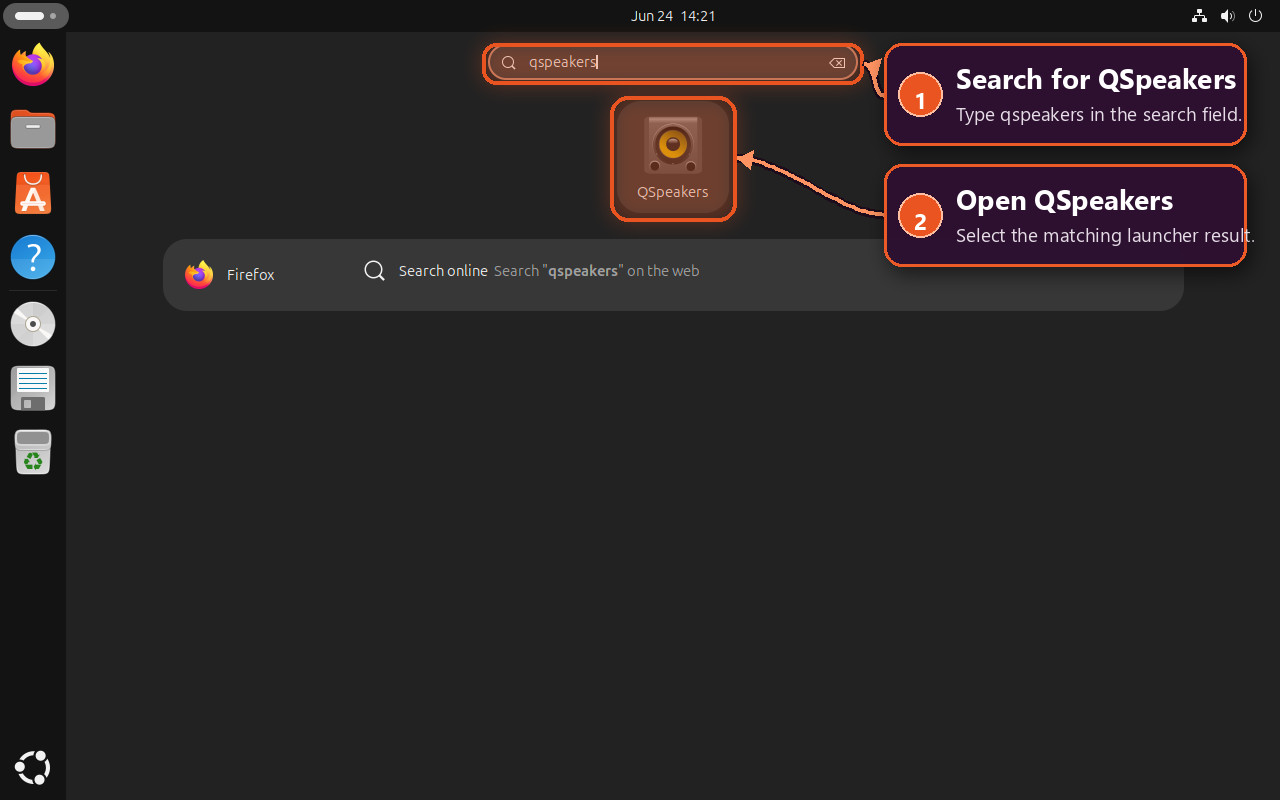
A successful launch opens the main design workspace with driver selection, enclosure tabs, enclosure controls, and a frequency-response plot.
Create a First Enclosure Model
Start with reliable Thiele/Small data from the driver manufacturer or your own measurements. Small errors in values such as Fs, Qts, and Vas can move the calculated response enough to undermine the enclosure comparison.
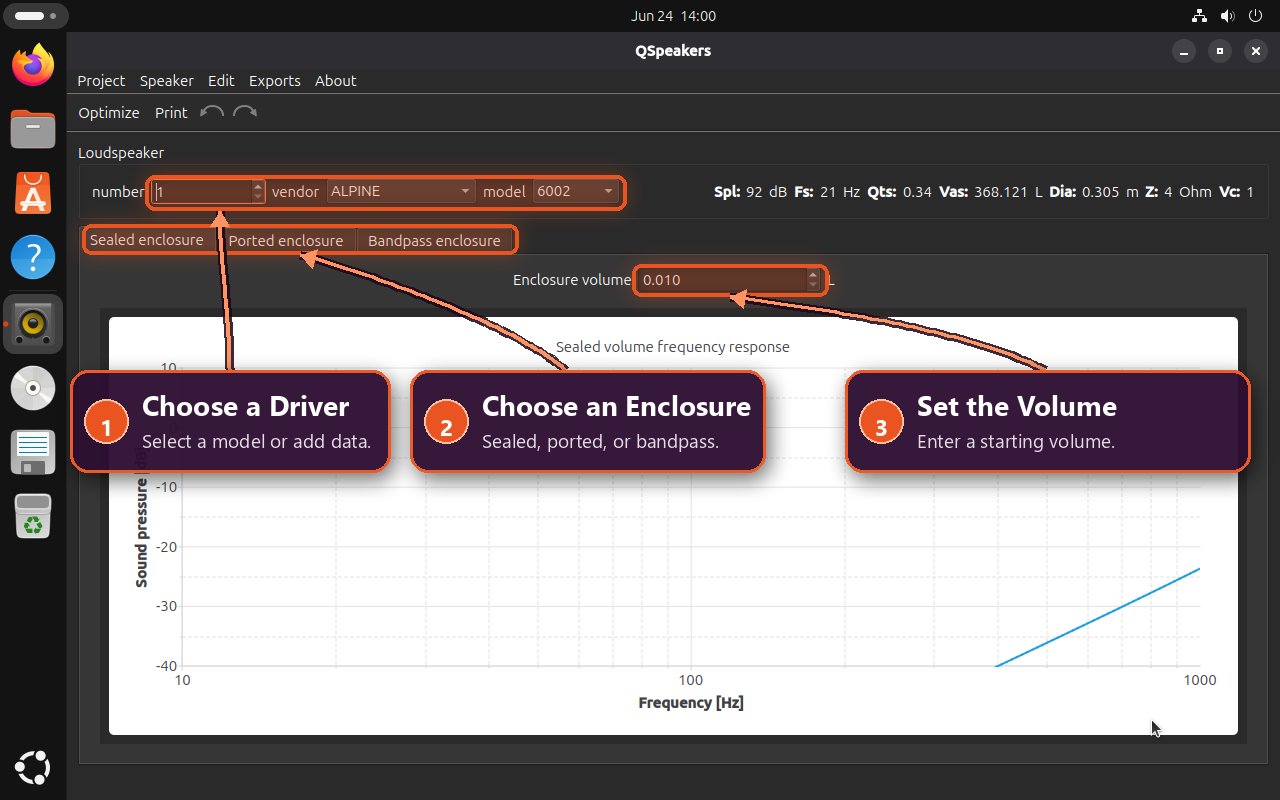
- Select a driver with the vendor and model controls. If the driver is not included, open Speaker > New and enter its measured parameters.
- Choose the Sealed enclosure, Ported enclosure, or Bandpass enclosure tab. Each alignment exposes the controls used by that design.
- Select Optimize after choosing the driver and enclosure type to calculate a practical starting point, then adjust the enclosure values for the design you are comparing.
- Read the response curve and change one value at a time. Treat the plot as a design model rather than a finished cabinet specification.
The three controls that define the first comparison are grouped across the top of the workspace: driver selection, enclosure type, and enclosure volume.
For a ported enclosure, review Vb, Fb, Ql, port count, diameter, and the calculated port length together. Confirm that the driver, port, bracing, wall thickness, and internal clearances physically fit before cutting cabinet panels.
Use Project > Save copy… to keep a reusable .qsp project before changing the alignment or enclosure values. A saved baseline makes side-by-side design comparisons easier to reproduce.
Update QSpeakers on Ubuntu
Update the APT Package
APT updates the Ubuntu package from the same configured repositories. Upgrade only QSpeakers when a newer candidate becomes available:
sudo apt update
sudo apt install --only-upgrade qspeakers
Update the Flatpak Package
Flatpak updates the application and its required runtime through Flathub:
sudo flatpak update rocks.noise.qspeakersCheck and Update the Source Build
Compare the active source-build marker with the latest numeric upstream tag before changing anything:
bash <<'QSP_STATUS'
set -euo pipefail

version_marker="$HOME/.local/opt/qspeakers/current/.linuxcapable-managed-version"
installed_version="$(
  sed -n 's/^version=//p' "$version_marker" 2>/dev/null ||
    true
)"
if ! [[ "$installed_version" =~ ^[0-9]+(\.[0-9]+){1,2}$ ]]; then
  echo "Could not read the active QSpeakers source version." >&2
  exit 1
fi

tag_listing="$(
  git ls-remote --tags https://github.com/be1/qspeakers.git
)"
latest_version="$(
  printf '%s\n' "$tag_listing" |
    sed -nE 's#^[0-9a-f]{40}[[:space:]]+refs/tags/([0-9]+(\.[0-9]+){1,2})$#\1#p' |
    sort -Vu |
    awk 'NF { latest = $0 } END { print latest }'
)"
if ! [[ "$latest_version" =~ ^[0-9]+(\.[0-9]+){1,2}$ ]]; then
  echo "Could not resolve the latest numeric upstream tag." >&2
  exit 1
fi

printf 'Installed version: %s\nLatest stable tag: %s\n' \
  "$installed_version" "$latest_version"
QSP_STATUS
Installed version: 1.8.6 Latest stable tag: 1.8.6
Run the helper without sudo when the upstream tag is newer. It builds into a new versioned directory and checks the binary, linked libraries, desktop entry, icon, MIME definition, and metadata before switching current:
update-qspeakers-sourceAn update from 1.8.5 to 1.8.6 includes these key status lines around the Git and compiler progress:
Installed version: 1.8.5 Latest stable tag: 1.8.6 Cloning QSpeakers tag 1.8.6... Building QSpeakers 1.8.6... QSpeakers 1.8.6 is now active. Launch command: qspeakers
Running the same command when no update exists refreshes the managed desktop integration and returns:
Installed version: 1.8.6 Latest stable tag: 1.8.6 QSpeakers is already current.
A future upstream tag can require different dependencies or qmake6 flags, so review its build notes before applying the update. The helper does not create a timer or background job; run it when you want to check and apply an upstream update. An invalid tag, missing tag, changed tag commit, or failed build stops before the active version changes. If desktop integration fails after a version switch, the helper attempts to restore the previous active version and reports a hard error if restoration cannot complete.
Remove QSpeakers from Ubuntu
Remove the APT Package
Remove the Ubuntu package without deleting project files saved in your home directory:
sudo apt remove qspeakersCheck that the package is no longer installed:
dpkg-query -W -f='${db:Status-Abbrev}\n' qspeakers 2>/dev/null |
  grep -q '^ii ' ||
  echo "QSpeakers is not installed by APT."
Remove the Flatpak Package
Uninstall the system-wide Flatpak application. This removes the application itself but leaves the current account’s sandboxed settings and data available for a later reinstall:
sudo flatpak uninstall rocks.noise.qspeakersConfirm that the application ID is absent from the system installation:
flatpak list --system --app --columns=application |
  grep -Fx rocks.noise.qspeakers ||
  echo "QSpeakers is not installed by Flatpak."
Delete Optional Flatpak Data
Flatpak can leave per-account settings and app data under ~/.var/app/rocks.noise.qspeakers. Inspect the directory before deciding whether to remove it:
if [ -d "$HOME/.var/app/rocks.noise.qspeakers" ]; then
  du -sh -- "$HOME/.var/app/rocks.noise.qspeakers"
else
  echo "No QSpeakers Flatpak data directory found."
fi
Deleting this directory permanently removes the current account’s QSpeakers Flatpak settings and app data. Back up anything you need first.
rm -rf -- "$HOME/.var/app/rocks.noise.qspeakers"Remove the Source Build
Close QSpeakers and run the removal block as your regular desktop user. It validates each managed prefix, marker, launcher, icon, and link before removing the source versions and their desktop integration.
This removal is limited to the managed source installation. It does not delete saved
.qspprojects, QSpeakers preferences, or shared build dependencies. Keep the dependency packages if other source builds use them.
bash <<'QSP_REMOVE'
#!/usr/bin/env bash
set -euo pipefail

install_root="$HOME/.local/opt/qspeakers"
current_link="$install_root/current"
helper_path="$HOME/.local/bin/update-qspeakers-source"
command_path="$HOME/.local/bin/qspeakers"
desktop_path="$HOME/.local/share/applications/qspeakers.desktop"
icon_path="$HOME/.local/share/icons/hicolor/scalable/apps/qspeakers.svg"
hicolor_root="$HOME/.local/share/icons/hicolor"
hicolor_index="$hicolor_root/index.theme"
hicolor_marker="$hicolor_root/.linuxcapable-created-qspeakers-index-theme"
mime_path="$HOME/.local/share/mime/packages/application-x-qspeakers.xml"
metainfo_path="$HOME/.local/share/metainfo/rocks.noise.qspeakers.metainfo.xml"
root_marker="$install_root/.linuxcapable-managed-source"

fail() {
	printf 'Error: %s\n' "$*" >&2
	exit 1
}

if [ "$(id -u)" -eq 0 ]; then
	fail 'run this removal block as your regular desktop user, not with sudo'
fi
if pgrep -x qspeakers >/dev/null 2>&1; then
	fail 'close QSpeakers before removing the source installation'
fi

if [ -L "$helper_path" ]; then
	fail "$helper_path is a symbolic link; refusing to follow it"
elif [ -e "$helper_path" ]; then
	if [ ! -f "$helper_path" ] ||
		! grep -Fxq '# linuxcapable-managed-qspeakers-source-helper' \
			"$helper_path"; then
		fail "$helper_path is not the managed QSpeakers update helper"
	fi
fi

check_exact_symlink() {
	local link_path="$1"
	local expected_target="$2"

	if [ -L "$link_path" ]; then
		[ "$(readlink -- "$link_path")" = "$expected_target" ] ||
			fail "$link_path points outside the managed QSpeakers source install"
	elif [ -e "$link_path" ]; then
		fail "$link_path is not a managed symbolic link"
	fi
}

check_exact_symlink "$command_path" "$current_link/bin/qspeakers"
check_exact_symlink \
	"$icon_path" \
	"$current_link/share/icons/hicolor/scalable/apps/qspeakers.svg"
check_exact_symlink \
	"$mime_path" \
	"$current_link/share/mime/packages/application-x-qspeakers.xml"
check_exact_symlink \
	"$metainfo_path" \
	"$current_link/share/metainfo/rocks.noise.qspeakers.metainfo.xml"

if [ -L "$desktop_path" ]; then
	fail "$desktop_path is a symbolic link; refusing to follow it"
elif [ -e "$desktop_path" ]; then
	if [ ! -f "$desktop_path" ] ||
		! grep -Fxq 'X-LinuxCapable-Managed=QSpeakersSource' \
			"$desktop_path"; then
		fail "$desktop_path is not a managed QSpeakers desktop entry"
	fi
fi

if [ -L "$hicolor_marker" ]; then
	fail "$hicolor_marker is a symbolic link; refusing to follow it"
elif [ -e "$hicolor_marker" ]; then
	[ -f "$hicolor_marker" ] &&
		[ "$(cat -- "$hicolor_marker")" = \
			'linuxcapable-created-qspeakers-hicolor-index' ] ||
		fail "$hicolor_marker has unexpected content"
fi

if [ -L "$install_root" ]; then
	fail "$install_root is a symbolic link; refusing to follow it"
elif [ -e "$install_root" ]; then
	[ -d "$install_root" ] ||
		fail "$install_root exists but is not a directory"
	[ ! -L "$root_marker" ] &&
		[ -f "$root_marker" ] &&
		[ "$(cat -- "$root_marker")" = \
			'linuxcapable-managed-qspeakers-source-root' ] ||
		fail "$install_root is not marked as a managed source tree"

	while IFS= read -r -d '' entry; do
		case "$entry" in
		"$root_marker") ;;
		"$current_link")
			[ -L "$current_link" ] ||
				fail "$current_link is not a symbolic link"
			current_target="$(readlink -f -- "$current_link" || true)"
			case "$current_target" in
			"$install_root"/[0-9]*.[0-9]*) ;;
			*) fail "$current_link points outside the managed version tree" ;;
			esac
			;;
		*)
			version_name="$(basename -- "$entry")"
			[[ "$version_name" =~ ^[0-9]+(\.[0-9]+){1,2}$ ]] ||
				fail "$entry is not a managed numeric QSpeakers version"
			[ ! -L "$entry" ] && [ -d "$entry" ] ||
				fail "$entry is not a managed version directory"
			version_marker="$entry/.linuxcapable-managed-version"
			[ ! -L "$version_marker" ] && [ -f "$version_marker" ] ||
				fail "$entry has no managed version marker"
			if [ "$(awk 'END { print NR }' "$version_marker")" != 2 ] ||
				! grep -Fxq "version=$version_name" "$version_marker" ||
				! grep -Eq '^commit=[0-9a-f]{40}$' "$version_marker"; then
				fail "$entry has an invalid managed version marker"
			fi
			;;
		esac
	done < <(find "$install_root" -mindepth 1 -maxdepth 1 -print0)
fi

rm -f -- \
	"$command_path" \
	"$icon_path" \
	"$mime_path" \
	"$metainfo_path" \
	"$desktop_path" \
	"$helper_path"
if [ -d "$install_root" ]; then
	rm -rf -- "$install_root"
fi

if [ -d "$HOME/.local/share/applications" ]; then
	update-desktop-database "$HOME/.local/share/applications"
fi
if [ -d "$HOME/.local/share/mime" ]; then
	update-mime-database "$HOME/.local/share/mime"
fi
if [ -d "$hicolor_root" ] && [ -f "$hicolor_index" ]; then
	gtk-update-icon-cache -q -f "$hicolor_root"
fi
if [ -e "$hicolor_marker" ]; then
	if ! find "$hicolor_root" -mindepth 1 \
		! -path "$hicolor_index" \
		! -path "$hicolor_marker" \
		! -path "$hicolor_root/icon-theme.cache" \
		! -type d -print -quit | grep -q .; then
		rm -f -- \
			"$hicolor_root/icon-theme.cache" \
			"$hicolor_index" \
			"$hicolor_marker"
		rmdir --ignore-fail-on-non-empty \
			"$hicolor_root/scalable/apps" \
			"$hicolor_root/scalable" \
			"$hicolor_root" 2>/dev/null || true
	else
		rm -f -- "$hicolor_marker"
	fi
fi

printf '%s\n' \
	'Removed the managed QSpeakers source install.' \
	'QSpeakers projects and preferences were not changed.'
QSP_REMOVE
Removed the managed QSpeakers source install. QSpeakers projects and preferences were not changed.
Troubleshoot QSpeakers on Ubuntu
APT Cannot Find the QSpeakers Package
Check whether APT has a package candidate before changing repository settings:
apt-cache policy qspeakersIf the output contains Candidate: (none), Universe may be disabled on a minimal or customised installation. Enable the component, refresh metadata, and check the candidate again:
sudo apt install software-properties-common
sudo add-apt-repository --yes universe
sudo apt update
apt-cache policy qspeakers
A versioned Candidate line means APT can install the package. The Ubuntu Universe repository guide explains the component and how to verify it on customised systems.
Flathub Is Missing or Disabled
Inspect the system-wide Flatpak remotes, including disabled entries:
flatpak remotes --system --show-disabled --columns=name,options |
  grep -E '^flathub[[:space:]]'
If the Flathub row contains disabled, re-enable the existing system remote:
sudo flatpak remote-modify --enable flathubIf the check returns no Flathub row, add the remote and retry the QSpeakers installation:
sudo flatpak remote-add --if-not-exists flathub https://dl.flathub.org/repo/flathub.flatpakrepoThe Source Helper Is Not Found
If a terminal opened before the helper was created cannot find the command, refresh that shell’s per-user path and command cache:
export PATH="$HOME/.local/bin:$PATH"
hash -r
command -v update-qspeakers-source
command -v qspeakers
Both checks should return paths under ~/.local/bin. If the helper remains absent, repeat the helper-creation block; its ownership guard will refresh only the managed helper created during source setup.
The Source Build Reports a Missing Dependency
Inspect the Qt build tools, OpenGL header, translation compiler, and release-specific Charts package before retrying the dependency block:
bash <<'QSP_DEP_CHECK'
set -euo pipefail

if apt-cache show qt6-charts-dev >/dev/null 2>&1; then
  charts_package=qt6-charts-dev
else
  charts_package=libqt6charts6-dev
fi

for package_name in \
  build-essential \
  git \
  libgl-dev \
  libgtk-3-bin \
  qmake6 \
  qt6-base-dev \
  "$charts_package" \
  qt6-l10n-tools \
  qt6-tools-dev-tools \
  desktop-file-utils \
  shared-mime-info; do
  package_state="$(
    dpkg-query -W -f='${db:Status-Abbrev}' "$package_name" 2>/dev/null ||
      true
  )"
  if [[ "$package_state" == ii* ]]; then
    printf 'Installed: %s\n' "$package_name"
  else
    printf 'Missing: %s\n' "$package_name"
  fi
done
QSP_DEP_CHECK
Every dependency should print an Installed line. Ubuntu 22.04 selects libqt6charts6-dev, while Ubuntu 24.04 and 26.04 select qt6-charts-dev. Re-run the dependency installation block if any package prints as Missing, then run update-qspeakers-source again.
The Source Helper Refuses an Existing Path or Tag
The helper stops when its install root, command link, desktop entry, icon, MIME file, metadata link, or update-helper path is not marked as belonging to the managed source installation. It also stops if an installed tag now resolves to a different upstream commit. These failures protect an unrelated installation and the last working build; inspect the reported path or review the upstream tag before changing anything. Do not bypass the guard with a broad recursive deletion.
The Launcher Does Not Appear
First start QSpeakers with the terminal command for the installed method. Source-build users can pass the active tag to the helper so it refreshes the desktop entry, application database, MIME database, and icon cache without selecting a newer upstream release:
bash <<'QSP_REFRESH'
set -euo pipefail

current_tag="$(
  sed -n 's/^version=//p' \
    "$HOME/.local/opt/qspeakers/current/.linuxcapable-managed-version" \
    2>/dev/null ||
    true
)"
if ! [[ "$current_tag" =~ ^[0-9]+(\.[0-9]+){1,2}$ ]]; then
  echo "Could not read the active QSpeakers source tag." >&2
  exit 1
fi
update-qspeakers-source "$current_tag"
QSP_REFRESH
APT users can verify /usr/share/applications/qspeakers.desktop with dpkg -L qspeakers, while Flatpak users can confirm the application with flatpak info --system rocks.noise.qspeakers. If the correct terminal launch works but application search still lacks the launcher, sign out and back in once so the desktop session reloads its application index. Installing another method is not a launcher repair and usually creates a second update path.
Conclusion
QSpeakers is ready to turn reliable driver data into repeatable enclosure comparisons. Save a .qsp baseline, change one variable at a time, and keep updates with the installation method you selected. Before cutting material, confirm driver and port clearance, wall thickness, bracing, and other physical limits the response plot cannot model.


Formatting tips for your comment
You can use basic HTML to format your comment. Useful tags currently allowed in published comments:
<code>command</code>command<strong>bold</strong><em>italic</em><a href="https://example.com">link</a><blockquote>quote</blockquote>