
Google Antigravity is not available from Fedora’s default repositories. Fedora 44 users can install the current Antigravity 2.0 desktop app, the separate Antigravity IDE, or the terminal-based agy CLI. The graphical downloads use guarded root-owned helpers, while the CLI uses Google’s per-user installer. An unsigned RPM repository still provides the older Antigravity IDE 1.23.2, but that package conflicts with the current desktop command and launcher.
Choose a Google Antigravity Install Path on Fedora
Google’s download page presents Antigravity 2.0, Antigravity CLI, Antigravity IDE, and Antigravity SDK as separate products. The installation choices are the desktop app, IDE, and CLI. The Python SDK needs a separate Python environment and is not installed by these commands.
These instructions target a traditional DNF-based Fedora Workstation installation. Fedora Silverblue, Kinoite, and other Atomic desktops use an image-based host and are not covered; do not paste the host-level DNF and /opt helper commands into an Atomic system.
| Install path | Best fit | Source and architecture | Update method | What it manages |
|---|---|---|---|---|
| Option 1: Antigravity 2.0 desktop app | Standalone projects, artifacts, scheduled work, and visual agent orchestration. | Official HTTPS tarball for x86_64 or ARM64. | Close the app, then run sudo update-antigravity. | Owns antigravity and antigravity.desktop; do not combine it with the legacy RPM. |
| Option 2: Antigravity IDE | Editor-first work with agents, artifacts, completion, and code-aware commands. | Official HTTPS IDE tarball for x86_64 or ARM64. | Close the IDE, then run sudo update-antigravity-ide. | Uses separate antigravity-ide command, launcher, icon, and install prefix. |
| Option 3: Antigravity CLI | Terminal work in local projects, SSH sessions, and scripts. | Official HTTPS per-user installer, which selects the Linux binary. | Rerun the verified upstream installer from your normal user account. | Owns the marked ~/.local/bin/agy installation and, when needed, a marked Bash PATH block. |
| Legacy: Antigravity IDE RPM | Older package-managed IDE when version 1.x is specifically required. | Unsigned Google RPM repository; currently x86_64 only. | Run sudo dnf upgrade --refresh --from-repo=antigravity-rpm antigravity if Google publishes a newer RPM. | Owns /usr/bin/antigravity and antigravity.desktop; conflicts with option 1. |
The Antigravity 2.0 desktop helper exposes
antigravity, while the current IDE helper exposesantigravity-ide. The legacy RPM also exposesantigravityandantigravity.desktop, so remove the legacy RPM before using the current desktop helper on the same Fedora system.
Install Google Antigravity on Fedora
The current desktop and IDE downloads are HTTPS-hosted tarballs without a separately published checksum. The helpers validate every archive path and link before extraction, reject special files and unmanaged path collisions, stage replacements on the /opt filesystem, and retain one ownership-marked previous version for guarded transaction recovery. Each helper records both the semantic version and Google’s numeric build, so a republished same-version archive is not mistaken for the installed build.
Google currently lists glibc 2.28 and GLIBCXX 3.4.25 as the Linux library floors. Fedora 44 exceeds those library versions, but the helpers’ URL and archive checks do not replace a cryptographic release signature; the official HTTPS origin remains the trust boundary.
Option 1: Install Antigravity 2.0 Desktop App on Fedora
Prepare Fedora for the Desktop Helper
Refresh Fedora first, then install the small set of tools used by the desktop helper:
sudo dnf upgrade --refresh && sudo dnf install curl desktop-file-utils python3 util-linuxThese commands use sudo for tasks that need root privileges. If your account is not in the sudoers file yet, follow the guide on how to add a user to sudoers on Fedora.
Save the Desktop Update Helper
The desktop helper reads Google’s download page, selects the x86_64 or ARM64 tarball for the local machine, installs the app under /opt/antigravity, creates /usr/local/bin/antigravity, extracts Google’s bundled icon, and adds the desktop launcher Fedora needs for correct app-menu and dock matching.
The setup block replaces only a helper carrying the LinuxCapable ownership marker or the exact fingerprint of the earlier download-page helper. The helper refuses unmanaged install roots, launchers, links, and icons instead of overwriting unrelated files.
Paste the entire block beginning with (. It stages and syntax-checks the helper, acquires the same lock used by updates, and atomically replaces only a recognized LinuxCapable helper.
(
set -euo pipefail

helper_path="/usr/local/bin/update-antigravity"
helper_lock="/run/lock/linuxcapable-antigravity-desktop.lock"
helper_source=""

# shellcheck disable=SC2329
cleanup_helper_source() {
	local status=$?
	trap - EXIT HUP INT TERM
	if [ -n "$helper_source" ]; then rm -f -- "$helper_source"; fi
	exit "$status"
}

trap cleanup_helper_source EXIT
trap 'exit 129' HUP
trap 'exit 130' INT
trap 'exit 143' TERM

helper_source=$(mktemp "${TMPDIR:-/tmp}/update-antigravity.XXXXXX")
cat >"$helper_source" <<'HELPER'
#!/usr/bin/env bash
# LinuxCapable owner: linuxcapable-google-antigravity-desktop-helper-v1
set -Eeuo pipefail

if [ "$(id -u)" -ne 0 ]; then
	echo "Run with sudo: sudo update-antigravity" >&2
	exit 1
fi

download_page="https://antigravity.google/download"
install_root="/opt/antigravity"
previous_root="${install_root}.previous"
command_link="/usr/local/bin/antigravity"
desktop_file="/usr/share/applications/antigravity.desktop"
icon_file="/usr/share/icons/hicolor/512x512/apps/antigravity.png"
old_icon_file="/usr/share/icons/hicolor/scalable/apps/antigravity.svg"
owner_id="linuxcapable-google-antigravity-desktop-v1"

case "$(uname -m)" in
x86_64 | amd64)
	platform="linux-x64"
	expected_top_dir="Antigravity-x64"
	;;
aarch64 | arm64)
	platform="linux-arm"
	expected_top_dir="Antigravity-arm64"
	;;
*)
	echo "Unsupported architecture: $(uname -m)" >&2
	exit 1
	;;
esac

expected_target="$install_root/$expected_top_dir/antigravity"

for required_command in curl desktop-file-validate flock python3; do
	if ! command -v "$required_command" >/dev/null 2>&1; then
		echo "$required_command is required to install Antigravity." >&2
		exit 1
	fi
done

if rpm -q antigravity >/dev/null 2>&1; then
	echo "Remove the legacy antigravity RPM before installing the current desktop app." >&2
	exit 1
fi

exec 9>/run/lock/linuxcapable-antigravity-desktop.lock
if ! flock -n 9; then
	echo "Another Antigravity desktop helper is already running." >&2
	exit 1
fi

work_dir=""
stage_dir=""
saved_previous=""
transaction_started="no"
had_current="no"
had_previous="no"
committed="no"
transaction_id=""
transaction_file=".linuxcapable-transaction"
release_file=".linuxcapable-release"
adopted_install_root="no"
adopted_previous_root="no"

path_exists() {
	[ -e "$1" ] || [ -L "$1" ]
}

is_managed_root() {
	local path=$1
	[ -d "$path" ] && [ ! -L "$path" ] &&
		[ -f "$path/.linuxcapable-owner" ] && [ ! -L "$path/.linuxcapable-owner" ] &&
		[ "$(cat "$path/.linuxcapable-owner")" = "$owner_id" ] &&
		[ -f "$path/.linuxcapable-version" ] && [ ! -L "$path/.linuxcapable-version" ] &&
		{ ! path_exists "$path/$release_file" ||
			{ [ -f "$path/$release_file" ] && [ ! -L "$path/$release_file" ]; }; }
}

is_legacy_root() {
	local path=$1
	[ -d "$path" ] && [ ! -L "$path" ] &&
		[ -f "$path/.linuxcapable-version" ] && [ ! -L "$path/.linuxcapable-version" ] &&
		! path_exists "$path/.linuxcapable-owner" &&
		! path_exists "$path/$release_file" &&
		[ -f "$path/$expected_top_dir/antigravity" ] &&
		[ ! -L "$path/$expected_top_dir/antigravity" ] &&
		[ -x "$path/$expected_top_dir/antigravity" ]
}

is_transaction_root() {
	local path=$1
	is_managed_root "$path" &&
		[ -f "$path/$transaction_file" ] && [ ! -L "$path/$transaction_file" ] &&
		[ "$(cat "$path/$transaction_file")" = "$transaction_id" ]
}

remove_adopted_owner() {
	local path=$1
	local launcher="$path/$expected_top_dir/antigravity"
	if ! path_exists "$path/.linuxcapable-owner"; then
		return 0
	fi
	if [ -d "$path" ] && [ ! -L "$path" ] &&
		[ -f "$path/.linuxcapable-owner" ] && [ ! -L "$path/.linuxcapable-owner" ] &&
		[ -f "$path/.linuxcapable-version" ] && [ ! -L "$path/.linuxcapable-version" ] &&
		! path_exists "$path/$release_file" &&
		[ -f "$launcher" ] && [ ! -L "$launcher" ] && [ -x "$launcher" ]; then
		rm -f -- "$path/.linuxcapable-owner"
	else
		echo "Could not safely roll back the temporary owner marker under $path." >&2
		return 1
	fi
}

is_expected_desktop() {
	local path=$1
	[ -f "$path" ] && [ ! -L "$path" ] &&
		desktop-file-validate "$path" >/dev/null 2>&1 &&
		grep -Fqx 'Name=Antigravity' "$path" &&
		grep -Fqx 'Comment=Google Antigravity 2.0 agent platform' "$path" &&
		grep -Fqx "Exec=$command_link %U" "$path" &&
		grep -Fqx 'Icon=antigravity' "$path" &&
		grep -Fqx 'Terminal=false' "$path" &&
		grep -Fqx 'Type=Application' "$path" &&
		grep -Fqx 'Categories=Development;IDE;' "$path" &&
		grep -Fqx 'StartupNotify=true' "$path" &&
		grep -Fqx 'StartupWMClass=Antigravity' "$path" &&
		grep -Fqx "X-LinuxCapable-Owner=$owner_id" "$path"
}

is_png_file() {
	local path=$1
	[ -f "$path" ] && [ ! -L "$path" ] || return 1
	python3 - "$path" <<'PY'
import struct
import sys
import zlib
from pathlib import Path

path = Path(sys.argv[1])
if path.is_symlink() or not path.is_file():
    raise SystemExit(1)
data = path.read_bytes()
if len(data) < 45 or not data.startswith(b"\x89PNG\r\n\x1a\n"):
    raise SystemExit(1)

offset = 8
chunk_index = 0
seen_ihdr = False
seen_idat = False
seen_iend = False
while offset < len(data):
    if offset + 12 > len(data):
        raise SystemExit(1)
    length = struct.unpack(">I", data[offset : offset + 4])[0]
    chunk_type = data[offset + 4 : offset + 8]
    chunk_end = offset + 12 + length
    if chunk_end > len(data):
        raise SystemExit(1)
    payload = data[offset + 8 : offset + 8 + length]
    expected_crc = struct.unpack(">I", data[offset + 8 + length : chunk_end])[0]
    actual_crc = zlib.crc32(payload, zlib.crc32(chunk_type)) & 0xFFFFFFFF
    if actual_crc != expected_crc:
        raise SystemExit(1)

    if chunk_index == 0:
        if chunk_type != b"IHDR" or length != 13:
            raise SystemExit(1)
        width, height = struct.unpack(">II", payload[:8])
        if width == 0 or height == 0:
            raise SystemExit(1)
        seen_ihdr = True
    elif chunk_type == b"IHDR":
        raise SystemExit(1)

    if chunk_type == b"IDAT":
        seen_idat = True
    elif chunk_type == b"IEND":
        if length != 0 or not seen_ihdr or not seen_idat or chunk_end != len(data):
            raise SystemExit(1)
        seen_iend = True
        offset = chunk_end
        break

    offset = chunk_end
    chunk_index += 1

raise SystemExit(0 if seen_ihdr and seen_idat and seen_iend and offset == len(data) else 1)
PY
}

remove_tracked_temp() {
	local path=$1
	case "$path" in
	/var/tmp/antigravity.* | /opt/.antigravity-stage.*)
		if [ -d "$path" ] && [ ! -L "$path" ]; then
			rm -rf -- "$path"
		fi
		;;
	esac
}

backup_item() {
	local source=$1
	local name=$2
	if [ -e "$source" ] || [ -L "$source" ]; then
		cp -a -- "$source" "$work_dir/backups/$name"
	else
		: >"$work_dir/backups/$name.missing"
	fi
}

restore_item() {
	local destination=$1
	local name=$2
	if ! rm -f -- "$destination"; then return 1; fi
	if [ -e "$work_dir/backups/$name" ] || [ -L "$work_dir/backups/$name" ]; then
		if ! cp -a -- "$work_dir/backups/$name" "$destination"; then return 1; fi
	fi
	return 0
}

finalize_commit() {
	local ok=yes

	if path_exists "$install_root/$transaction_file"; then
		if is_transaction_root "$install_root"; then
			rm -f -- "$install_root/$transaction_file" || ok=no
		else
			echo "Commit stopped: the Antigravity transaction marker changed unexpectedly." >&2
			ok=no
		fi
	elif ! is_managed_root "$install_root"; then
		echo "Commit stopped: $install_root is not the expected managed root." >&2
		ok=no
	fi

	if [ -n "$saved_previous" ] && path_exists "$saved_previous"; then
		if ! is_managed_root "$saved_previous"; then
			echo "Commit preserved an unrecognized rollback at $saved_previous for manual review." >&2
			ok=no
		elif [ "$had_current" = yes ]; then
			rm -rf -- "$saved_previous" || ok=no
		elif [ "$had_previous" = yes ] && ! path_exists "$previous_root"; then
			mv -- "$saved_previous" "$previous_root" || ok=no
		else
			echo "Commit could not place the prior rollback automatically: $saved_previous" >&2
			ok=no
		fi
	fi

	[ "$ok" = yes ]
}

rollback_transaction() {
	local ok=yes

	if is_transaction_root "$install_root"; then
		rm -rf -- "$install_root" || ok=no
	elif path_exists "$install_root"; then
		if [ "$had_current" != yes ] || ! is_managed_root "$install_root"; then
			echo "Rollback stopped at an unexpected live root: $install_root" >&2
			ok=no
		fi
	fi

	if [ "$had_current" = yes ] && ! path_exists "$install_root"; then
		if is_managed_root "$previous_root"; then
			mv -- "$previous_root" "$install_root" || ok=no
		else
			echo "Rollback could not restore the previous live root automatically." >&2
			ok=no
		fi
	fi

	if [ -n "$saved_previous" ] && path_exists "$saved_previous"; then
		if ! path_exists "$previous_root" && is_managed_root "$saved_previous"; then
			mv -- "$saved_previous" "$previous_root" || ok=no
		else
			echo "Prior rollback preserved for manual recovery at $saved_previous" >&2
			ok=no
		fi
	fi

	[ "$ok" = yes ]
}

cleanup() {
	local status=$?
	local rollback_ok=yes
	set +e
	trap - EXIT HUP INT TERM

	if [ "$transaction_started" = yes ]; then
		if [ "$committed" = yes ]; then
			if ! finalize_commit; then rollback_ok=no; fi
		else
			if ! rollback_transaction; then rollback_ok=no; fi

			if [ -n "$work_dir" ] && [ -d "$work_dir/backups" ]; then
				if ! restore_item "$command_link" command-link; then rollback_ok=no; fi
				if ! restore_item "$desktop_file" desktop-file; then rollback_ok=no; fi
				if ! restore_item "$icon_file" icon-file; then rollback_ok=no; fi
				if ! restore_item "$old_icon_file" old-icon-file; then rollback_ok=no; fi
			fi

			if command -v restorecon >/dev/null 2>&1; then
				if [ -e "$install_root" ] && ! restorecon -R "$install_root"; then rollback_ok=no; fi
				if { [ -e "$command_link" ] || [ -L "$command_link" ]; } && ! restorecon "$command_link"; then rollback_ok=no; fi
				if [ -e "$desktop_file" ] && ! restorecon "$desktop_file"; then rollback_ok=no; fi
				if [ -e "$icon_file" ] && ! restorecon "$icon_file"; then rollback_ok=no; fi
				if [ -e "$old_icon_file" ] && ! restorecon "$old_icon_file"; then rollback_ok=no; fi
			fi

			if command -v update-desktop-database >/dev/null 2>&1 &&
				! update-desktop-database /usr/share/applications >/dev/null; then
				rollback_ok=no
			fi
			if command -v gtk-update-icon-cache >/dev/null 2>&1 &&
				! gtk-update-icon-cache -q /usr/share/icons/hicolor >/dev/null; then
				rollback_ok=no
			fi
		fi

		if [ "$rollback_ok" != yes ]; then status=1; fi
	fi
	if [ "$transaction_started" = no ] && [ -n "$saved_previous" ] && path_exists "$saved_previous"; then
		if [ -d "$saved_previous" ] && [ ! -L "$saved_previous" ] &&
			[ -z "$(find "$saved_previous" -mindepth 1 -print -quit)" ]; then
			if ! rmdir -- "$saved_previous"; then status=1; fi
		else
			echo "Preserving unexpected rollback-reservation state at $saved_previous" >&2
			status=1
		fi
	fi

	if [ "$committed" != yes ]; then
		if [ "$adopted_install_root" = yes ] && ! remove_adopted_owner "$install_root"; then rollback_ok=no; fi
		if [ "$adopted_previous_root" = yes ] && ! remove_adopted_owner "$previous_root"; then rollback_ok=no; fi
		if [ "$rollback_ok" != yes ]; then status=1; fi
	fi

	if [ -n "$stage_dir" ]; then
		if ! remove_tracked_temp "$stage_dir"; then status=1; fi
	fi
	if [ -n "$work_dir" ]; then
		if ! remove_tracked_temp "$work_dir"; then status=1; fi
	fi
	exit "$status"
}

trap cleanup EXIT
trap 'exit 129' HUP
trap 'exit 130' INT
trap 'exit 143' TERM

desktop_owned=no
if [ -L "$desktop_file" ] || { [ -e "$desktop_file" ] && [ ! -f "$desktop_file" ]; }; then
	echo "$desktop_file is not a regular file. Move it before rerunning this helper." >&2
	exit 1
elif [ -f "$desktop_file" ]; then
	if grep -Fqx "X-LinuxCapable-Owner=$owner_id" "$desktop_file"; then
		desktop_owned=yes
	elif grep -Fqx 'Exec=/usr/local/bin/antigravity %U' "$desktop_file" &&
		grep -Fqx 'Icon=antigravity' "$desktop_file" &&
		grep -Fqx 'StartupWMClass=Antigravity' "$desktop_file"; then
		desktop_owned=yes
	else
		echo "$desktop_file does not carry the expected LinuxCapable owner marker. Move it before rerunning this helper." >&2
		exit 1
	fi
fi

for managed_icon in "$icon_file" "$old_icon_file"; do
	if [ -L "$managed_icon" ] || { [ -e "$managed_icon" ] && [ ! -f "$managed_icon" ]; }; then
		echo "$managed_icon is not a regular file. Move it before rerunning this helper." >&2
		exit 1
	elif [ -f "$managed_icon" ] && [ "$desktop_owned" != yes ]; then
		echo "$managed_icon exists without a LinuxCapable-managed desktop entry. Move it before rerunning this helper." >&2
		exit 1
	fi
done

if [ -L "$command_link" ]; then
	if [ "$(readlink "$command_link")" != "$expected_target" ]; then
		echo "$command_link points somewhere else. Move it before rerunning this helper." >&2
		exit 1
	fi
elif [ -e "$command_link" ]; then
	echo "$command_link exists and is not a symlink. Move it before rerunning this helper." >&2
	exit 1
fi

if [ -e "$install_root" ] || [ -L "$install_root" ]; then
	if is_managed_root "$install_root"; then
		:
	elif is_legacy_root "$install_root" && [ -L "$command_link" ] && [ "$desktop_owned" = yes ] && [ -f "$icon_file" ]; then
		adopted_install_root=yes
		printf '%s\n' "$owner_id" >"$install_root/.linuxcapable-owner"
		chmod 0644 "$install_root/.linuxcapable-owner"
	else
		echo "$install_root does not carry the expected LinuxCapable owner marker. Move it before rerunning this helper." >&2
		exit 1
	fi
elif [ -L "$command_link" ]; then
	echo "$command_link exists but $install_root is missing. Move the stale link before rerunning this helper." >&2
	exit 1
fi

if [ -e "$previous_root" ] || [ -L "$previous_root" ]; then
	if is_managed_root "$previous_root"; then
		:
	elif is_legacy_root "$previous_root" &&
		is_managed_root "$install_root" &&
		[ -L "$command_link" ] && [ "$desktop_owned" = yes ] && [ -f "$icon_file" ]; then
		adopted_previous_root=yes
		printf '%s\n' "$owner_id" >"$previous_root/.linuxcapable-owner"
		chmod 0644 "$previous_root/.linuxcapable-owner"
	else
		echo "$previous_root is not an ownership-marked rollback. Move it before rerunning this helper." >&2
		exit 1
	fi
fi

for managed_root in "$install_root" "$previous_root"; do
	if [ -e "$managed_root/$transaction_file" ] || [ -L "$managed_root/$transaction_file" ]; then
		echo "A prior Antigravity transaction marker remains under $managed_root. Preserve the current and previous roots for manual recovery before rerunning this helper." >&2
		exit 1
	fi
done

shopt -s nullglob
recovery_paths=(/opt/.antigravity-stage.* /opt/.antigravity-previous-save.*)
shopt -u nullglob
for recovery_path in "${recovery_paths[@]}"; do
	echo "Prior Antigravity transaction state requires manual recovery: $recovery_path" >&2
	exit 1
done
unset recovery_paths recovery_path

work_dir=$(mktemp -d /var/tmp/antigravity.XXXXXX)
mkdir -m 0700 "$work_dir/backups"
download_html="$work_dir/download.html"
archive="$work_dir/Antigravity.tar.gz"
icon_staged="$work_dir/antigravity.png"
desktop_staged="$work_dir/antigravity.desktop"

curl -fsSL --proto '=https' --proto-redir '=https' --compressed --retry 3 -o "$download_html" "$download_page"
download_fields=$(
	python3 - "$download_html" "$download_page" "$platform" <<'PY'
import re
import sys
from html.parser import HTMLParser
from pathlib import Path
from urllib.parse import urljoin

class LinkParser(HTMLParser):
    def __init__(self):
        super().__init__()
        self.hrefs = []

    def handle_starttag(self, tag, attrs):
        if tag != "a":
            return
        href = dict(attrs).get("href")
        if href:
            self.hrefs.append(href)

html = Path(sys.argv[1]).read_text(errors="replace")
page_url = sys.argv[2]
platform = sys.argv[3]
parser = LinkParser()
parser.feed(html)
pattern = re.compile(
    r"https://storage\.googleapis\.com/antigravity-public/antigravity-hub/"
    r"(([0-9]+\.[0-9]+\.[0-9]+)-[0-9]+)/"
    + re.escape(platform)
    + r"/Antigravity\.tar\.gz"
)
matches = []
for href in parser.hrefs:
    url = urljoin(page_url, href)
    match = pattern.fullmatch(url)
    if match and url not in {item[2] for item in matches}:
        matches.append((match.group(2), match.group(1), url))

if len(matches) != 1:
    raise SystemExit(f"Could not find exactly one download for {platform}")

print(*matches[0], sep="\t")
PY
)
IFS=$'\t' read -r version release_id download_url <<<"$download_fields"

if [[ ! "$version" =~ ^[0-9]+\.[0-9]+\.[0-9]+$ ]] ||
	[[ ! "$release_id" =~ ^[0-9]+\.[0-9]+\.[0-9]+-[0-9]+$ ]] ||
	[ "${release_id%-*}" != "$version" ] ||
	[ "$download_url" != "https://storage.googleapis.com/antigravity-public/antigravity-hub/$release_id/$platform/Antigravity.tar.gz" ]; then
	echo "Could not parse the Antigravity download page." >&2
	exit 1
fi

if is_managed_root "$install_root" &&
	[ "$(cat "$install_root/.linuxcapable-version" 2>/dev/null || true)" = "$version" ] &&
	[ -f "$install_root/$release_file" ] && [ ! -L "$install_root/$release_file" ] &&
	[ "$(cat "$install_root/$release_file")" = "$release_id" ] &&
	[ -f "$expected_target" ] && [ ! -L "$expected_target" ] && [ -x "$expected_target" ] &&
	[ -L "$command_link" ] && [ "$(readlink "$command_link")" = "$expected_target" ] &&
	is_expected_desktop "$desktop_file" &&
	is_png_file "$icon_file"; then
	printf 'Antigravity %s is already installed at %s\n' "$version" "$install_root/$expected_top_dir"
	exit 0
fi

printf 'Downloading Antigravity %s for %s...\n' "$version" "$platform"
curl -fsSL --proto '=https' --proto-redir '=https' --retry 3 -o "$archive" "$download_url"
stage_dir=$(mktemp -d /opt/.antigravity-stage.XXXXXX)

python3 - "$archive" "$stage_dir" "$expected_top_dir" <<'PY'
import os
import sys
import tarfile
from pathlib import Path, PurePosixPath

archive_path = Path(sys.argv[1])
destination = Path(sys.argv[2])
expected_top = sys.argv[3]


def normalize(parts):
    output = []
    for part in parts:
        if part in ("", "."):
            continue
        if part == "..":
            if not output:
                return None
            output.pop()
        else:
            output.append(part)
    return output


launcher_seen = False
with tarfile.open(archive_path, "r:gz") as bundle:
    members = bundle.getmembers()
    if not members:
        raise SystemExit("The Antigravity archive is empty")

    for member in members:
        raw_path = PurePosixPath(member.name)
        if raw_path.is_absolute() or ".." in raw_path.parts:
            raise SystemExit(f"Unsafe archive path: {member.name}")
        member_parts = normalize(raw_path.parts)
        if not member_parts or member_parts[0] != expected_top:
            raise SystemExit(f"Unexpected archive path: {member.name}")
        if not (member.isfile() or member.isdir() or member.issym() or member.islnk()):
            raise SystemExit(f"Unsupported archive member: {member.name}")

        if member.issym() or member.islnk():
            link_path = PurePosixPath(member.linkname)
            if link_path.is_absolute():
                raise SystemExit(f"Unsafe archive link: {member.name} -> {member.linkname}")
            link_base = member_parts[:-1] if member.issym() else []
            target_parts = normalize([*link_base, *link_path.parts])
            if not target_parts or target_parts[0] != expected_top:
                raise SystemExit(f"Out-of-tree archive link: {member.name} -> {member.linkname}")

        if member_parts == [expected_top, "antigravity"]:
            if not member.isfile():
                raise SystemExit("The Antigravity launcher is not a regular archive file")
            launcher_seen = True

    if not launcher_seen:
        raise SystemExit("The Antigravity launcher was not found in the archive")
    bundle.extractall(destination, members=members, filter="data")

root = (destination / expected_top).resolve(strict=True)
launcher = destination / expected_top / "antigravity"
if launcher.is_symlink() or not launcher.is_file() or not os.access(launcher, os.X_OK):
    raise SystemExit("The extracted Antigravity launcher is not a regular executable")
launcher.resolve(strict=True).relative_to(root)
PY

python3 - "$stage_dir/$expected_top_dir/resources/app.asar" "$icon_staged" <<'PY'
import json
import struct
import sys
from pathlib import Path

asar = Path(sys.argv[1])
output = Path(sys.argv[2])
if asar.is_symlink() or not asar.is_file():
    raise SystemExit("The Antigravity app.asar file is not a regular file")

file_size = asar.stat().st_size
with asar.open("rb") as source:
    source.read(4)
    header_size = struct.unpack("<I", source.read(4))[0]
    source.read(4)
    json_size = struct.unpack("<I", source.read(4))[0]
    if header_size < 8 or json_size > header_size or 8 + header_size > file_size:
        raise SystemExit("The Antigravity app.asar header is invalid")
    header = json.loads(source.read(json_size).decode())

try:
    icon = header["files"]["icon.png"]
    icon_offset = int(icon["offset"])
    icon_size = int(icon["size"])
except (KeyError, TypeError, ValueError) as exc:
    raise SystemExit("icon.png was not found in the Antigravity bundle") from exc

data_offset = 8 + header_size + icon_offset
if icon_offset < 0 or icon_size <= 0 or data_offset + icon_size > file_size:
    raise SystemExit("The Antigravity icon entry is invalid")

with asar.open("rb") as source:
    source.seek(data_offset)
    data = source.read(icon_size)
if not data.startswith(b"\x89PNG\r\n\x1a\n"):
    raise SystemExit("The extracted Antigravity icon is not a PNG file")
output.write_bytes(data)
PY
is_png_file "$icon_staged"

printf '%s\n' "$owner_id" >"$stage_dir/.linuxcapable-owner"
printf '%s\n' "$version" >"$stage_dir/.linuxcapable-version"
printf '%s\n' "$release_id" >"$stage_dir/$release_file"
transaction_id="${stage_dir##*.}.$$"
printf '%s\n' "$transaction_id" >"$stage_dir/$transaction_file"
chmod 0644 "$stage_dir/.linuxcapable-owner" "$stage_dir/.linuxcapable-version" "$stage_dir/$release_file" "$stage_dir/$transaction_file"
chmod 0755 "$stage_dir" "$stage_dir/$expected_top_dir"

cat >"$desktop_staged" <<DESKTOP
[Desktop Entry]
Name=Antigravity
Comment=Google Antigravity 2.0 agent platform
Exec=$command_link %U
Icon=antigravity
Terminal=false
Type=Application
Categories=Development;IDE;
StartupNotify=true
StartupWMClass=Antigravity
X-LinuxCapable-Owner=$owner_id
DESKTOP
desktop-file-validate "$desktop_staged"

backup_item "$command_link" command-link
backup_item "$desktop_file" desktop-file
backup_item "$icon_file" icon-file
backup_item "$old_icon_file" old-icon-file

if path_exists "$install_root"; then
	if ! is_managed_root "$install_root"; then
		echo "$install_root lost its ownership marker before promotion." >&2
		exit 1
	fi
	had_current=yes
fi

if path_exists "$previous_root"; then
	if ! is_managed_root "$previous_root"; then
		echo "$previous_root lost its ownership marker before promotion." >&2
		exit 1
	fi
	had_previous=yes
	saved_previous=$(mktemp -d /opt/.antigravity-previous-save.XXXXXX)
	rmdir -- "$saved_previous"
fi

transaction_started=yes
if [ "$had_previous" = yes ]; then
	mv -- "$previous_root" "$saved_previous"
fi
if [ "$had_current" = yes ]; then
	mv -- "$install_root" "$previous_root"
fi

mv -- "$stage_dir" "$install_root"
stage_dir=""
ln -sfn -- "$expected_target" "$command_link"
install -D -m 0644 "$desktop_staged" "$desktop_file"
install -D -m 0644 "$icon_staged" "$icon_file"
rm -f -- "$old_icon_file"

if command -v restorecon >/dev/null 2>&1; then
	restorecon -R "$install_root"
	restorecon "$command_link" "$desktop_file" "$icon_file"
fi

if command -v update-desktop-database >/dev/null 2>&1; then
	update-desktop-database /usr/share/applications >/dev/null
fi
if command -v gtk-update-icon-cache >/dev/null 2>&1; then
	gtk-update-icon-cache -q /usr/share/icons/hicolor >/dev/null
fi

is_managed_root "$install_root"
[ -f "$expected_target" ] && [ ! -L "$expected_target" ] && [ -x "$expected_target" ]
[ -L "$command_link" ] && [ "$(readlink -f "$command_link")" = "$expected_target" ]
desktop-file-validate "$desktop_file"
grep -Fqx "X-LinuxCapable-Owner=$owner_id" "$desktop_file"
is_png_file "$icon_file"

if [ -n "${SUDO_USER:-}" ] && [ "$SUDO_USER" != root ]; then
	runuser -u "$SUDO_USER" -- test -x "$expected_target"
fi

committed=yes
finalize_commit
printf 'Installed Antigravity %s at %s\n' "$version" "$install_root/$expected_top_dir"
HELPER

bash -n "$helper_source"
helper_digest=$(
	python3 - "$helper_source" <<'PY'
import hashlib
import sys
from pathlib import Path

print(hashlib.sha256(Path(sys.argv[1]).read_bytes()).hexdigest())
PY
)
sudo bash -s -- "$helper_source" "$helper_path" "$helper_lock" "$helper_digest" <<'ROOT_INSTALL'
set -euo pipefail

source_file=$1
helper_path=$2
lock_file=$3
expected_digest=$4
staged_helper=""

cleanup_helper_install() {
	local status=$?
	trap - EXIT HUP INT TERM
	if [ -n "$staged_helper" ]; then rm -f -- "$staged_helper"; fi
	exit "$status"
}

trap cleanup_helper_install EXIT
trap 'exit 129' HUP
trap 'exit 130' INT
trap 'exit 143' TERM

exec 9>"$lock_file"
if ! flock -n 9; then
	echo "The Antigravity desktop helper or removal command is already running." >&2
	exit 1
fi

if [ -L "$helper_path" ] || { [ -e "$helper_path" ] && [ ! -f "$helper_path" ]; }; then
	echo "$helper_path is not a regular file. Move it before continuing." >&2
	exit 1
elif [ -f "$helper_path" ]; then
	if grep -Fqx '# LinuxCapable owner: linuxcapable-google-antigravity-desktop-helper-v1' "$helper_path"; then
		:
	elif grep -Fqx '#!/usr/bin/env bash' "$helper_path" &&
		grep -Fqx 'download_page="https://antigravity.google/download"' "$helper_path" &&
		grep -Fqx 'install_root="/opt/antigravity"' "$helper_path" &&
		grep -Fqx 'command_link="/usr/local/bin/antigravity"' "$helper_path"; then
		echo "Replacing the earlier LinuxCapable download-page helper."
	else
		echo "$helper_path does not carry a recognized LinuxCapable helper marker. Move it before continuing." >&2
		exit 1
	fi
fi

staged_helper=$(mktemp /usr/local/bin/.update-antigravity.XXXXXX)
python3 - "$source_file" "$staged_helper" "$expected_digest" <<'PY'
import hashlib
import os
import stat
import sys

source, destination, expected = sys.argv[1:]
source_fd = os.open(source, os.O_RDONLY | os.O_NOFOLLOW)
try:
    source_stat = os.fstat(source_fd)
    if not stat.S_ISREG(source_stat.st_mode):
        raise SystemExit("The staged helper source is not a regular file")
    chunks = []
    while True:
        chunk = os.read(source_fd, 65536)
        if not chunk:
            break
        chunks.append(chunk)
finally:
    os.close(source_fd)

data = b"".join(chunks)
if hashlib.sha256(data).hexdigest() != expected:
    raise SystemExit("The staged helper source changed before the root copy")

destination_fd = os.open(destination, os.O_WRONLY | os.O_TRUNC | os.O_NOFOLLOW)
try:
    view = memoryview(data)
    while view:
        written = os.write(destination_fd, view)
        view = view[written:]
finally:
    os.close(destination_fd)
PY
grep -Fqx '# LinuxCapable owner: linuxcapable-google-antigravity-desktop-helper-v1' "$staged_helper"
chown root:root "$staged_helper"
chmod 0755 "$staged_helper"
bash -n "$staged_helper"
mv -fT -- "$staged_helper" "$helper_path"
staged_helper=""
ROOT_INSTALL
)
Install or Update the Desktop App
Run the helper to install or refresh the Antigravity 2.0 desktop app. A successful run prints the installed version and path:
command -v update-antigravity
sudo update-antigravity
/usr/local/bin/update-antigravity Downloading Antigravity 2.3.1 for linux-x64... Installed Antigravity 2.3.1 at /opt/antigravity/Antigravity-x64
Run the helper once more to confirm its no-op path:
sudo update-antigravityAntigravity 2.3.1 is already installed at /opt/antigravity/Antigravity-x64
Verify the Desktop Integration
Verify the launcher path and desktop entry. The resolved directory name can differ by architecture, but it should end with the antigravity executable.
cat /opt/antigravity/.linuxcapable-version
cat /opt/antigravity/.linuxcapable-release
cat /opt/antigravity/.linuxcapable-owner
readlink -f /usr/local/bin/antigravity
test -f "$(readlink -f /usr/local/bin/antigravity)" && test -x "$(readlink -f /usr/local/bin/antigravity)" && echo "Antigravity launcher is installed"
grep -E '^(Name|Exec|Icon|Categories|StartupWMClass)=' /usr/share/applications/antigravity.desktop
sed -n 's/^Directories=//p' /usr/share/icons/hicolor/index.theme | tr ',' '\n' | grep -Fx '512x512/apps'
test -f /usr/share/icons/hicolor/512x512/apps/antigravity.png && echo "Antigravity icon is installed"
2.3.1 2.3.1-5358163105546240 linuxcapable-google-antigravity-desktop-v1 /opt/antigravity/Antigravity-x64/antigravity Antigravity launcher is installed Name=Antigravity Exec=/usr/local/bin/antigravity %U Icon=antigravity Categories=Development;IDE; StartupWMClass=Antigravity 512x512/apps Antigravity icon is installed
The helper also restores Fedora’s default SELinux labels after copying the tarball payload. The important context types are usr_t for the application directory, desktop file, and icon, and bin_t for the command link:
ls -Zd /opt/antigravity /usr/local/bin/antigravity /usr/share/applications/antigravity.desktop /usr/share/icons/hicolor/512x512/apps/antigravity.pngunconfined_u:object_r:usr_t:s0 /opt/antigravity unconfined_u:object_r:bin_t:s0 /usr/local/bin/antigravity unconfined_u:object_r:usr_t:s0 /usr/share/applications/antigravity.desktop system_u:object_r:usr_t:s0 /usr/share/icons/hicolor/512x512/apps/antigravity.png
Option 2: Install Antigravity IDE on Fedora
Install the IDE Prerequisites
The current Antigravity IDE is a separate 2.x editor build from Google’s download page. It uses a Linux tarball instead of the legacy RPM repo, so install it with its own helper, command name, desktop file, and icon.
Install the helper prerequisites if they are not already present:
sudo dnf install curl desktop-file-utils python3 util-linuxSave the IDE Update Helper
The IDE helper reads Google’s download page, selects the Linux x64 or ARM64 IDE tarball, installs it under /opt/antigravity-ide/Antigravity-IDE, creates /usr/local/bin/antigravity-ide, installs the upstream icon, and writes a separate Fedora launcher. The normalized directory avoids a space in the managed executable path.
Paste the entire block beginning with (. It stages and syntax-checks the IDE helper, acquires the same lock used by updates, and atomically replaces only a recognized LinuxCapable helper.
(
set -euo pipefail

helper_path="/usr/local/bin/update-antigravity-ide"
helper_lock="/run/lock/linuxcapable-antigravity-ide.lock"
helper_source=""

# shellcheck disable=SC2329
cleanup_helper_source() {
	local status=$?
	trap - EXIT HUP INT TERM
	if [ -n "$helper_source" ]; then rm -f -- "$helper_source"; fi
	exit "$status"
}

trap cleanup_helper_source EXIT
trap 'exit 129' HUP
trap 'exit 130' INT
trap 'exit 143' TERM

helper_source=$(mktemp "${TMPDIR:-/tmp}/update-antigravity-ide.XXXXXX")
cat >"$helper_source" <<'HELPER'
#!/usr/bin/env bash
# LinuxCapable owner: linuxcapable-google-antigravity-ide-helper-v1
set -Eeuo pipefail

if [ "$(id -u)" -ne 0 ]; then
	echo "Run with sudo: sudo update-antigravity-ide" >&2
	exit 1
fi

download_page="https://antigravity.google/download"
install_root="/opt/antigravity-ide"
previous_root="${install_root}.previous"
command_link="/usr/local/bin/antigravity-ide"
desktop_file="/usr/share/applications/antigravity-ide.desktop"
icon_file="/usr/share/icons/hicolor/512x512/apps/antigravity-ide.png"
owner_id="linuxcapable-google-antigravity-ide-v1"
archive_top_dir="Antigravity IDE"
installed_top_dir="Antigravity-IDE"

case "$(uname -m)" in
x86_64 | amd64)
	platform="linux-x64"
	;;
aarch64 | arm64)
	platform="linux-arm"
	;;
*)
	echo "Unsupported architecture: $(uname -m)" >&2
	exit 1
	;;
esac

expected_target="$install_root/$installed_top_dir/antigravity-ide"
legacy_expected_target="$install_root/$archive_top_dir/antigravity-ide"

for required_command in curl desktop-file-validate flock python3; do
	if ! command -v "$required_command" >/dev/null 2>&1; then
		echo "$required_command is required to install Antigravity IDE." >&2
		exit 1
	fi
done

exec 9>/run/lock/linuxcapable-antigravity-ide.lock
if ! flock -n 9; then
	echo "Another Antigravity IDE helper is already running." >&2
	exit 1
fi

work_dir=""
stage_dir=""
saved_previous=""
transaction_started="no"
had_current="no"
had_previous="no"
committed="no"
transaction_id=""
transaction_file=".linuxcapable-transaction"
release_file=".linuxcapable-release"
adopted_install_root="no"
adopted_previous_root="no"

path_exists() {
	[ -e "$1" ] || [ -L "$1" ]
}

is_managed_root() {
	local path=$1
	[ -d "$path" ] && [ ! -L "$path" ] &&
		[ -f "$path/.linuxcapable-owner" ] && [ ! -L "$path/.linuxcapable-owner" ] &&
		[ "$(cat "$path/.linuxcapable-owner")" = "$owner_id" ] &&
		[ -f "$path/.linuxcapable-version" ] && [ ! -L "$path/.linuxcapable-version" ] &&
		{ ! path_exists "$path/$release_file" ||
			{ [ -f "$path/$release_file" ] && [ ! -L "$path/$release_file" ]; }; }
}

is_legacy_root() {
	local path=$1
	[ -d "$path" ] && [ ! -L "$path" ] &&
		[ -f "$path/.linuxcapable-version" ] && [ ! -L "$path/.linuxcapable-version" ] &&
		! path_exists "$path/.linuxcapable-owner" &&
		! path_exists "$path/$release_file" &&
		[ -f "$path/$archive_top_dir/antigravity-ide" ] &&
		[ ! -L "$path/$archive_top_dir/antigravity-ide" ] &&
		[ -x "$path/$archive_top_dir/antigravity-ide" ]
}

is_transaction_root() {
	local path=$1
	is_managed_root "$path" &&
		[ -f "$path/$transaction_file" ] && [ ! -L "$path/$transaction_file" ] &&
		[ "$(cat "$path/$transaction_file")" = "$transaction_id" ]
}

remove_adopted_owner() {
	local path=$1
	local launcher="$path/$archive_top_dir/antigravity-ide"
	if ! path_exists "$path/.linuxcapable-owner"; then
		return 0
	fi
	if [ -d "$path" ] && [ ! -L "$path" ] &&
		[ -f "$path/.linuxcapable-owner" ] && [ ! -L "$path/.linuxcapable-owner" ] &&
		[ -f "$path/.linuxcapable-version" ] && [ ! -L "$path/.linuxcapable-version" ] &&
		! path_exists "$path/$release_file" &&
		[ -f "$launcher" ] && [ ! -L "$launcher" ] && [ -x "$launcher" ]; then
		rm -f -- "$path/.linuxcapable-owner"
	else
		echo "Could not safely roll back the temporary owner marker under $path." >&2
		return 1
	fi
}

is_expected_desktop() {
	local path=$1
	[ -f "$path" ] && [ ! -L "$path" ] &&
		desktop-file-validate "$path" >/dev/null 2>&1 &&
		grep -Fqx 'Name=Antigravity IDE' "$path" &&
		grep -Fqx 'Comment=Google Antigravity IDE' "$path" &&
		grep -Fqx "Exec=$command_link %U" "$path" &&
		grep -Fqx 'Icon=antigravity-ide' "$path" &&
		grep -Fqx 'Terminal=false' "$path" &&
		grep -Fqx 'Type=Application' "$path" &&
		grep -Fqx 'Categories=Development;IDE;' "$path" &&
		grep -Fqx 'MimeType=x-scheme-handler/antigravity-ide;application/x-antigravity-workspace;' "$path" &&
		grep -Fqx 'StartupNotify=true' "$path" &&
		grep -Fqx 'StartupWMClass=antigravity-ide' "$path" &&
		grep -Fqx "X-LinuxCapable-Owner=$owner_id" "$path"
}

is_png_file() {
	local path=$1
	[ -f "$path" ] && [ ! -L "$path" ] || return 1
	python3 - "$path" <<'PY'
import struct
import sys
import zlib
from pathlib import Path

path = Path(sys.argv[1])
if path.is_symlink() or not path.is_file():
    raise SystemExit(1)
data = path.read_bytes()
if len(data) < 45 or not data.startswith(b"\x89PNG\r\n\x1a\n"):
    raise SystemExit(1)

offset = 8
chunk_index = 0
seen_ihdr = False
seen_idat = False
seen_iend = False
while offset < len(data):
    if offset + 12 > len(data):
        raise SystemExit(1)
    length = struct.unpack(">I", data[offset : offset + 4])[0]
    chunk_type = data[offset + 4 : offset + 8]
    chunk_end = offset + 12 + length
    if chunk_end > len(data):
        raise SystemExit(1)
    payload = data[offset + 8 : offset + 8 + length]
    expected_crc = struct.unpack(">I", data[offset + 8 + length : chunk_end])[0]
    actual_crc = zlib.crc32(payload, zlib.crc32(chunk_type)) & 0xFFFFFFFF
    if actual_crc != expected_crc:
        raise SystemExit(1)

    if chunk_index == 0:
        if chunk_type != b"IHDR" or length != 13:
            raise SystemExit(1)
        width, height = struct.unpack(">II", payload[:8])
        if width == 0 or height == 0:
            raise SystemExit(1)
        seen_ihdr = True
    elif chunk_type == b"IHDR":
        raise SystemExit(1)

    if chunk_type == b"IDAT":
        seen_idat = True
    elif chunk_type == b"IEND":
        if length != 0 or not seen_ihdr or not seen_idat or chunk_end != len(data):
            raise SystemExit(1)
        seen_iend = True
        offset = chunk_end
        break

    offset = chunk_end
    chunk_index += 1

raise SystemExit(0 if seen_ihdr and seen_idat and seen_iend and offset == len(data) else 1)
PY
}

remove_tracked_temp() {
	local path=$1
	case "$path" in
	/var/tmp/antigravity-ide.* | /opt/.antigravity-ide-stage.*)
		if [ -d "$path" ] && [ ! -L "$path" ]; then
			rm -rf -- "$path"
		fi
		;;
	esac
}

backup_item() {
	local source=$1
	local name=$2
	if [ -e "$source" ] || [ -L "$source" ]; then
		cp -a -- "$source" "$work_dir/backups/$name"
	else
		: >"$work_dir/backups/$name.missing"
	fi
}

restore_item() {
	local destination=$1
	local name=$2
	if ! rm -f -- "$destination"; then return 1; fi
	if [ -e "$work_dir/backups/$name" ] || [ -L "$work_dir/backups/$name" ]; then
		if ! cp -a -- "$work_dir/backups/$name" "$destination"; then return 1; fi
	fi
	return 0
}

finalize_commit() {
	local ok=yes

	if path_exists "$install_root/$transaction_file"; then
		if is_transaction_root "$install_root"; then
			rm -f -- "$install_root/$transaction_file" || ok=no
		else
			echo "Commit stopped: the Antigravity IDE transaction marker changed unexpectedly." >&2
			ok=no
		fi
	elif ! is_managed_root "$install_root"; then
		echo "Commit stopped: $install_root is not the expected managed root." >&2
		ok=no
	fi

	if [ -n "$saved_previous" ] && path_exists "$saved_previous"; then
		if ! is_managed_root "$saved_previous"; then
			echo "Commit preserved an unrecognized rollback at $saved_previous for manual review." >&2
			ok=no
		elif [ "$had_current" = yes ]; then
			rm -rf -- "$saved_previous" || ok=no
		elif [ "$had_previous" = yes ] && ! path_exists "$previous_root"; then
			mv -- "$saved_previous" "$previous_root" || ok=no
		else
			echo "Commit could not place the prior rollback automatically: $saved_previous" >&2
			ok=no
		fi
	fi

	[ "$ok" = yes ]
}

rollback_transaction() {
	local ok=yes

	if is_transaction_root "$install_root"; then
		rm -rf -- "$install_root" || ok=no
	elif path_exists "$install_root"; then
		if [ "$had_current" != yes ] || ! is_managed_root "$install_root"; then
			echo "Rollback stopped at an unexpected live root: $install_root" >&2
			ok=no
		fi
	fi

	if [ "$had_current" = yes ] && ! path_exists "$install_root"; then
		if is_managed_root "$previous_root"; then
			mv -- "$previous_root" "$install_root" || ok=no
		else
			echo "Rollback could not restore the previous live root automatically." >&2
			ok=no
		fi
	fi

	if [ -n "$saved_previous" ] && path_exists "$saved_previous"; then
		if ! path_exists "$previous_root" && is_managed_root "$saved_previous"; then
			mv -- "$saved_previous" "$previous_root" || ok=no
		else
			echo "Prior rollback preserved for manual recovery at $saved_previous" >&2
			ok=no
		fi
	fi

	[ "$ok" = yes ]
}

cleanup() {
	local status=$?
	local rollback_ok=yes
	set +e
	trap - EXIT HUP INT TERM

	if [ "$transaction_started" = yes ]; then
		if [ "$committed" = yes ]; then
			if ! finalize_commit; then rollback_ok=no; fi
		else
			if ! rollback_transaction; then rollback_ok=no; fi

			if [ -n "$work_dir" ] && [ -d "$work_dir/backups" ]; then
				if ! restore_item "$command_link" command-link; then rollback_ok=no; fi
				if ! restore_item "$desktop_file" desktop-file; then rollback_ok=no; fi
				if ! restore_item "$icon_file" icon-file; then rollback_ok=no; fi
			fi

			if command -v restorecon >/dev/null 2>&1; then
				if [ -e "$install_root" ] && ! restorecon -R "$install_root"; then rollback_ok=no; fi
				if { [ -e "$command_link" ] || [ -L "$command_link" ]; } && ! restorecon "$command_link"; then rollback_ok=no; fi
				if [ -e "$desktop_file" ] && ! restorecon "$desktop_file"; then rollback_ok=no; fi
				if [ -e "$icon_file" ] && ! restorecon "$icon_file"; then rollback_ok=no; fi
			fi

			if command -v update-desktop-database >/dev/null 2>&1 &&
				! update-desktop-database /usr/share/applications >/dev/null; then
				rollback_ok=no
			fi
			if command -v gtk-update-icon-cache >/dev/null 2>&1 &&
				! gtk-update-icon-cache -q /usr/share/icons/hicolor >/dev/null; then
				rollback_ok=no
			fi
		fi

		if [ "$rollback_ok" != yes ]; then status=1; fi
	fi
	if [ "$transaction_started" = no ] && [ -n "$saved_previous" ] && path_exists "$saved_previous"; then
		if [ -d "$saved_previous" ] && [ ! -L "$saved_previous" ] &&
			[ -z "$(find "$saved_previous" -mindepth 1 -print -quit)" ]; then
			if ! rmdir -- "$saved_previous"; then status=1; fi
		else
			echo "Preserving unexpected rollback-reservation state at $saved_previous" >&2
			status=1
		fi
	fi

	if [ "$committed" != yes ]; then
		if [ "$adopted_install_root" = yes ] && ! remove_adopted_owner "$install_root"; then rollback_ok=no; fi
		if [ "$adopted_previous_root" = yes ] && ! remove_adopted_owner "$previous_root"; then rollback_ok=no; fi
		if [ "$rollback_ok" != yes ]; then status=1; fi
	fi

	if [ -n "$stage_dir" ]; then
		if ! remove_tracked_temp "$stage_dir"; then status=1; fi
	fi
	if [ -n "$work_dir" ]; then
		if ! remove_tracked_temp "$work_dir"; then status=1; fi
	fi
	exit "$status"
}

trap cleanup EXIT
trap 'exit 129' HUP
trap 'exit 130' INT
trap 'exit 143' TERM

desktop_owned=no
if [ -L "$desktop_file" ] || { [ -e "$desktop_file" ] && [ ! -f "$desktop_file" ]; }; then
	echo "$desktop_file is not a regular file. Move it before rerunning this helper." >&2
	exit 1
elif [ -f "$desktop_file" ]; then
	if grep -Fqx "X-LinuxCapable-Owner=$owner_id" "$desktop_file"; then
		desktop_owned=yes
	elif grep -Fqx 'Exec=/usr/local/bin/antigravity-ide %U' "$desktop_file" &&
		grep -Fqx 'Icon=antigravity-ide' "$desktop_file" &&
		grep -Fqx 'StartupWMClass=antigravity-ide' "$desktop_file"; then
		desktop_owned=yes
	else
		echo "$desktop_file does not carry the expected LinuxCapable owner marker. Move it before rerunning this helper." >&2
		exit 1
	fi
fi

for managed_icon in "$icon_file"; do
	if [ -L "$managed_icon" ] || { [ -e "$managed_icon" ] && [ ! -f "$managed_icon" ]; }; then
		echo "$managed_icon is not a regular file. Move it before rerunning this helper." >&2
		exit 1
	elif [ -f "$managed_icon" ] && [ "$desktop_owned" != yes ]; then
		echo "$managed_icon exists without a LinuxCapable-managed desktop entry. Move it before rerunning this helper." >&2
		exit 1
	fi
done

if [ -L "$command_link" ]; then
	command_target=$(readlink "$command_link")
	if [ "$command_target" != "$expected_target" ] && [ "$command_target" != "$legacy_expected_target" ]; then
		echo "$command_link points somewhere else. Move it before rerunning this helper." >&2
		exit 1
	fi
elif [ -e "$command_link" ]; then
	echo "$command_link exists and is not a symlink. Move it before rerunning this helper." >&2
	exit 1
fi

if [ -e "$install_root" ] || [ -L "$install_root" ]; then
	if is_managed_root "$install_root"; then
		:
	elif is_legacy_root "$install_root" && [ -L "$command_link" ] && [ "$(readlink "$command_link")" = "$legacy_expected_target" ] && [ "$desktop_owned" = yes ] && [ -f "$icon_file" ]; then
		adopted_install_root=yes
		printf '%s\n' "$owner_id" >"$install_root/.linuxcapable-owner"
		chmod 0644 "$install_root/.linuxcapable-owner"
	else
		echo "$install_root does not carry the expected LinuxCapable owner marker. Move it before rerunning this helper." >&2
		exit 1
	fi
elif [ -L "$command_link" ]; then
	echo "$command_link exists but $install_root is missing. Move the stale link before rerunning this helper." >&2
	exit 1
fi

if [ -e "$previous_root" ] || [ -L "$previous_root" ]; then
	if is_managed_root "$previous_root"; then
		:
	elif is_legacy_root "$previous_root" &&
		is_managed_root "$install_root" &&
		[ -L "$command_link" ] && [ "$desktop_owned" = yes ] && [ -f "$icon_file" ]; then
		adopted_previous_root=yes
		printf '%s\n' "$owner_id" >"$previous_root/.linuxcapable-owner"
		chmod 0644 "$previous_root/.linuxcapable-owner"
	else
		echo "$previous_root is not an ownership-marked rollback. Move it before rerunning this helper." >&2
		exit 1
	fi
fi

for managed_root in "$install_root" "$previous_root"; do
	if [ -e "$managed_root/$transaction_file" ] || [ -L "$managed_root/$transaction_file" ]; then
		echo "A prior Antigravity IDE transaction marker remains under $managed_root. Preserve the current and previous roots for manual recovery before rerunning this helper." >&2
		exit 1
	fi
done

shopt -s nullglob
recovery_paths=(/opt/.antigravity-ide-stage.* /opt/.antigravity-ide-previous-save.*)
shopt -u nullglob
for recovery_path in "${recovery_paths[@]}"; do
	echo "Prior Antigravity IDE transaction state requires manual recovery: $recovery_path" >&2
	exit 1
done
unset recovery_paths recovery_path

work_dir=$(mktemp -d /var/tmp/antigravity-ide.XXXXXX)
mkdir -m 0700 "$work_dir/backups"
download_html="$work_dir/download.html"
archive="$work_dir/Antigravity-IDE.tar.gz"
icon_staged="$work_dir/antigravity-ide.png"
desktop_staged="$work_dir/antigravity-ide.desktop"

curl -fsSL --proto '=https' --proto-redir '=https' --compressed --retry 3 -o "$download_html" "$download_page"
download_fields=$(
	python3 - "$download_html" "$download_page" "$platform" <<'PY'
import re
import sys
from html.parser import HTMLParser
from pathlib import Path
from urllib.parse import urljoin

class LinkParser(HTMLParser):
    def __init__(self):
        super().__init__()
        self.hrefs = []

    def handle_starttag(self, tag, attrs):
        if tag != "a":
            return
        href = dict(attrs).get("href")
        if href:
            self.hrefs.append(href)

html = Path(sys.argv[1]).read_text(errors="replace")
page_url = sys.argv[2]
platform = sys.argv[3]
parser = LinkParser()
parser.feed(html)
pattern = re.compile(
    r"https://edgedl\.me\.gvt1\.com/edgedl/release2/j0qc3/antigravity/stable/"
    r"(([0-9]+\.[0-9]+\.[0-9]+)-[0-9]+)/"
    + re.escape(platform)
    + r"/Antigravity%20IDE\.tar\.gz"
)
matches = []
for href in parser.hrefs:
    url = urljoin(page_url, href)
    match = pattern.fullmatch(url)
    if match and url not in {item[2] for item in matches}:
        matches.append((match.group(2), match.group(1), url))

if len(matches) != 1:
    raise SystemExit(f"Could not find exactly one IDE download for {platform}")

print(*matches[0], sep="\t")
PY
)
IFS=$'\t' read -r version release_id download_url <<<"$download_fields"

if [[ ! "$version" =~ ^[0-9]+\.[0-9]+\.[0-9]+$ ]] ||
	[[ ! "$release_id" =~ ^[0-9]+\.[0-9]+\.[0-9]+-[0-9]+$ ]] ||
	[ "${release_id%-*}" != "$version" ] ||
	[ "$download_url" != "https://edgedl.me.gvt1.com/edgedl/release2/j0qc3/antigravity/stable/$release_id/$platform/Antigravity%20IDE.tar.gz" ]; then
	echo "Could not parse the Antigravity IDE download page." >&2
	exit 1
fi

if is_managed_root "$install_root" &&
	[ "$(cat "$install_root/.linuxcapable-version" 2>/dev/null || true)" = "$version" ] &&
	[ -f "$install_root/$release_file" ] && [ ! -L "$install_root/$release_file" ] &&
	[ "$(cat "$install_root/$release_file")" = "$release_id" ] &&
	[ -f "$expected_target" ] && [ ! -L "$expected_target" ] && [ -x "$expected_target" ] &&
	[ -L "$command_link" ] && [ "$(readlink "$command_link")" = "$expected_target" ] &&
	is_expected_desktop "$desktop_file" &&
	is_png_file "$icon_file"; then
	printf 'Antigravity IDE %s is already installed at %s\n' "$version" "$install_root/$installed_top_dir"
	exit 0
fi

printf 'Downloading Antigravity IDE %s for %s...\n' "$version" "$platform"
curl -fsSL --proto '=https' --proto-redir '=https' --retry 3 -o "$archive" "$download_url"
stage_dir=$(mktemp -d /opt/.antigravity-ide-stage.XXXXXX)

python3 - "$archive" "$stage_dir" "$archive_top_dir" <<'PY'
import os
import sys
import tarfile
from pathlib import Path, PurePosixPath

archive_path = Path(sys.argv[1])
destination = Path(sys.argv[2])
expected_top = sys.argv[3]


def normalize(parts):
    output = []
    for part in parts:
        if part in ("", "."):
            continue
        if part == "..":
            if not output:
                return None
            output.pop()
        else:
            output.append(part)
    return output


launcher_seen = False
with tarfile.open(archive_path, "r:gz") as bundle:
    members = bundle.getmembers()
    if not members:
        raise SystemExit("The Antigravity archive is empty")

    for member in members:
        raw_path = PurePosixPath(member.name)
        if raw_path.is_absolute() or ".." in raw_path.parts:
            raise SystemExit(f"Unsafe archive path: {member.name}")
        member_parts = normalize(raw_path.parts)
        if not member_parts or member_parts[0] != expected_top:
            raise SystemExit(f"Unexpected archive path: {member.name}")
        if not (member.isfile() or member.isdir() or member.issym() or member.islnk()):
            raise SystemExit(f"Unsupported archive member: {member.name}")

        if member.issym() or member.islnk():
            link_path = PurePosixPath(member.linkname)
            if link_path.is_absolute():
                raise SystemExit(f"Unsafe archive link: {member.name} -> {member.linkname}")
            link_base = member_parts[:-1] if member.issym() else []
            target_parts = normalize([*link_base, *link_path.parts])
            if not target_parts or target_parts[0] != expected_top:
                raise SystemExit(f"Out-of-tree archive link: {member.name} -> {member.linkname}")

        if member_parts == [expected_top, "antigravity-ide"]:
            if not member.isfile():
                raise SystemExit("The Antigravity IDE launcher is not a regular archive file")
            launcher_seen = True

    if not launcher_seen:
        raise SystemExit("The Antigravity IDE launcher was not found in the archive")
    bundle.extractall(destination, members=members, filter="data")

root = (destination / expected_top).resolve(strict=True)
launcher = destination / expected_top / "antigravity-ide"
if launcher.is_symlink() or not launcher.is_file() or not os.access(launcher, os.X_OK):
    raise SystemExit("The extracted Antigravity IDE launcher is not a regular executable")
launcher.resolve(strict=True).relative_to(root)
PY

mv -- "$stage_dir/$archive_top_dir" "$stage_dir/$installed_top_dir"
python3 - "$stage_dir/$installed_top_dir" "$icon_staged" <<'PY'
import sys
from pathlib import Path

root = Path(sys.argv[1]).resolve(strict=True)
icon = root / "resources/app/resources/linux/code.png"
output = Path(sys.argv[2])
if icon.is_symlink() or not icon.is_file():
    raise SystemExit("The Antigravity IDE icon is not a regular file")
icon.resolve(strict=True).relative_to(root)
data = icon.read_bytes()
if not data.startswith(b"\x89PNG\r\n\x1a\n"):
    raise SystemExit("The Antigravity IDE icon is not a PNG file")
output.write_bytes(data)
PY
is_png_file "$icon_staged"

printf '%s\n' "$owner_id" >"$stage_dir/.linuxcapable-owner"
printf '%s\n' "$version" >"$stage_dir/.linuxcapable-version"
printf '%s\n' "$release_id" >"$stage_dir/$release_file"
transaction_id="${stage_dir##*.}.$$"
printf '%s\n' "$transaction_id" >"$stage_dir/$transaction_file"
chmod 0644 "$stage_dir/.linuxcapable-owner" "$stage_dir/.linuxcapable-version" "$stage_dir/$release_file" "$stage_dir/$transaction_file"
chmod 0755 "$stage_dir" "$stage_dir/$installed_top_dir"

cat >"$desktop_staged" <<DESKTOP
[Desktop Entry]
Name=Antigravity IDE
Comment=Google Antigravity IDE
Exec=$command_link %U
Icon=antigravity-ide
Terminal=false
Type=Application
Categories=Development;IDE;
MimeType=x-scheme-handler/antigravity-ide;application/x-antigravity-workspace;
StartupNotify=true
StartupWMClass=antigravity-ide
X-LinuxCapable-Owner=$owner_id
DESKTOP
desktop-file-validate "$desktop_staged"

backup_item "$command_link" command-link
backup_item "$desktop_file" desktop-file
backup_item "$icon_file" icon-file

if path_exists "$install_root"; then
	if ! is_managed_root "$install_root"; then
		echo "$install_root lost its ownership marker before promotion." >&2
		exit 1
	fi
	had_current=yes
fi

if path_exists "$previous_root"; then
	if ! is_managed_root "$previous_root"; then
		echo "$previous_root lost its ownership marker before promotion." >&2
		exit 1
	fi
	had_previous=yes
	saved_previous=$(mktemp -d /opt/.antigravity-ide-previous-save.XXXXXX)
	rmdir -- "$saved_previous"
fi

transaction_started=yes
if [ "$had_previous" = yes ]; then
	mv -- "$previous_root" "$saved_previous"
fi
if [ "$had_current" = yes ]; then
	mv -- "$install_root" "$previous_root"
fi

mv -- "$stage_dir" "$install_root"
stage_dir=""
ln -sfn -- "$expected_target" "$command_link"
install -D -m 0644 "$desktop_staged" "$desktop_file"
install -D -m 0644 "$icon_staged" "$icon_file"

if command -v restorecon >/dev/null 2>&1; then
	restorecon -R "$install_root"
	restorecon "$command_link" "$desktop_file" "$icon_file"
fi

if command -v update-desktop-database >/dev/null 2>&1; then
	update-desktop-database /usr/share/applications >/dev/null
fi
if command -v gtk-update-icon-cache >/dev/null 2>&1; then
	gtk-update-icon-cache -q /usr/share/icons/hicolor >/dev/null
fi

is_managed_root "$install_root"
[ -f "$expected_target" ] && [ ! -L "$expected_target" ] && [ -x "$expected_target" ]
[ -L "$command_link" ] && [ "$(readlink -f "$command_link")" = "$expected_target" ]
desktop-file-validate "$desktop_file"
grep -Fqx "X-LinuxCapable-Owner=$owner_id" "$desktop_file"
is_png_file "$icon_file"

if [ -n "${SUDO_USER:-}" ] && [ "$SUDO_USER" != root ]; then
	runuser -u "$SUDO_USER" -- test -x "$expected_target"
fi

committed=yes
finalize_commit
printf 'Installed Antigravity IDE %s at %s\n' "$version" "$install_root/$installed_top_dir"
HELPER

bash -n "$helper_source"
helper_digest=$(
	python3 - "$helper_source" <<'PY'
import hashlib
import sys
from pathlib import Path

print(hashlib.sha256(Path(sys.argv[1]).read_bytes()).hexdigest())
PY
)
sudo bash -s -- "$helper_source" "$helper_path" "$helper_lock" "$helper_digest" <<'ROOT_INSTALL'
set -euo pipefail

source_file=$1
helper_path=$2
lock_file=$3
expected_digest=$4
staged_helper=""

cleanup_helper_install() {
	local status=$?
	trap - EXIT HUP INT TERM
	if [ -n "$staged_helper" ]; then rm -f -- "$staged_helper"; fi
	exit "$status"
}

trap cleanup_helper_install EXIT
trap 'exit 129' HUP
trap 'exit 130' INT
trap 'exit 143' TERM

exec 9>"$lock_file"
if ! flock -n 9; then
	echo "The Antigravity IDE helper or removal command is already running." >&2
	exit 1
fi

if [ -L "$helper_path" ] || { [ -e "$helper_path" ] && [ ! -f "$helper_path" ]; }; then
	echo "$helper_path is not a regular file. Move it before continuing." >&2
	exit 1
elif [ -f "$helper_path" ]; then
	if grep -Fqx '# LinuxCapable owner: linuxcapable-google-antigravity-ide-helper-v1' "$helper_path"; then
		:
	elif grep -Fqx '#!/usr/bin/env bash' "$helper_path" &&
		grep -Fqx 'download_page="https://antigravity.google/download"' "$helper_path" &&
		grep -Fqx 'install_root="/opt/antigravity-ide"' "$helper_path" &&
		grep -Fqx 'command_link="/usr/local/bin/antigravity-ide"' "$helper_path"; then
		echo "Replacing the earlier LinuxCapable Antigravity IDE download-page helper."
	else
		echo "$helper_path does not carry a recognized LinuxCapable helper marker. Move it before continuing." >&2
		exit 1
	fi
fi

staged_helper=$(mktemp /usr/local/bin/.update-antigravity-ide.XXXXXX)
python3 - "$source_file" "$staged_helper" "$expected_digest" <<'PY'
import hashlib
import os
import stat
import sys

source, destination, expected = sys.argv[1:]
source_fd = os.open(source, os.O_RDONLY | os.O_NOFOLLOW)
try:
    source_stat = os.fstat(source_fd)
    if not stat.S_ISREG(source_stat.st_mode):
        raise SystemExit("The staged helper source is not a regular file")
    chunks = []
    while True:
        chunk = os.read(source_fd, 65536)
        if not chunk:
            break
        chunks.append(chunk)
finally:
    os.close(source_fd)

data = b"".join(chunks)
if hashlib.sha256(data).hexdigest() != expected:
    raise SystemExit("The staged helper source changed before the root copy")

destination_fd = os.open(destination, os.O_WRONLY | os.O_TRUNC | os.O_NOFOLLOW)
try:
    view = memoryview(data)
    while view:
        written = os.write(destination_fd, view)
        view = view[written:]
finally:
    os.close(destination_fd)
PY
grep -Fqx '# LinuxCapable owner: linuxcapable-google-antigravity-ide-helper-v1' "$staged_helper"
chown root:root "$staged_helper"
chmod 0755 "$staged_helper"
bash -n "$staged_helper"
mv -fT -- "$staged_helper" "$helper_path"
staged_helper=""
ROOT_INSTALL
)
Install or Update the IDE
Run the helper to install or refresh the current Antigravity IDE. A successful run prints the version and install path:
command -v update-antigravity-ide
sudo update-antigravity-ide
/usr/local/bin/update-antigravity-ide Downloading Antigravity IDE 2.1.1 for linux-x64... Installed Antigravity IDE 2.1.1 at /opt/antigravity-ide/Antigravity-IDE
Run the IDE helper once more to confirm its no-op path:
sudo update-antigravity-ideAntigravity IDE 2.1.1 is already installed at /opt/antigravity-ide/Antigravity-IDE
Verify the IDE Integration
Verify the IDE command, desktop entry, and icon:
cat /opt/antigravity-ide/.linuxcapable-version
cat /opt/antigravity-ide/.linuxcapable-release
cat /opt/antigravity-ide/.linuxcapable-owner
readlink -f /usr/local/bin/antigravity-ide
test -f "$(readlink -f /usr/local/bin/antigravity-ide)" && test -x "$(readlink -f /usr/local/bin/antigravity-ide)" && echo "Antigravity IDE launcher is installed"
grep -E '^(Name|Exec|Icon|Categories|StartupWMClass)=' /usr/share/applications/antigravity-ide.desktop
sed -n 's/^Directories=//p' /usr/share/icons/hicolor/index.theme | tr ',' '\n' | grep -Fx '512x512/apps'
test -f /usr/share/icons/hicolor/512x512/apps/antigravity-ide.png && echo "Antigravity IDE icon is installed"
2.1.1 2.1.1-6123990880747520 linuxcapable-google-antigravity-ide-v1 /opt/antigravity-ide/Antigravity-IDE/antigravity-ide Antigravity IDE launcher is installed Name=Antigravity IDE Exec=/usr/local/bin/antigravity-ide %U Icon=antigravity-ide Categories=Development;IDE; StartupWMClass=antigravity-ide 512x512/apps Antigravity IDE icon is installed
Option 3: Install Antigravity CLI on Fedora
Install the CLI Prerequisite
The Antigravity CLI is a separate terminal interface named agy. Install curl first, then run the remaining commands from your normal Fedora account:
sudo dnf install curlRun the Verified CLI Installer
Google’s official CLI installer writes the binary under ~/.local/bin instead of installing a system RPM. Google does not publish a separate checksum or signature beside the script, so the block downloads one HTTPS copy, checks its Bash syntax, runs that saved file, validates the installed command, and records ownership only after those checks pass.
(
set -u

agy_path="$HOME/.local/bin/agy"
owner_dir="$HOME/.local/share/linuxcapable"
owner_file="$owner_dir/antigravity-cli.owner"
owner_id="linuxcapable-google-antigravity-cli-v1"

if [ -e "$agy_path" ] || [ -L "$agy_path" ]; then
  echo "$agy_path already exists; move it before running Google's installer." >&2
  exit 1
elif [ -L "$owner_file" ] || { [ -e "$owner_file" ] && [ ! -f "$owner_file" ]; }; then
  echo "Unexpected owner-record path: $owner_file" >&2
  exit 1
elif [ -f "$owner_file" ] && {
  ! grep -Fqx "owner=$owner_id" "$owner_file" ||
  ! grep -Fqx "path=$agy_path" "$owner_file";
}; then
  echo "Unrecognized owner record: $owner_file" >&2
  exit 1
else
  (
  set -euo pipefail
  installer=""
  owner_stage=""
  install_committed=no

  # shellcheck disable=SC2329
  cleanup_cli_install() {
    local status=$?
    trap - EXIT HUP INT TERM
    if [ -n "$installer" ]; then rm -f -- "$installer"; fi
    if [ -n "$owner_stage" ]; then rm -f -- "$owner_stage"; fi
    if [ "$install_committed" != yes ]; then
      if [ -L "$agy_path" ] || { [ -e "$agy_path" ] && [ -f "$agy_path" ]; }; then
        rm -f -- "$agy_path"
      elif [ -e "$agy_path" ]; then
        echo "The failed installer left an unexpected path for manual review: $agy_path" >&2
      fi
    fi
    exit "$status"
  }

  trap cleanup_cli_install EXIT
  trap 'exit 129' HUP
  trap 'exit 130' INT
  trap 'exit 143' TERM

  installer=$(mktemp "${TMPDIR:-/tmp}/antigravity-cli-installer.XXXXXX")
  curl -fsSL --proto '=https' --proto-redir '=https' --retry 3 -o "$installer" https://antigravity.google/cli/install.sh
  bash -n "$installer"
  bash "$installer" --skip-path --skip-aliases
  [ -f "$agy_path" ] && [ ! -L "$agy_path" ] && [ -x "$agy_path" ]
  agy_version=$("$agy_path" --version 2>/dev/null || true)
  agy_help=$("$agy_path" --help 2>&1 || true)
  [[ "$agy_version" =~ ^[0-9]+\.[0-9]+\.[0-9]+$ ]]
  grep -Fq 'Usage of agy:' <<<"$agy_help"
  grep -Fq 'Available subcommands:' <<<"$agy_help"

  if [ -L "$owner_dir" ] || { [ -e "$owner_dir" ] && [ ! -d "$owner_dir" ]; }; then
    echo "Unexpected owner-record directory: $owner_dir" >&2
    exit 1
  fi
  mkdir -p -- "$owner_dir"
  owner_stage=$(mktemp "$owner_dir/.antigravity-cli.owner.XXXXXX")
  printf 'owner=%s\npath=%s\n' "$owner_id" "$agy_path" >"$owner_stage"
  chmod 0600 "$owner_stage"
  mv -fT -- "$owner_stage" "$owner_file"
  owner_stage=""
  install_committed=yes
  )
fi
)
Verify the CLI Command
The installer’s --skip-path and --skip-aliases flags prevent untracked profile edits and alias removal. The next block leaves an existing exact Bash PATH line intact or appends its own marked entry, then starts a fresh Bash with a deliberately minimal inherited PATH. This proves a new terminal can select the installed command instead of passing only because the current shell was configured manually:
(
set -euo pipefail
bashrc="$HOME/.bashrc"
path_marker='# LinuxCapable Antigravity CLI PATH'
path_line='export PATH="$HOME/.local/bin:$PATH"'
if [ -L "$bashrc" ] || { [ -e "$bashrc" ] && [ ! -f "$bashrc" ]; }; then
  echo "Unexpected Bash profile path: $bashrc" >&2
  exit 1
fi
if ! grep -Fqx "$path_line" "$bashrc" 2>/dev/null; then
  if grep -Fqx "$path_marker" "$bashrc" 2>/dev/null; then
    echo "The LinuxCapable PATH marker already exists without its expected line; review $bashrc manually." >&2
    exit 1
  fi
  printf '\n%s\n%s\n' "$path_marker" "$path_line" >>"$bashrc"
fi
fresh_output=""
if ! fresh_output=$(
  PATH=/usr/bin:/bin bash --noprofile --rcfile "$bashrc" -ic '
    resolved_agy=$(command -v agy || true)
    if [ "$resolved_agy" != "$HOME/.local/bin/agy" ]; then
      echo "A fresh Bash did not select $HOME/.local/bin/agy." >&2
      exit 1
    fi
    printf "%s\n" "$resolved_agy"
    agy --version
  '
); then
  echo "Fresh-shell CLI verification failed; review the Bash profile and any agy alias or function." >&2
  exit 1
fi
printf '%s\n' "$fresh_output"
)
/home/username/.local/bin/agy 1.1.5
Check the available CLI flags and subcommands after installation. The help includes --dangerously-skip-permissions; do not use that permission-bypass flag for ordinary projects because it auto-approves tool actions.
agy --help 2>&1 | sed -n '1,34p'Usage of agy: --add-dir Add a directory to the workspace (repeatable) (default []) --agent Agent for the current CLI session -c Short alias for --continue --continue Continue the most recent conversation --conversation Resume a previous conversation by ID --dangerously-skip-permissions Auto-approve all tool permission requests without prompting -i Short alias for --prompt-interactive --log-file Override CLI log file path --mode Set the agent execution mode for this session (accept-edits, plan) --model Model for the current CLI session --new-project Create a new project for this session -p Short alias for --print --print Run a single prompt non-interactively and print the response --print-timeout Timeout for print mode wait (default 5m0s) --project Project ID for the current CLI session --prompt Alias for --print --prompt-interactive Run an initial prompt interactively and continue the session --sandbox Run in a sandbox with terminal restrictions enabled Available subcommands: agent List available agents agents List available agents changelog Show changelog and release notes help Show help for subcommands install Configure environment paths and shell settings models List available models plugin Manage plugins (install, uninstall, list, enable, disable) plugins Alias for plugin update Update CLI
Legacy Method: Install Antigravity IDE RPM on Fedora
The legacy repository exposes Antigravity IDE 1.23.2 and sets
gpgcheck=0, so Fedora cannot authenticate the package with OpenPGP. Use this method only if you deliberately need the older package-managed IDE and accept that reduced trust boundary.
Create the RPM repository file only if you specifically need the older Antigravity IDE package:
sudo bash <<'EOF'
set -euo pipefail

repo_file="/etc/yum.repos.d/antigravity.repo"
stage_file=""

if [ "$(uname -m)" != x86_64 ]; then
	echo "The current legacy repository exposes only an x86_64 package." >&2
	exit 1
fi
for current_path in /opt/antigravity /usr/local/bin/update-antigravity /usr/local/bin/antigravity; do
	if [ -e "$current_path" ] || [ -L "$current_path" ]; then
		echo "Remove the current desktop-method path before enabling the conflicting legacy RPM: $current_path" >&2
		exit 1
	fi
done
for rpm_path in /usr/bin/antigravity /usr/share/applications/antigravity.desktop; do
	if [ -e "$rpm_path" ] || [ -L "$rpm_path" ]; then
		rpm_owner=$(rpm -qf --qf '%{NAME}\n' "$rpm_path" 2>/dev/null || true)
		if [ "$rpm_owner" != antigravity ]; then
			echo "Refusing to overwrite a path not owned by the antigravity RPM: $rpm_path" >&2
			exit 1
		fi
	fi
done

cleanup_repo_stage() {
	local status=$?
	trap - EXIT HUP INT TERM
	if [ -n "$stage_file" ]; then rm -f -- "$stage_file"; fi
	exit "$status"
}
trap cleanup_repo_stage EXIT
trap 'exit 129' HUP
trap 'exit 130' INT
trap 'exit 143' TERM

if [ -L "$repo_file" ] || { [ -e "$repo_file" ] && [ ! -f "$repo_file" ]; }; then
	echo "Refusing unexpected repository path: $repo_file" >&2
	exit 1
fi

stage_file=$(mktemp /etc/yum.repos.d/.antigravity.repo.XXXXXX)
cat >"$stage_file" <<'REPO'
[antigravity-rpm]
name=Antigravity RPM Repository
baseurl=https://us-central1-yum.pkg.dev/projects/antigravity-auto-updater-dev/antigravity-rpm
enabled=1
gpgcheck=0
REPO
chmod 0644 "$stage_file"

if [ -f "$repo_file" ]; then
	if cmp -s -- "$stage_file" "$repo_file"; then
		echo "The LinuxCapable-managed Antigravity RPM repository file is already present."
		exit 0
	fi
	echo "Refusing to replace a modified or unrelated repository file: $repo_file" >&2
	exit 1
fi

mv -fT -- "$stage_file" "$repo_file"
stage_file=""
if command -v restorecon >/dev/null 2>&1; then restorecon "$repo_file"; fi
EOF
Refresh that repository and check the newest package visible for your architecture before installing:
(
set -euo pipefail
sudo dnf makecache --refresh --repo antigravity-rpm
dnf repoquery --repo antigravity-rpm --arch="$(uname -m)" --latest-limit=1 antigravity
)
antigravity-0:1.23.2-1776330658.el8.x86_64
If you still want the legacy IDE package after confirming the version, install it with DNF:
sudo dnf install --from-repo=antigravity-rpm antigravityWarning: skipped OpenPGP checks for 1 package from repository: antigravity-rpm Complete!
Verify the installed version, architecture, package-owned command, and desktop entry before launch:
rpm -q --qf '%{NAME} %{VERSION}-%{RELEASE} %{ARCH}\n' antigravity
rpm -qf /usr/bin/antigravity /usr/share/applications/antigravity.desktop
command -v antigravity
grep -E '^(Name|Exec|Icon|Categories|StartupWMClass)=' /usr/share/applications/antigravity.desktop
The legacy RPM owns /usr/bin/antigravity and /usr/share/applications/antigravity.desktop. After those checks pass, launch the older IDE from Activities as Antigravity, or run /usr/bin/antigravity when you intentionally want the RPM-managed 1.x IDE.
Launch Google Antigravity on Fedora
The graphical Antigravity surfaces and the terminal CLI launch separately. Use the Fedora app menu for the desktop app or IDE, and use agy from a terminal when you want the CLI workflow.
The Antigravity 2.0 desktop app and Antigravity IDE need a logged-in graphical session before their interfaces are useful. Fedora Server or a minimal install can hold the files, but the GUI surfaces are meant for a desktop session.
Open Antigravity 2.0 Desktop App from Activities
- Open Activities.
- Search for Antigravity.
- Select the Antigravity launcher to open the app.
A desktop terminal can start the same launcher directly:
antigravityOn first launch, choose a Google account or Google Cloud project if the desktop app asks you to sign in. After sign-in, the main workspace opens with the model picker and conversation input described in Google’s Antigravity 2.0 overview. For a low-risk first check, select a small project folder and ask Antigravity to summarize its files without making changes.
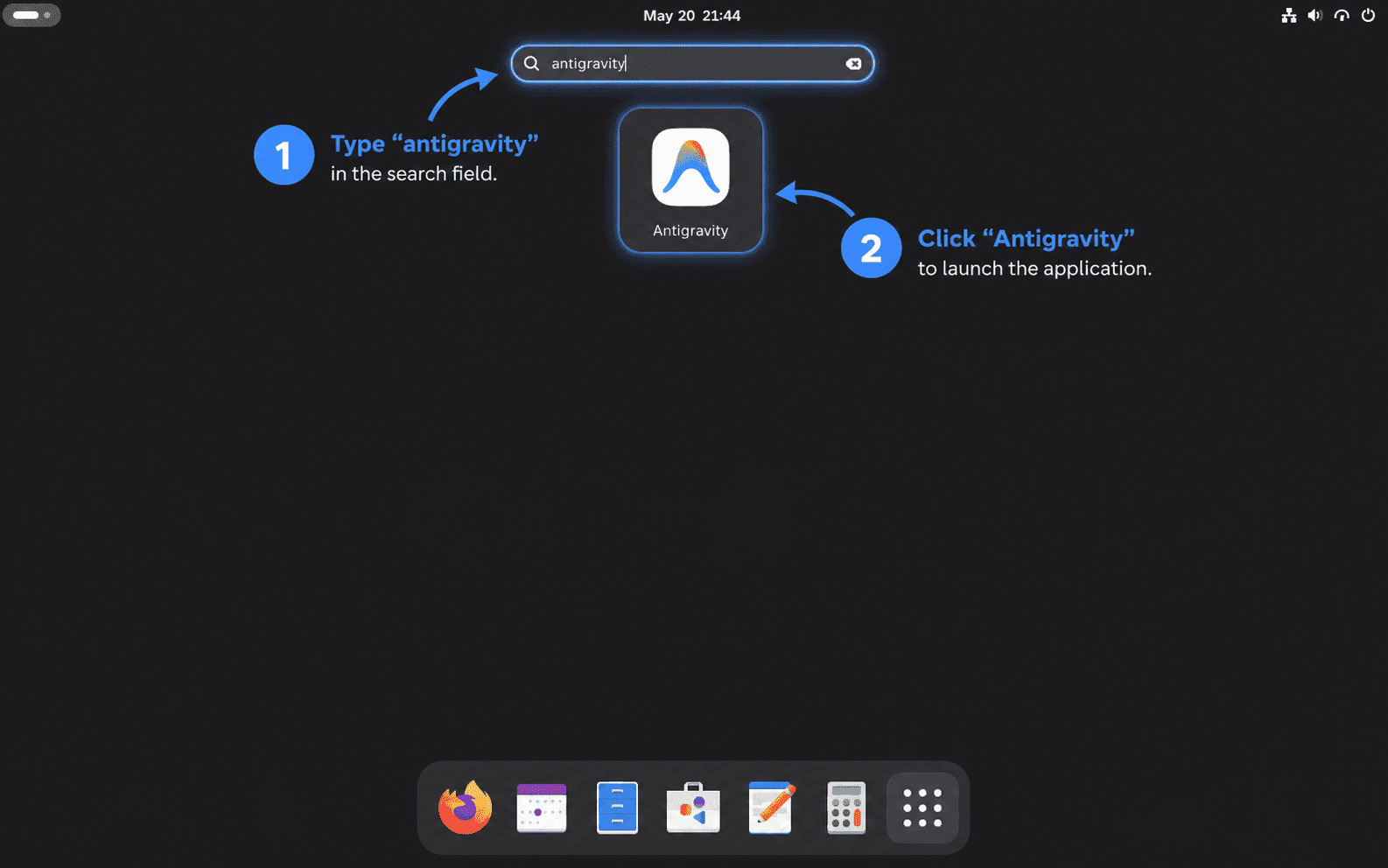
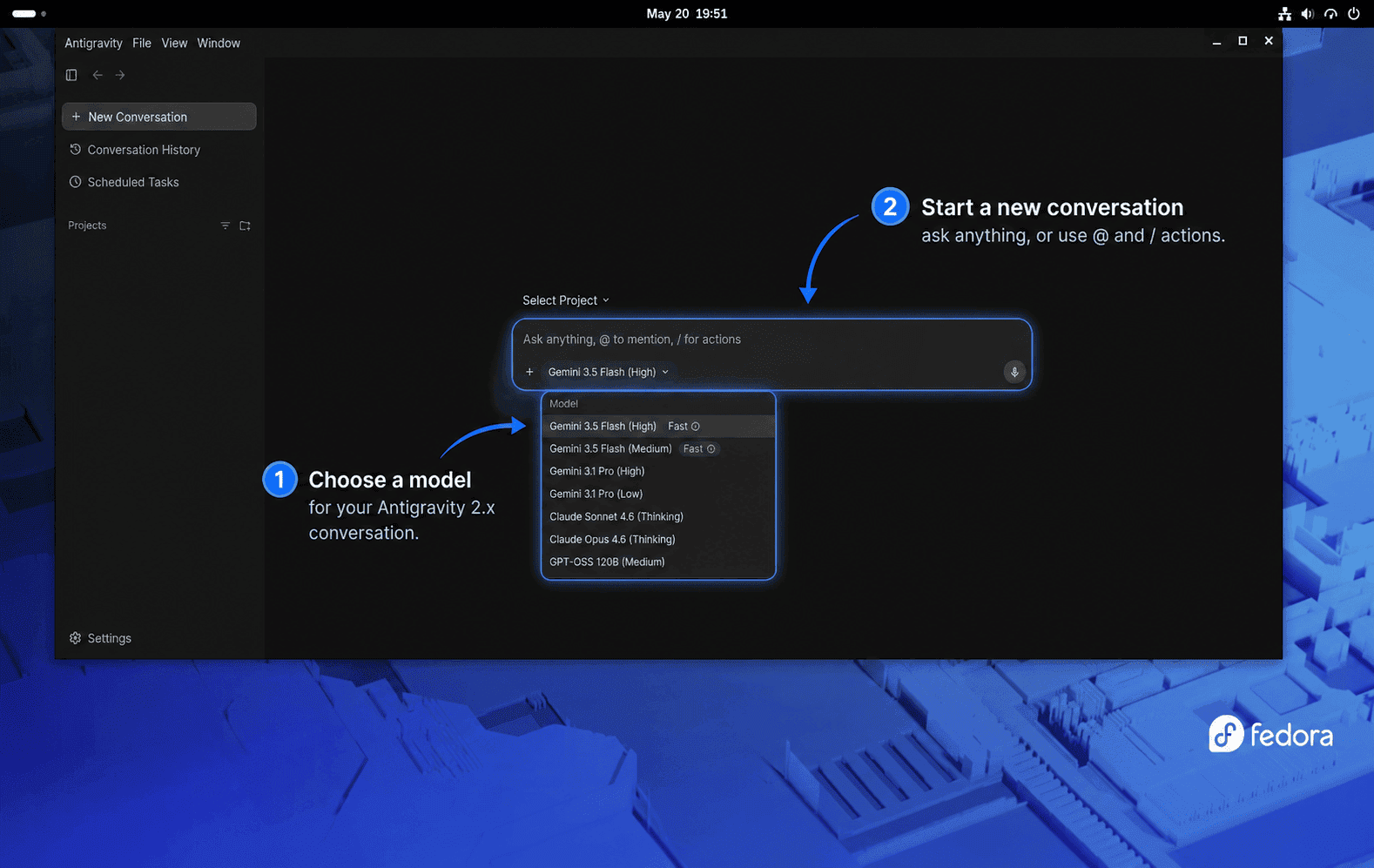
Open Antigravity IDE on Fedora
The IDE helper creates a separate Antigravity IDE launcher for editor-first work.
- Open Activities.
- Search for Antigravity IDE.
- Select the Antigravity IDE launcher to open the editor.
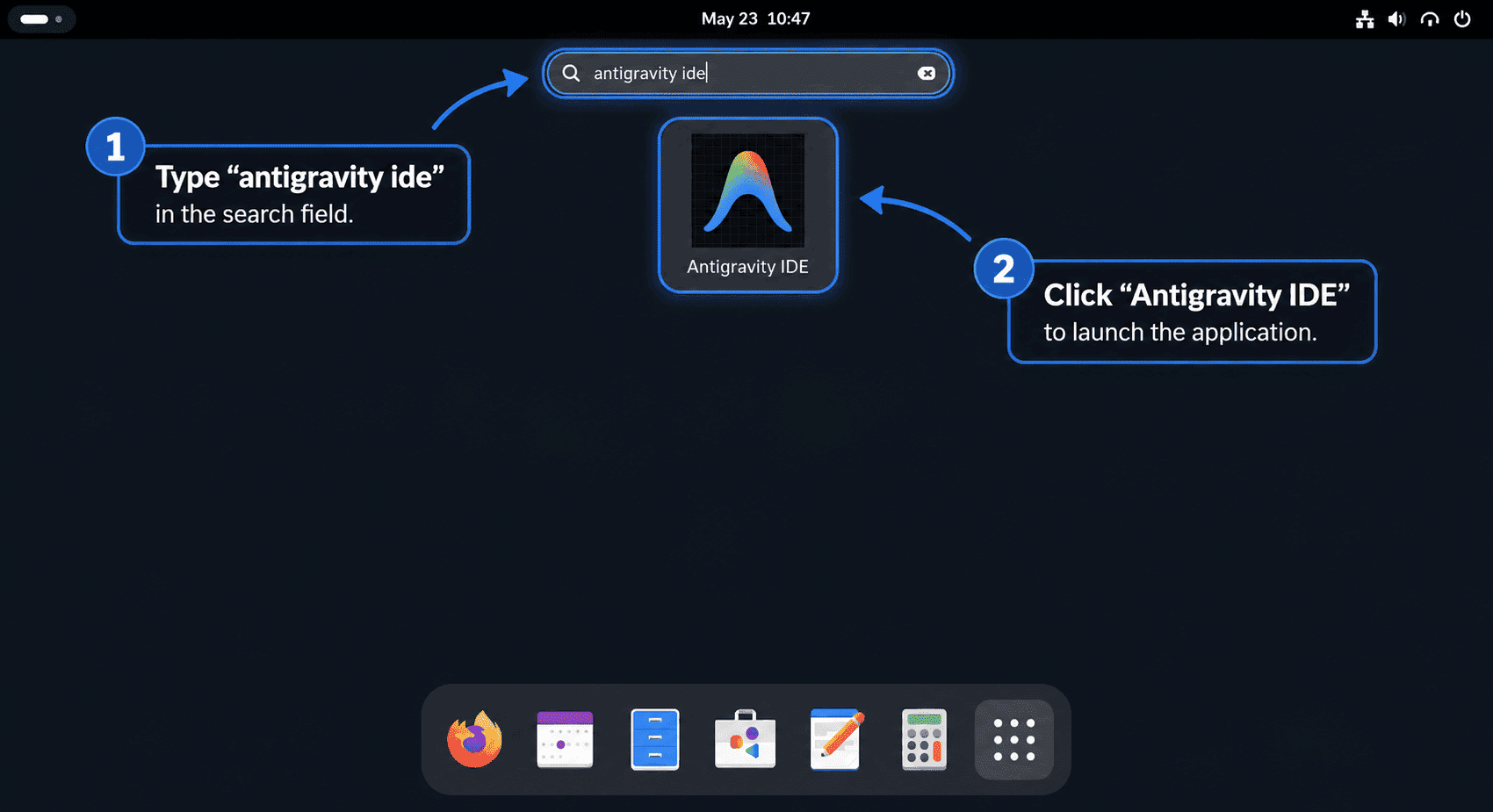
A desktop terminal can start the same IDE launcher directly:
antigravity-ideThe IDE is the right surface when you want normal file editing, tab completion, code commands, and the agent manager in one editor window. Use File > Open Folder to open a small project, select a text file, and ask the agent panel to explain it without editing. Google’s Antigravity IDE product page describes the wider editor and artifact-review workflow. Use the Antigravity 2.0 desktop app instead when you want the standalone project and scheduled-task surface.
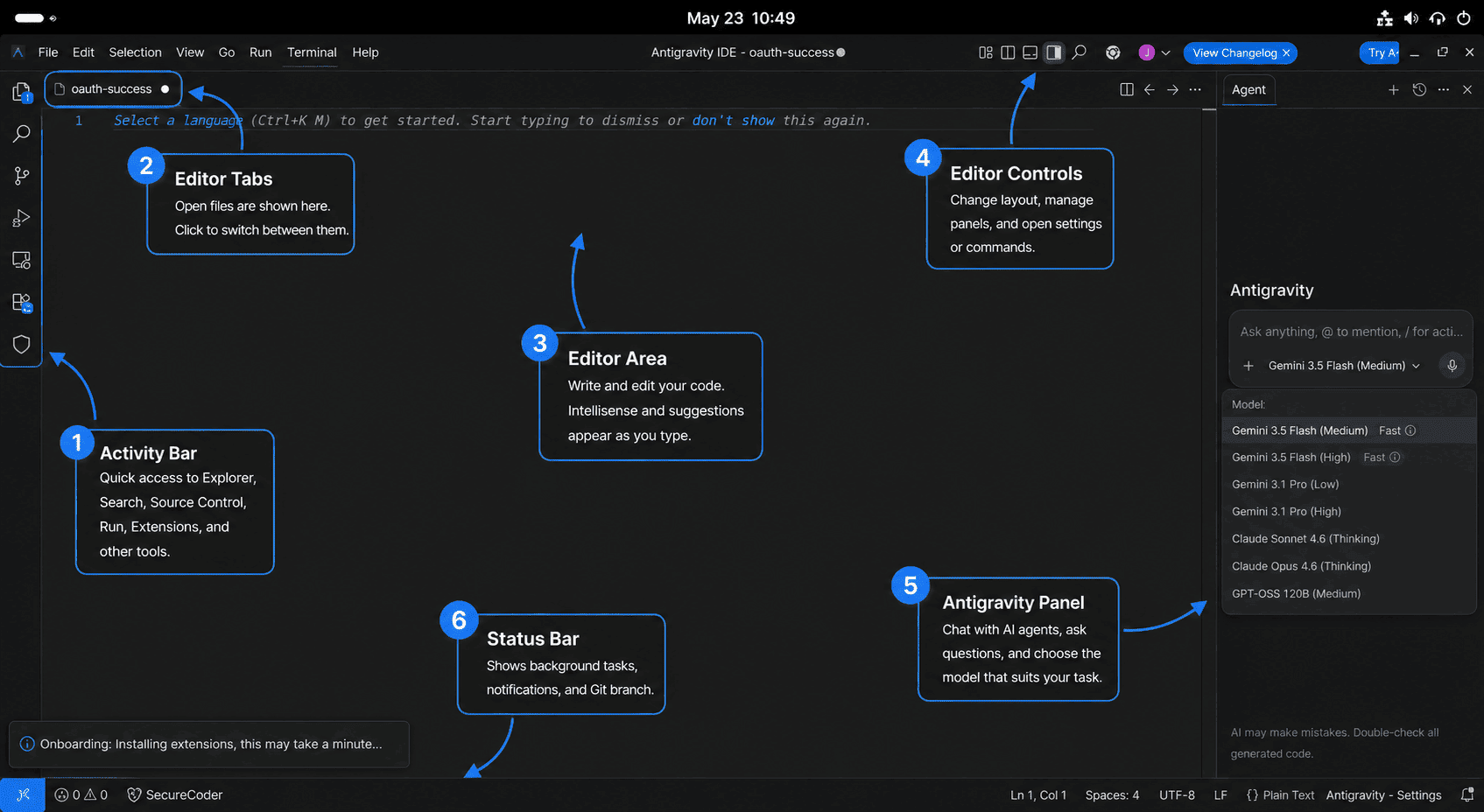
Start Antigravity CLI from a Terminal
Run agy from a project directory when you want the terminal interface. The CLI uses the current directory as the main workspace unless you add more paths with --add-dir.
agyAuthenticate Antigravity CLI on Fedora
When no saved session is available, Antigravity CLI uses a browser-backed sign-in flow. On a local Fedora desktop, agy can open the browser sign-in page. In an SSH session, it prints an authorization URL for your local browser and asks you to paste the returned code into the terminal.
To clear saved CLI credentials later, open agy and run /logout from the prompt.
Run First Antigravity CLI Commands
The CLI can run interactively or answer a single non-interactive prompt. This disposable example creates its own small project, runs one read-only prompt, and removes the demo directory when the command finishes:
(
set -euo pipefail
demo_dir=$(mktemp -d "${TMPDIR:-/tmp}/antigravity-cli-demo.XXXXXX")
trap 'rm -rf -- "$demo_dir"' EXIT
printf '%s\n' '# Antigravity CLI demo' 'A disposable read-only workspace.' >"$demo_dir/README.md"
cd "$demo_dir"
agy --print "Summarize this demo project without changing files."
)
Use --prompt-interactive when you want to seed the first message and continue the conversation in the terminal UI:
agy --prompt-interactive "Review this repository and ask before changing files."To test --add-dir without relying on placeholder paths, create two disposable folders and ask the CLI to inspect both:
(
set -euo pipefail
project_dir=$(mktemp -d "${TMPDIR:-/tmp}/antigravity-project.XXXXXX")
shared_dir=$(mktemp -d "${TMPDIR:-/tmp}/antigravity-shared.XXXXXX")
trap 'rm -rf -- "$project_dir" "$shared_dir"' EXIT
printf '%s\n' 'project file' >"$project_dir/project.txt"
printf '%s\n' 'shared file' >"$shared_dir/shared.txt"
cd "$project_dir"
agy --add-dir "$shared_dir" --prompt-interactive "Describe both files and ask before changing anything."
)
Use the sandbox flag for a session where local command execution should start from stricter containment:
agy --sandbox --print "Run a read-only project health check and report findings."Use Antigravity CLI Features
Several CLI controls are typed directly into the agy prompt. These are useful after the first launch; Google’s CLI feature documentation covers plugins, sandboxing, slash commands, and subagents in more depth.
| CLI control | Use |
|---|---|
? | Open inline help and available slash commands. |
@ | Trigger path suggestions when referencing files. |
! | Start a terminal command prompt from inside the CLI. |
/config or /settings | Open the settings panel for behavior, safety, and interface options. |
/permissions | Set how much review the agent needs before actions. |
/agents | Open the subagents panel to monitor parallel agent work. |
/tasks | Monitor, inspect, or stop background tasks. |
/skills | Browse available local and global skills. |
/mcp | Configure Model Context Protocol servers. |
/resume | Resume or switch conversations. |
/rewind | Roll back conversation history to an earlier point. |
/logout | Sign out and clear saved CLI credentials. |
If this Fedora workstation still needs Git, install Git on Fedora first, then configure Git username and email before you start cloning repositories inside Antigravity.
For Python projects, Antigravity uses the interpreter and virtual environments available in the workspace. If that toolchain is not ready yet, install Python on Fedora before opening the project folder.
Update Google Antigravity on Fedora
Update Antigravity 2.0 Desktop App
The desktop app is installed as a root-owned /opt tree. Close Antigravity, verify the saved helper, run it, and check the locally recorded release before relaunching. Use this helper rather than an in-app update prompt for the root-owned layout:
(
set -euo pipefail
command -v update-antigravity
sudo update-antigravity
cat /opt/antigravity/.linuxcapable-version
cat /opt/antigravity/.linuxcapable-release
sudo update-antigravity
)
When the desktop app is already current, the combined output resembles:
/usr/local/bin/update-antigravity
Antigravity 2.3.1 is already installed at /opt/antigravity/Antigravity-x64
2.3.1
2.3.1-5358163105546240
Antigravity 2.3.1 is already installed at /opt/antigravity/Antigravity-x64
The helper validates the current online download, stages the replacement, and retains the preceding ownership-marked payload at /opt/antigravity.previous. If the installation transaction fails, it restores that payload automatically. The second helper run is a no-op check and should report that the same version is already installed.
Update Antigravity IDE
Close Antigravity IDE before updating its root-owned /opt layout. Verify the helper, run it, inspect the recorded version, and run it a second time to prove the same-version no-op path:
(
set -euo pipefail
command -v update-antigravity-ide
sudo update-antigravity-ide
cat /opt/antigravity-ide/.linuxcapable-version
cat /opt/antigravity-ide/.linuxcapable-release
sudo update-antigravity-ide
)
When the IDE is already current, the combined output resembles:
/usr/local/bin/update-antigravity-ide
Antigravity IDE 2.1.1 is already installed at /opt/antigravity-ide/Antigravity-IDE
2.1.1
2.1.1-6123990880747520
Antigravity IDE 2.1.1 is already installed at /opt/antigravity-ide/Antigravity-IDE
The helper resolves the current online IDE release, retains the preceding ownership-marked payload at /opt/antigravity-ide.previous, and restores it automatically if the installation transaction fails. The second run should report that the same IDE version is already installed.
Update Antigravity CLI
Google documents the same installer as the supported install-or-upgrade path. Run this block from your normal Fedora account; it prechecks and backs up the marked ~/.local/bin/agy binary, prevents untracked profile or alias changes, validates the replacement, and restores the prior binary if the update fails:
(
set -euo pipefail
agy_path="$HOME/.local/bin/agy"
owner_file="$HOME/.local/share/linuxcapable/antigravity-cli.owner"
owner_id="linuxcapable-google-antigravity-cli-v1"
installer=""
binary_backup=""
update_committed=no

# shellcheck disable=SC2329
cleanup_cli_update() {
  local status=$?
  trap - EXIT HUP INT TERM
  if [ "$update_committed" != yes ] && [ -n "$binary_backup" ]; then
    if [ -L "$agy_path" ] || { [ -e "$agy_path" ] && [ ! -f "$agy_path" ]; }; then
      echo "The failed update left an unexpected path at $agy_path." >&2
      echo "The prior binary is preserved for manual recovery at $binary_backup." >&2
      binary_backup=""
      status=1
    elif mv -fT -- "$binary_backup" "$agy_path"; then
      binary_backup=""
      echo "Restored the preceding agy binary after the update failed." >&2
    else
      echo "Automatic rollback failed; the prior binary remains at $binary_backup." >&2
      binary_backup=""
      status=1
    fi
  fi
  if [ -n "$installer" ]; then rm -f -- "$installer" || status=1; fi
  if [ -n "$binary_backup" ]; then rm -f -- "$binary_backup" || status=1; fi
  exit "$status"
}

trap cleanup_cli_update EXIT
trap 'exit 129' HUP
trap 'exit 130' INT
trap 'exit 143' TERM

if [ ! -f "$owner_file" ] || [ -L "$owner_file" ] ||
  ! grep -Fqx "owner=$owner_id" "$owner_file" ||
  ! grep -Fqx "path=$agy_path" "$owner_file"; then
  echo "The LinuxCapable CLI owner record is missing or unrecognized; leave the existing command in place." >&2
  exit 1
fi
if [ ! -f "$agy_path" ] || [ -L "$agy_path" ] || [ ! -x "$agy_path" ]; then
  echo "The managed agy path is missing or has an unexpected type: $agy_path" >&2
  exit 1
fi

old_version=$("$agy_path" --version 2>/dev/null || true)
old_help=$("$agy_path" --help 2>&1 || true)
if [[ ! "$old_version" =~ ^[0-9]+\.[0-9]+\.[0-9]+$ ]] ||
  ! grep -Fq 'Usage of agy:' <<<"$old_help" ||
  ! grep -Fq 'Available subcommands:' <<<"$old_help"; then
  echo "The existing agy command did not pass its identity checks; no update was attempted." >&2
  exit 1
fi

binary_backup=$(mktemp "$HOME/.local/bin/.agy.before-update.XXXXXX")
if ! cp -p -- "$agy_path" "$binary_backup"; then
  rm -f -- "$binary_backup"
  binary_backup=""
  echo "Could not back up the existing agy binary; no update was attempted." >&2
  exit 1
fi
installer=$(mktemp "${TMPDIR:-/tmp}/antigravity-cli-installer.XXXXXX")
curl -fsSL --proto '=https' --proto-redir '=https' --retry 3 -o "$installer" https://antigravity.google/cli/install.sh
bash -n "$installer"
bash "$installer" --skip-path --skip-aliases

if [ ! -f "$agy_path" ] || [ -L "$agy_path" ] || [ ! -x "$agy_path" ]; then
  echo "The updated agy path has an unexpected type; starting rollback." >&2
  exit 1
fi
new_version=$("$agy_path" --version 2>/dev/null || true)
agy_help=$("$agy_path" --help 2>&1 || true)
if [[ ! "$new_version" =~ ^[0-9]+\.[0-9]+\.[0-9]+$ ]] ||
  ! grep -Fq 'Usage of agy:' <<<"$agy_help" ||
  ! grep -Fq 'Available subcommands:' <<<"$agy_help"; then
  echo "The updated agy command did not pass its identity checks." >&2
  exit 1
fi
update_committed=yes
rm -f -- "$binary_backup"
binary_backup=""
printf 'Antigravity CLI: %s -> %s\n' "$old_version" "$new_version"
)
The final line reports the version before and after the installer runs. Equal versions mean the installed CLI was already current; a higher second version confirms an upgrade.
Antigravity CLI: 1.1.5 -> 1.1.5
Update the Legacy Antigravity IDE RPM
DNF can update the legacy RPM if Google publishes another package to the RPM repo:
sudo dnf upgrade --refresh --from-repo=antigravity-rpm antigravityConfirm which RPM version and architecture remain installed:
rpm -q --qf '%{NAME} %{VERSION}-%{RELEASE} %{ARCH}\n' antigravityTroubleshoot Google Antigravity on Fedora
Antigravity RPM Still Shows Version 1.23.2
A 1.23.2 result can be correct for the legacy RPM even when a current tarball method is also present. Identify the installed package and the command selected by your PATH:
rpm -q --qf '%{NAME} %{VERSION}-%{RELEASE} %{ARCH}\n' antigravity
rpm -qf /usr/bin/antigravity /usr/share/applications/antigravity.desktop
command -v antigravity
readlink -f "$(command -v antigravity)"
If RPM reports 1.23.2 and the command resolves to /usr/bin/antigravity, you are using the legacy IDE as expected. If the command resolves through /usr/local/bin/antigravity, the current desktop helper is taking PATH precedence and the two conflicting methods should not remain installed together. Remove the method you do not want, then rerun the four checks. Use sudo update-antigravity for the current desktop app, sudo update-antigravity-ide for the current IDE, or rerun the repository query later if Google starts publishing 2.x RPMs.
A saved helper reports an older version is already installed
An unexpected old-version message or a repeatable parser failure usually means a saved helper still reads Google’s retired updater endpoint or hashed JavaScript bundle. Check both installed helpers:
for helper in /usr/local/bin/update-antigravity /usr/local/bin/update-antigravity-ide; do
  if sudo test -L "$helper" || { sudo test -e "$helper" && ! sudo test -f "$helper"; }; then
    printf 'Unexpected helper path: %s\n' "$helper"
  elif sudo test -f "$helper" && sudo grep -Fq 'antigravity-auto-updater-974169037036' "$helper"; then
    printf 'Legacy endpoint helper requires the backup step: %s\n' "$helper"
  elif sudo test -f "$helper" && sudo grep -Eq 'download_js=|main-\[\^"\]' "$helper"; then
    printf 'Hashed-JavaScript resolver can be replaced by the setup block: %s\n' "$helper"
  elif sudo test -f "$helper"; then
    printf 'No obsolete resolver fingerprint found: %s\n' "$helper"
  else
    printf 'Helper is not installed: %s\n' "$helper"
  fi
done
If the desktop helper reports the legacy endpoint, preserve that exact older file at a non-command backup path before recreating it:
(
set -euo pipefail
old_helper="/usr/local/bin/update-antigravity"
old_backup="/usr/local/bin/update-antigravity.auto-updater-backup"

if sudo test -L "$old_helper" || { sudo test -e "$old_helper" && ! sudo test -f "$old_helper"; }; then
  echo "Refusing unexpected helper path: $old_helper" >&2
  exit 1
elif sudo test -e "$old_backup" || sudo test -L "$old_backup"; then
  echo "Move the existing backup before continuing: $old_backup" >&2
  exit 1
elif sudo test -f "$old_helper" &&
  sudo grep -Fqx '#!/usr/bin/env bash' "$old_helper" &&
  sudo grep -Fq 'antigravity-auto-updater-974169037036' "$old_helper" &&
  sudo grep -Fqx 'install_root="/opt/antigravity"' "$old_helper"; then
  sudo mv -- "$old_helper" "$old_backup"
  echo "Saved the legacy endpoint helper at $old_backup"
else
  echo "The desktop helper does not match the legacy LinuxCapable fingerprint; leave it in place for manual review." >&2
  exit 1
fi
)
A hashed-JavaScript helper already carries the recognized LinuxCapable marker, so its setup block can replace it directly. Recreate each affected helper from the matching install section, then run sudo update-antigravity or sudo update-antigravity-ide twice: the first run installs the current release, and the second must report that the same version is already installed. Keep the preserved endpoint backup until both desktop runs pass; the desktop removal block deletes that recognized backup later.
Desktop or IDE Helper Fails with a Download or 404 Error
A download 404 usually means Google’s download page changed or an old helper built an invalid URL. Check whether the page still exposes the allowlisted desktop and IDE tarball anchors:
(
set -euo pipefail
download_html=$(curl -fsSL --proto '=https' --proto-redir '=https' --compressed https://antigravity.google/download)
if download_urls=$(
  printf '%s' "$download_html" |
    grep -Eo 'https://storage\.googleapis\.com/antigravity-public/antigravity-hub/[0-9]+\.[0-9]+\.[0-9]+-[0-9]+/(linux-x64|linux-arm)/Antigravity\.tar\.gz|https://edgedl\.me\.gvt1\.com/edgedl/release2/j0qc3/antigravity/stable/[0-9]+\.[0-9]+\.[0-9]+-[0-9]+/(linux-x64|linux-arm)/Antigravity%20IDE\.tar\.gz' |
    sort -u
); then
  printf '%s\n' "$download_urls"
else
  grep_status=$?
  if [ "$grep_status" -eq 1 ]; then
    echo "No allowlisted Antigravity desktop or IDE URLs were found."
  else
    exit "$grep_status"
  fi
fi
)
If the command prints the desktop and IDE URLs, recreate the affected helper and rerun its update command. If it reports that no allowlisted URLs were found, check Google’s download page, release notes, and support resources before retrying.
Troubleshoot a Black or Frozen Antigravity Window
Inspect the User Journal
Inspect the user journal before applying a rendering workaround. This separates GPU or display errors from authentication, profile, permission, or other startup failures. The journalctl command guide explains broader filtering and boot selection when the short check is not enough.
(
set -euo pipefail
if ! journal_output=$(journalctl --user --no-pager -n 300); then
  echo "Could not read the user journal." >&2
  exit 1
fi
if ! grep -i antigravity <<<"$journal_output"; then
  echo "No Antigravity messages found"
fi
)
Test One Affected Product
If the log specifically names GPU, VA-API, or rendering failures, run only the command for the affected product from a desktop terminal. Test the desktop app with:
antigravity --disable-gpuTest the IDE separately with:
antigravity-ide --disable-gpuOn Wayland, test an Xwayland fallback only if the matching GPU-disabled command still fails. For the desktop app, run:
ELECTRON_OZONE_PLATFORM_HINT=x11 antigravity --disable-gpuFor the IDE, run:
ELECTRON_OZONE_PLATFORM_HINT=x11 antigravity-ide --disable-gpuCreate a Separate X11 Fallback Launcher
Keep the normal launchers unchanged until a workaround succeeds in the affected desktop session. If the desktop app command works, create a separate fallback launcher:
sudo bash <<'EOF'
set -euo pipefail

source_file="/usr/share/applications/antigravity.desktop"
fallback_file="/usr/share/applications/antigravity-x11.desktop"
owner_line="X-LinuxCapable-Owner=linuxcapable-google-antigravity-desktop-v1"
stage_file=""

cleanup_stage() {
	local status=$?
	trap - EXIT HUP INT TERM
	if [ -n "$stage_file" ]; then rm -f -- "$stage_file"; fi
	exit "$status"
}
trap cleanup_stage EXIT
trap 'exit 129' HUP
trap 'exit 130' INT
trap 'exit 143' TERM

exec 9>/run/lock/linuxcapable-antigravity-desktop.lock
flock -n 9 || { echo "The Antigravity desktop helper or removal command is already running." >&2; exit 1; }

if [ ! -f "$source_file" ] || [ -L "$source_file" ] || ! grep -Fqx "$owner_line" "$source_file"; then
	echo "The LinuxCapable-managed desktop launcher is missing or unrecognized." >&2
	exit 1
fi
if [ -L "$fallback_file" ] || { [ -e "$fallback_file" ] && [ ! -f "$fallback_file" ]; }; then
	echo "Refusing unexpected fallback path: $fallback_file" >&2
	exit 1
elif [ -f "$fallback_file" ] && ! grep -Fqx "$owner_line" "$fallback_file"; then
	echo "Refusing to replace an unmarked fallback launcher: $fallback_file" >&2
	exit 1
fi

stage_file=$(mktemp --suffix=.desktop /usr/share/applications/.antigravity-x11.XXXXXX)
install -o root -g root -m 0644 -- "$source_file" "$stage_file"
sed -i \
  -e 's/^Name=.*/Name=Antigravity (X11 fallback)/' \
  -e 's#^Exec=.*#Exec=env ELECTRON_OZONE_PLATFORM_HINT=x11 /usr/local/bin/antigravity --disable-gpu %U#' \
  "$stage_file"
desktop-file-validate "$stage_file"
mv -fT -- "$stage_file" "$fallback_file"
stage_file=""
if command -v restorecon >/dev/null 2>&1; then restorecon "$fallback_file"; fi
update-desktop-database /usr/share/applications
EOF
If the IDE command works with the same fallback, create a separate IDE fallback launcher:
sudo bash <<'EOF'
set -euo pipefail

source_file="/usr/share/applications/antigravity-ide.desktop"
fallback_file="/usr/share/applications/antigravity-ide-x11.desktop"
owner_line="X-LinuxCapable-Owner=linuxcapable-google-antigravity-ide-v1"
stage_file=""

cleanup_stage() {
	local status=$?
	trap - EXIT HUP INT TERM
	if [ -n "$stage_file" ]; then rm -f -- "$stage_file"; fi
	exit "$status"
}
trap cleanup_stage EXIT
trap 'exit 129' HUP
trap 'exit 130' INT
trap 'exit 143' TERM

exec 9>/run/lock/linuxcapable-antigravity-ide.lock
flock -n 9 || { echo "The Antigravity IDE helper or removal command is already running." >&2; exit 1; }

if [ ! -f "$source_file" ] || [ -L "$source_file" ] || ! grep -Fqx "$owner_line" "$source_file"; then
	echo "The LinuxCapable-managed IDE launcher is missing or unrecognized." >&2
	exit 1
fi
if [ -L "$fallback_file" ] || { [ -e "$fallback_file" ] && [ ! -f "$fallback_file" ]; }; then
	echo "Refusing unexpected fallback path: $fallback_file" >&2
	exit 1
elif [ -f "$fallback_file" ] && ! grep -Fqx "$owner_line" "$fallback_file"; then
	echo "Refusing to replace an unmarked fallback launcher: $fallback_file" >&2
	exit 1
fi

stage_file=$(mktemp --suffix=.desktop /usr/share/applications/.antigravity-ide-x11.XXXXXX)
install -o root -g root -m 0644 -- "$source_file" "$stage_file"
sed -i \
  -e 's/^Name=.*/Name=Antigravity IDE (X11 fallback)/' \
  -e 's#^Exec=.*#Exec=env ELECTRON_OZONE_PLATFORM_HINT=x11 /usr/local/bin/antigravity-ide --disable-gpu %U#' \
  "$stage_file"
desktop-file-validate "$stage_file"
mv -fT -- "$stage_file" "$fallback_file"
stage_file=""
if command -v restorecon >/dev/null 2>&1; then restorecon "$fallback_file"; fi
update-desktop-database /usr/share/applications
EOF
Remove the X11 Fallback Launchers
Remove the fallback launchers later if a Google update or Fedora graphics update fixes the black window:
sudo bash <<'EOF'
set -euo pipefail

desktop_fallback="/usr/share/applications/antigravity-x11.desktop"
ide_fallback="/usr/share/applications/antigravity-ide-x11.desktop"

exec 9>/run/lock/linuxcapable-antigravity-desktop.lock
flock -n 9 || { echo "The Antigravity desktop helper or removal command is already running." >&2; exit 1; }
exec 8>/run/lock/linuxcapable-antigravity-ide.lock
flock -n 8 || { echo "The Antigravity IDE helper or removal command is already running." >&2; exit 1; }

check_fallback() {
	local path=$1
	local owner_line=$2
	if [ -L "$path" ] || { [ -e "$path" ] && [ ! -f "$path" ]; }; then
		echo "Refusing unexpected fallback path: $path" >&2
		return 1
	fi
	if [ -f "$path" ] && ! grep -Fqx "$owner_line" "$path"; then
		echo "Refusing to remove an unmarked fallback launcher: $path" >&2
		return 1
	fi
}

check_fallback "$desktop_fallback" "X-LinuxCapable-Owner=linuxcapable-google-antigravity-desktop-v1"
check_fallback "$ide_fallback" "X-LinuxCapable-Owner=linuxcapable-google-antigravity-ide-v1"
rm -f -- "$desktop_fallback" "$ide_fallback"
update-desktop-database /usr/share/applications
EOF
Fix a SIGILL Language-Server Crash
On x86_64 systems, a language server that exits with SIGILL or status 132 points to an unavailable CPU instruction rather than a graphics failure. Check the CPU features exposed to Fedora before changing SELinux, sandbox, or GPU settings:
for flag in aes sse4_1 sse4_2; do
  if grep -qw "$flag" /proc/cpuinfo; then
    printf '%-7s available\n' "$flag"
  else
    printf '%-7s MISSING\n' "$flag"
  fi
done
If aes is missing in a virtual machine, expose AES-NI through a compatible virtual CPU model when the host supports it. A physical CPU without AES-NI needs compatible hardware; reinstalling Fedora cannot add the instruction. If all three flags are present, update the affected Antigravity product and collect the exact product version, CPU model, and journal error before trying another fix. Do not apply the generic Go setting GODEBUG=cpu.aes=off unless Google confirms it for the affected binary.
Check SELinux Labels for Desktop and IDE Paths
A normal helper install should not need a custom SELinux policy after Fedora labels the copied files correctly. If you edited a helper, copied files manually, or moved Antigravity to a different prefix, restore and inspect only the paths that exist:
(
set -euo pipefail
antigravity_paths=(
  /opt/antigravity
  /opt/antigravity-ide
  /usr/local/bin/antigravity
  /usr/local/bin/antigravity-ide
  /usr/share/applications/antigravity.desktop
  /usr/share/applications/antigravity-ide.desktop
  /usr/share/icons/hicolor/512x512/apps/antigravity.png
  /usr/share/icons/hicolor/512x512/apps/antigravity-ide.png
)
existing_paths=()
for path in "${antigravity_paths[@]}"; do
  if [ -e "$path" ] || [ -L "$path" ]; then
    if [ -d "$path" ] && [ ! -L "$path" ]; then
      sudo restorecon -R -- "$path"
    else
      sudo restorecon -- "$path"
    fi
    existing_paths+=("$path")
  fi
done

if [ "${#existing_paths[@]}" -eq 0 ]; then
  echo "No Antigravity desktop or IDE paths are installed"
else
  ls -Zd -- "${existing_paths[@]}"
fi
)
With both graphical methods installed, the label check should show each application path with the expected context types. A single-method installation shows only its own paths. Fedora should show normal user and binary contexts, not temporary extraction contexts from /tmp:
unconfined_u:object_r:usr_t:s0 /opt/antigravity
unconfined_u:object_r:usr_t:s0 /opt/antigravity-ide
unconfined_u:object_r:bin_t:s0 /usr/local/bin/antigravity
unconfined_u:object_r:bin_t:s0 /usr/local/bin/antigravity-ide
unconfined_u:object_r:usr_t:s0 /usr/share/applications/antigravity.desktop
unconfined_u:object_r:usr_t:s0 /usr/share/applications/antigravity-ide.desktop
system_u:object_r:usr_t:s0 /usr/share/icons/hicolor/512x512/apps/antigravity.png
system_u:object_r:usr_t:s0 /usr/share/icons/hicolor/512x512/apps/antigravity-ide.png
Refresh a Missing Antigravity Icon
If Activities shows a generic icon, confirm that Fedora’s hicolor theme advertises the installed directory and that the matching PNG exists, then refresh both desktop caches:
sed -n 's/^Directories=//p' /usr/share/icons/hicolor/index.theme | tr ',' '\n' | grep -Fx '512x512/apps'
ls -l /usr/share/icons/hicolor/512x512/apps/antigravity*.png
sudo update-desktop-database /usr/share/applications
sudo gtk-update-icon-cache -q /usr/share/icons/hicolor
Fix agy Command Not Found
The CLI installer writes agy to ~/.local/bin. Open a new terminal first. If Bash still cannot find it, add one guarded PATH entry to ~/.bashrc and retest from a fresh Bash whose inherited PATH does not already contain that directory:
(
set -euo pipefail
bashrc="$HOME/.bashrc"
path_marker='# LinuxCapable Antigravity CLI PATH'
path_line='export PATH="$HOME/.local/bin:$PATH"'
if [ -L "$bashrc" ] || { [ -e "$bashrc" ] && [ ! -f "$bashrc" ]; }; then
  echo "Unexpected Bash profile path: $bashrc" >&2
  exit 1
fi
if ! grep -Fqx "$path_line" "$bashrc" 2>/dev/null; then
  if grep -Fqx "$path_marker" "$bashrc" 2>/dev/null; then
    echo "The LinuxCapable PATH marker already exists without its expected line; review $bashrc manually." >&2
    exit 1
  fi
  printf '\n%s\n%s\n' "$path_marker" "$path_line" >>"$bashrc"
fi
fresh_output=""
if ! fresh_output=$(
  PATH=/usr/bin:/bin bash --noprofile --rcfile "$bashrc" -ic '
    resolved_agy=$(command -v agy || true)
    if [ "$resolved_agy" != "$HOME/.local/bin/agy" ]; then
      echo "A fresh Bash did not select $HOME/.local/bin/agy." >&2
      exit 1
    fi
    printf "%s\n" "$resolved_agy"
    agy --version
  '
); then
  echo "Fresh-shell CLI verification failed; review the Bash profile and any agy alias or function." >&2
  exit 1
fi
printf '%s\n' "$fresh_output"
)
Fix Sign-In Opening in a Text Editor
If an Antigravity sign-in URL opens as raw HTML in a text editor, inspect the user-level HTTP and HTML handlers instead of changing Antigravity authentication:
(
set -euo pipefail
for mime_type in x-scheme-handler/http x-scheme-handler/https text/html application/xhtml+xml application/xml text/xml; do
  printf '\n%s\n' "$mime_type"
  xdg-mime query default "$mime_type"
  gio mime "$mime_type" | sed -n '1,3p'
done
)
Each result should identify the desktop file for your intended browser. If an editor is registered instead, open Settings > Apps > Default Apps, choose the browser for Web, rerun the checks, and restart the affected Antigravity surface.
Fix Antigravity CLI Sign-In on SSH
If agy cannot open a browser from an SSH session, use the authorization URL it prints in the terminal. Open that URL in a local browser, sign in, then paste the returned code back into the SSH terminal when the CLI asks for it.
Handle Legacy RPM Signature Verification Errors
Do not change a local
gpgcheck=1policy to suppress this error. The upstream legacy RPM is unsigned; use a current tarball or CLI method when package signature verification is required. There is no signing key to import for the current 1.23.2 package.
Remove Google Antigravity from Fedora
Remove Antigravity 2.0 Desktop App
Close Antigravity first. This removal block deletes only paths carrying the helper’s ownership marker or an exact managed target. It stops without deleting anything if an unmanaged collision is present:
if (
set -e
sudo bash <<'EOF'
set -euo pipefail
(

install_root="/opt/antigravity"
previous_root="${install_root}.previous"
command_link="/usr/local/bin/antigravity"
helper_file="/usr/local/bin/update-antigravity"
legacy_helper_backup="/usr/local/bin/update-antigravity.auto-updater-backup"
desktop_file="/usr/share/applications/antigravity.desktop"
fallback_file="/usr/share/applications/antigravity-x11.desktop"
icon_file="/usr/share/icons/hicolor/512x512/apps/antigravity.png"
old_icon_file="/usr/share/icons/hicolor/scalable/apps/antigravity.svg"
owner_id="linuxcapable-google-antigravity-desktop-v1"

exec 9>/run/lock/linuxcapable-antigravity-desktop.lock
if ! flock -n 9; then
  echo "The Antigravity desktop helper or another removal command is already running." >&2
  exit 1
fi

path_exists() { [ -e "$1" ] || [ -L "$1" ]; }
managed_root() {
  [ -d "$1" ] && [ ! -L "$1" ] &&
    [ -f "$1/.linuxcapable-owner" ] && [ ! -L "$1/.linuxcapable-owner" ] &&
    [ "$(cat "$1/.linuxcapable-owner")" = "$owner_id" ] &&
    [ -f "$1/.linuxcapable-version" ] && [ ! -L "$1/.linuxcapable-version" ] &&
    { ! path_exists "$1/.linuxcapable-release" ||
      { [ -f "$1/.linuxcapable-release" ] && [ ! -L "$1/.linuxcapable-release" ]; }; }
}
managed_desktop() {
  [ -f "$1" ] && [ ! -L "$1" ] &&
    grep -Fqx "X-LinuxCapable-Owner=$owner_id" "$1"
}

managed_evidence=no
for root in "$install_root" "$previous_root"; do
  if path_exists "$root"; then
    if path_exists "$root/.linuxcapable-transaction"; then
      echo "Refusing to remove a root with an unfinished transaction marker: $root" >&2
      exit 1
    fi
    if ! managed_root "$root"; then
      echo "Refusing to remove unmarked path: $root" >&2
      exit 1
    fi
    managed_evidence=yes
  fi
done

if path_exists "$command_link"; then
  if [ ! -L "$command_link" ]; then
    echo "Refusing to remove non-symlink: $command_link" >&2
    exit 1
  fi
  case "$(readlink "$command_link")" in
  "$install_root/Antigravity-x64/antigravity" | "$install_root/Antigravity-arm64/antigravity") ;;
  *) echo "Refusing to remove unmanaged link: $command_link" >&2; exit 1 ;;
  esac
fi

for launcher in "$desktop_file" "$fallback_file"; do
  if path_exists "$launcher"; then
    if ! managed_desktop "$launcher"; then
      echo "Refusing to remove unmarked desktop file: $launcher" >&2
      exit 1
    fi
    managed_evidence=yes
  fi
done

if path_exists "$helper_file" && { [ ! -f "$helper_file" ] || [ -L "$helper_file" ] || ! grep -Fqx '# LinuxCapable owner: linuxcapable-google-antigravity-desktop-helper-v1' "$helper_file"; }; then
  echo "Refusing to remove unmarked helper: $helper_file" >&2
  exit 1
fi

if path_exists "$legacy_helper_backup"; then
  if [ ! -f "$legacy_helper_backup" ] || [ -L "$legacy_helper_backup" ] ||
    ! grep -Fqx '#!/usr/bin/env bash' "$legacy_helper_backup" ||
    ! grep -Fq 'antigravity-auto-updater-974169037036' "$legacy_helper_backup" ||
    ! grep -Fqx 'install_root="/opt/antigravity"' "$legacy_helper_backup"; then
    echo "Refusing to remove unrecognized helper backup: $legacy_helper_backup" >&2
    exit 1
  fi
fi

for icon in "$icon_file" "$old_icon_file"; do
  if path_exists "$icon" && { [ ! -f "$icon" ] || [ -L "$icon" ] || [ "$managed_evidence" != yes ]; }; then
    echo "Refusing to remove unproven icon: $icon" >&2
    exit 1
  fi
done

rm -f -- "$command_link" "$helper_file" "$legacy_helper_backup" "$desktop_file" "$fallback_file" "$icon_file" "$old_icon_file"
for root in "$install_root" "$previous_root"; do
  if managed_root "$root"; then rm -rf -- "$root"; fi
done

if command -v update-desktop-database >/dev/null 2>&1; then
  update-desktop-database /usr/share/applications >/dev/null
fi
if command -v gtk-update-icon-cache >/dev/null 2>&1; then
  gtk-update-icon-cache -q /usr/share/icons/hicolor >/dev/null
fi

for path in "$install_root" "$previous_root" "$command_link" "$helper_file" "$legacy_helper_backup" "$desktop_file" "$fallback_file" "$icon_file" "$old_icon_file"; do
  if path_exists "$path"; then echo "Removal check failed: $path" >&2; exit 1; fi
done
echo "Antigravity 2.0 LinuxCapable-managed files are removed"
)
EOF
hash -r
); then
  hash -r
else
  hash -r
  false
fi
Remove Antigravity IDE
Close Antigravity IDE first. Use the matching ownership checks for the current IDE, its marked rollback, launcher, helper, and icon:
if (
set -e
sudo bash <<'EOF'
set -euo pipefail
(

install_root="/opt/antigravity-ide"
previous_root="${install_root}.previous"
command_link="/usr/local/bin/antigravity-ide"
helper_file="/usr/local/bin/update-antigravity-ide"
desktop_file="/usr/share/applications/antigravity-ide.desktop"
fallback_file="/usr/share/applications/antigravity-ide-x11.desktop"
icon_file="/usr/share/icons/hicolor/512x512/apps/antigravity-ide.png"
owner_id="linuxcapable-google-antigravity-ide-v1"

exec 9>/run/lock/linuxcapable-antigravity-ide.lock
if ! flock -n 9; then
  echo "The Antigravity IDE helper or another removal command is already running." >&2
  exit 1
fi

path_exists() { [ -e "$1" ] || [ -L "$1" ]; }
managed_root() {
  [ -d "$1" ] && [ ! -L "$1" ] &&
    [ -f "$1/.linuxcapable-owner" ] && [ ! -L "$1/.linuxcapable-owner" ] &&
    [ "$(cat "$1/.linuxcapable-owner")" = "$owner_id" ] &&
    [ -f "$1/.linuxcapable-version" ] && [ ! -L "$1/.linuxcapable-version" ] &&
    { ! path_exists "$1/.linuxcapable-release" ||
      { [ -f "$1/.linuxcapable-release" ] && [ ! -L "$1/.linuxcapable-release" ]; }; }
}
managed_desktop() {
  [ -f "$1" ] && [ ! -L "$1" ] &&
    grep -Fqx "X-LinuxCapable-Owner=$owner_id" "$1"
}

managed_evidence=no
for root in "$install_root" "$previous_root"; do
  if path_exists "$root"; then
    if path_exists "$root/.linuxcapable-transaction"; then
      echo "Refusing to remove a root with an unfinished transaction marker: $root" >&2
      exit 1
    fi
    if ! managed_root "$root"; then
      echo "Refusing to remove unmarked path: $root" >&2
      exit 1
    fi
    managed_evidence=yes
  fi
done

if path_exists "$command_link"; then
  if [ ! -L "$command_link" ] || [ "$(readlink "$command_link")" != "$install_root/Antigravity-IDE/antigravity-ide" ]; then
    echo "Refusing to remove unmanaged command path: $command_link" >&2
    exit 1
  fi
fi

for launcher in "$desktop_file" "$fallback_file"; do
  if path_exists "$launcher"; then
    if ! managed_desktop "$launcher"; then
      echo "Refusing to remove unmarked desktop file: $launcher" >&2
      exit 1
    fi
    managed_evidence=yes
  fi
done

if path_exists "$helper_file" && { [ ! -f "$helper_file" ] || [ -L "$helper_file" ] || ! grep -Fqx '# LinuxCapable owner: linuxcapable-google-antigravity-ide-helper-v1' "$helper_file"; }; then
  echo "Refusing to remove unmarked helper: $helper_file" >&2
  exit 1
fi

if path_exists "$icon_file" && { [ ! -f "$icon_file" ] || [ -L "$icon_file" ] || [ "$managed_evidence" != yes ]; }; then
  echo "Refusing to remove unproven icon: $icon_file" >&2
  exit 1
fi

rm -f -- "$command_link" "$helper_file" "$desktop_file" "$fallback_file" "$icon_file"
for root in "$install_root" "$previous_root"; do
  if managed_root "$root"; then rm -rf -- "$root"; fi
done

if command -v update-desktop-database >/dev/null 2>&1; then
  update-desktop-database /usr/share/applications >/dev/null
fi
if command -v gtk-update-icon-cache >/dev/null 2>&1; then
  gtk-update-icon-cache -q /usr/share/icons/hicolor >/dev/null
fi

for path in "$install_root" "$previous_root" "$command_link" "$helper_file" "$desktop_file" "$fallback_file" "$icon_file"; do
  if path_exists "$path"; then echo "Removal check failed: $path" >&2; exit 1; fi
done
echo "Antigravity IDE LinuxCapable-managed files are removed"
)
EOF
hash -r
); then
  hash -r
else
  hash -r
  false
fi
Remove Antigravity CLI
Open agy, run /logout, and exit the CLI before removing its binary. This clears the saved authentication session through the application instead of guessing at credential files.
agyAt the agy prompt, enter /logout, wait for confirmation, and exit the CLI.
Then remove agy only when its owner record, expected path, executable shape, and Antigravity CLI help signature all match. The compatibility check also removes the earlier LinuxCapable CLI update helper only when its recognized installer-and-update fingerprint matches:
if (
set -u

agy_path="$HOME/.local/bin/agy"
owner_dir="$HOME/.local/share/linuxcapable"
owner_file="$owner_dir/antigravity-cli.owner"
owner_id="linuxcapable-google-antigravity-cli-v1"
legacy_helper="$HOME/.local/bin/update-antigravity-cli"
owner_valid=no
owner_dir_valid=yes
removal_ok=yes

path_exists() { [ -e "$1" ] || [ -L "$1" ]; }

if [ -L "$owner_dir" ] || { [ -e "$owner_dir" ] && [ ! -d "$owner_dir" ]; }; then
  echo "Refusing unexpected owner directory: $owner_dir" >&2
  owner_dir_valid=no
  removal_ok=no
fi

if [ "$owner_dir_valid" = yes ]; then
  if [ -L "$owner_file" ] || { [ -e "$owner_file" ] && [ ! -f "$owner_file" ]; }; then
    echo "Refusing unexpected owner-record path: $owner_file" >&2
    removal_ok=no
  elif [ -f "$owner_file" ]; then
    if grep -Fqx "owner=$owner_id" "$owner_file" &&
      grep -Fqx "path=$agy_path" "$owner_file"; then
      owner_valid=yes
    else
      echo "Refusing unrecognized owner record: $owner_file" >&2
      removal_ok=no
    fi
  fi
fi

if [ -e "$agy_path" ] || [ -L "$agy_path" ]; then
  if [ "$owner_valid" != yes ]; then
    echo "Refusing to remove $agy_path without its valid LinuxCapable owner record." >&2
    removal_ok=no
  elif [ ! -f "$agy_path" ] || [ -L "$agy_path" ] || [ ! -x "$agy_path" ]; then
    echo "Refusing to remove unexpected CLI path: $agy_path" >&2
    removal_ok=no
  elif ! agy_help=$("$agy_path" --help 2>&1); then
    echo "Refusing to remove a CLI whose help check fails: $agy_path" >&2
    removal_ok=no
  elif ! grep -Fq 'Usage of agy:' <<<"$agy_help" ||
    ! grep -Fq 'Available subcommands:' <<<"$agy_help"; then
    echo "Refusing to remove a CLI with an unexpected help signature: $agy_path" >&2
    removal_ok=no
  else
    if ! rm -f -- "$agy_path" "$owner_file"; then
      echo "Managed CLI deletion failed." >&2
      removal_ok=no
    elif path_exists "$agy_path" || path_exists "$owner_file"; then
      echo "Managed CLI removal is incomplete." >&2
      removal_ok=no
    else
      rmdir -- "$owner_dir" 2>/dev/null || true
    fi
  fi
elif [ "$owner_valid" = yes ]; then
  if ! rm -f -- "$owner_file" || path_exists "$owner_file"; then
    echo "The stale owner record could not be removed: $owner_file" >&2
    removal_ok=no
  else
    rmdir -- "$owner_dir" 2>/dev/null || true
  fi
fi

if [ "$removal_ok" = yes ]; then
  if [ -L "$legacy_helper" ] || { [ -e "$legacy_helper" ] && [ ! -f "$legacy_helper" ]; }; then
    echo "Leaving unrelated path in place: $legacy_helper" >&2
  elif [ -f "$legacy_helper" ]; then
    # Match the literal command text in the previously published helper.
    # shellcheck disable=SC2016
    if grep -Fqx '#!/usr/bin/env bash' "$legacy_helper" &&
      grep -Fq 'https://antigravity.google/cli/install.sh' "$legacy_helper" &&
      grep -Fq '"$HOME/.local/bin/agy" update' "$legacy_helper"; then
      if ! rm -f -- "$legacy_helper" || path_exists "$legacy_helper"; then
        echo "The recognized compatibility helper could not be removed: $legacy_helper" >&2
        removal_ok=no
      fi
    else
      echo "Leaving unrecognized helper in place: $legacy_helper" >&2
    fi
  fi
fi

hash -r
resolved_agy=$(command -v agy 2>/dev/null || true)
if [ "$resolved_agy" = "$agy_path" ]; then
  echo "Managed agy still resolves from $agy_path" >&2
  removal_ok=no
elif [ -n "$resolved_agy" ]; then
  echo "Another agy command remains at $resolved_agy"
else
  echo "agy command is removed"
fi
if [ "$removal_ok" != yes ]; then
  exit 1
fi
); then
  hash -r
else
  hash -r
  false
fi
If the CLI verification or PATH troubleshooting block added its marked Bash entry, remove only that exact two-line block. This leaves an unmarked ~/.local/bin PATH entry intact when another tool or your Fedora profile owns it:
(
set -euo pipefail
bashrc="$HOME/.bashrc"
path_marker='# LinuxCapable Antigravity CLI PATH'
path_line='export PATH="$HOME/.local/bin:$PATH"'
if [ -L "$bashrc" ] || { [ -e "$bashrc" ] && [ ! -f "$bashrc" ]; }; then
  echo "Unexpected Bash profile path: $bashrc" >&2
  exit 1
elif [ -f "$bashrc" ] && grep -Fqx "$path_marker" "$bashrc"; then
  profile_stage=$(mktemp "$HOME/.bashrc.antigravity.XXXXXX")
  trap 'if [ -n "$profile_stage" ]; then rm -f -- "$profile_stage"; fi' EXIT
  awk -v marker="$path_marker" -v pathline="$path_line" '
    $0 == marker {
      if ((getline nextline) > 0 && nextline == pathline) next
      print
      if (nextline != "") print nextline
      next
    }
    { print }
  ' "$bashrc" >"$profile_stage"
  chmod --reference="$bashrc" "$profile_stage"
  mv -fT -- "$profile_stage" "$bashrc"
  profile_stage=""
fi
)
An older Antigravity CLI installation may predate the owner record. In that case, the guarded block leaves agy in place. Verify its help signature, move it to a non-command backup path, start a new terminal, and confirm your scripts no longer need that copy before deleting the backup:
if (
set -euo pipefail

agy_path="$HOME/.local/bin/agy"
owner_file="$HOME/.local/share/linuxcapable/antigravity-cli.owner"
backup_path="$HOME/.local/bin/agy.pre-owner-backup"
agy_help=""

if [ -e "$owner_file" ] || [ -L "$owner_file" ]; then
  echo "The owner record is present; use the guarded owner-record removal command instead." >&2
  exit 1
elif [ ! -f "$agy_path" ] || [ -L "$agy_path" ] || [ ! -x "$agy_path" ]; then
  echo "No regular executable is available for legacy review: $agy_path" >&2
  exit 1
elif [ -e "$backup_path" ] || [ -L "$backup_path" ]; then
  echo "Move the existing backup before continuing: $backup_path" >&2
  exit 1
elif ! agy_help=$("$agy_path" --help 2>&1) ||
  ! grep -Fq 'Usage of agy:' <<<"$agy_help" ||
  ! grep -Fq 'Available subcommands:' <<<"$agy_help"; then
  echo "The CLI help signature is not recognized; leave $agy_path in place." >&2
  exit 1
else
  mv -- "$agy_path" "$backup_path"
  echo "Moved the older CLI to $backup_path for review"
fi
); then
  hash -r
else
  hash -r
  false
fi
After confirming the older command is no longer needed, delete only that reviewed backup and verify that the path is gone:
(
set -euo pipefail
backup_path="$HOME/.local/bin/agy.pre-owner-backup"
backup_help=""
backup_version=""
if [ -L "$backup_path" ] || { [ -e "$backup_path" ] && [ ! -f "$backup_path" ]; }; then
  echo "Refusing unexpected backup path: $backup_path" >&2
  exit 1
elif [ -f "$backup_path" ]; then
  backup_version=$("$backup_path" --version 2>/dev/null || true)
  backup_help=$("$backup_path" --help 2>&1 || true)
  if [ ! -x "$backup_path" ] ||
    [[ ! "$backup_version" =~ ^[0-9]+\.[0-9]+\.[0-9]+$ ]] ||
    ! grep -Fq 'Usage of agy:' <<<"$backup_help" ||
    ! grep -Fq 'Available subcommands:' <<<"$backup_help"; then
    echo "The reviewed backup no longer has the expected Antigravity CLI signature: $backup_path" >&2
    exit 1
  fi
fi
rm -f -- "$backup_path"
test ! -e "$backup_path" && echo "Reviewed agy backup is removed"
)
Remove the Legacy Antigravity IDE RPM
Uninstall the RPM package, then remove the repository file only when its exact section, URL, and trust setting still match this method:
(
set -euo pipefail

if ! sudo dnf remove --no-autoremove antigravity; then
  echo "Package removal failed; leaving the Antigravity repository file in place." >&2
  exit 1
fi

repo_file="/etc/yum.repos.d/antigravity.repo"
repo_owned=yes
if sudo test -L "$repo_file" || { sudo test -e "$repo_file" && ! sudo test -f "$repo_file"; }; then
  echo "Refusing to remove unexpected repository path: $repo_file" >&2
  repo_owned=no
elif sudo test -f "$repo_file"; then
  if ! repo_line_count=$(sudo awk 'END { print NR }' "$repo_file"); then
    echo "Could not inspect the repository file; leaving it in place: $repo_file" >&2
    exit 1
  fi
  if [ "$repo_line_count" -ne 5 ] ||
    ! sudo grep -Fqx '[antigravity-rpm]' "$repo_file" ||
    ! sudo grep -Fqx 'name=Antigravity RPM Repository' "$repo_file" ||
    ! sudo grep -Fqx 'baseurl=https://us-central1-yum.pkg.dev/projects/antigravity-auto-updater-dev/antigravity-rpm' "$repo_file" ||
    ! sudo grep -Fqx 'enabled=1' "$repo_file" ||
    ! sudo grep -Fqx 'gpgcheck=0' "$repo_file"; then
    echo "Leaving modified repository file in place for manual review: $repo_file" >&2
    repo_owned=no
  fi
fi

if [ "$repo_owned" != yes ]; then
  exit 1
fi
sudo rm -f -- "$repo_file"
if sudo test -e "$repo_file" || sudo test -L "$repo_file"; then
  echo "Repository file removal is incomplete: $repo_file" >&2
  exit 1
fi
sudo dnf clean metadata
sudo dnf check
)
Confirm the RPM package and repo file are gone:
(
set -euo pipefail
if rpm -q antigravity >/dev/null 2>&1; then
  echo "The antigravity RPM is still installed." >&2
  exit 1
else
  echo "antigravity RPM is removed"
fi
if [ -e /etc/yum.repos.d/antigravity.repo ] || [ -L /etc/yum.repos.d/antigravity.repo ]; then
  echo "The antigravity repo path still exists." >&2
  exit 1
else
  echo "antigravity repo file is removed"
fi
if ! repo_list=$(dnf repo list --all); then
  echo "DNF repository listing failed." >&2
  exit 1
fi
if grep -Fq antigravity-rpm <<<"$repo_list"; then
  echo "antigravity-rpm still appears in DNF." >&2
  exit 1
else
  echo "antigravity-rpm is absent from DNF"
fi
sudo dnf check
)
Delete Antigravity User Data
User-data cleanup permanently deletes Antigravity desktop settings, IDE settings, CLI state, cached files, and updater data from your home directory. Keep a backup first if you may need the profile later.
Review matching Antigravity paths before deleting anything:
find "$HOME" -mindepth 1 -maxdepth 1 -name '.antigravity*' -print 2>/dev/null
find "$HOME/.config" "$HOME/.cache" -mindepth 1 -maxdepth 1 -iname '*antigravity*' -print 2>/dev/null
find "$HOME/.gemini" -mindepth 1 -maxdepth 1 -iname 'antigravity*' -print 2>/dev/null
Remove the known desktop, IDE, and CLI profile paths when you are ready to discard them. The guarded block refuses root and any target that resolves outside your real home directory. The ~/.gemini/antigravity-backup directory is intentionally preserved so a prior migration backup is not erased by the cleanup command:
(
set -euo pipefail
if [ "$(id -u)" -eq 0 ]; then
  echo "Run this user-data cleanup from your normal Fedora account, not with sudo." >&2
  exit 1
fi
if [ -z "${HOME:-}" ] || [ "$HOME" = / ] || [ ! -d "$HOME" ]; then
  echo "HOME is not a safe existing user directory." >&2
  exit 1
fi
real_home=$(realpath -e -- "$HOME")
if [ -z "$real_home" ] || [ "$real_home" = / ]; then
  echo "The resolved home directory is unsafe: $real_home" >&2
  exit 1
fi
cleanup_paths=(
  "$HOME/.config/Antigravity"
  "$HOME/.config/Antigravity IDE"
  "$HOME/.antigravity"
  "$HOME/.antigravity-ide"
  "$HOME/.cache/antigravity"
  "$HOME/.cache/antigravity-updater"
  "$HOME/.gemini/antigravity"
  "$HOME/.gemini/antigravity-ide"
  "$HOME/.gemini/antigravity-cli"
)
for path in "${cleanup_paths[@]}"; do
  resolved_path=$(realpath -m -- "$path")
  if [[ "$resolved_path" != "$real_home/"* ]]; then
    echo "Refusing user-data path outside the resolved home directory: $path -> $resolved_path" >&2
    exit 1
  fi
done
rm -rf -- "${cleanup_paths[@]}"
)
Check every removed path afterward. The final message confirms that no active profile path remains; a separate line reports the preserved migration backup when it exists:
(
set -u
cleanup_failed=no
for path in \
  "$HOME/.config/Antigravity" \
  "$HOME/.config/Antigravity IDE" \
  "$HOME/.antigravity" \
  "$HOME/.antigravity-ide" \
  "$HOME/.cache/antigravity" \
  "$HOME/.cache/antigravity-updater" \
  "$HOME/.gemini/antigravity" \
  "$HOME/.gemini/antigravity-ide" \
  "$HOME/.gemini/antigravity-cli"; do
  if [ -e "$path" ] || [ -L "$path" ]; then
    echo "User-data path remains: $path" >&2
    cleanup_failed=yes
  fi
done
if [ "$cleanup_failed" = yes ]; then
  exit 1
fi
echo "Active Antigravity profile paths are removed"
if [ -e "$HOME/.gemini/antigravity-backup" ]; then
  echo "Preserved backup: $HOME/.gemini/antigravity-backup"
fi
)
Conclusion
Antigravity now has a Fedora launcher or terminal command, with updates and removal tied to the selected source. Start with a small project, verify the intended launcher or agy command, and avoid the unsigned legacy repository unless an older 1.x IDE is specifically required.


already update the script but cant update to 2.3.0 🙁
Replacing the earlier LinuxCapable download-page helper.
cleanup_helper_source:1: read-only variable: status
~
➜ sudo update-antigravity
Could not find the Antigravity download bundle
Hi Tony. Both errors came from the earlier helper. Your current shell rejected the setup wrapper’s
statusvariable, and Google’s download page no longer exposes the hashed JavaScript bundle that version searched for.The Fedora guide now uses Google’s direct official download links. Start a Bash subshell before pasting the revised setup block:
Then paste the complete revised Save the Desktop Update Helper block and run:
This replaces the recognized older helper and selects the current desktop release automatically; you do not need to specify
2.3.0.Please answer how update Antigravity 2.0.1 to last version 2.0.6?
Hi Alex. That
2.0.1result indicates that/usr/local/bin/update-antigravitywas created from the older article version and is still using Google’s previous updater endpoint.In the Fedora guide, follow the section titled A saved helper reports an older version is already installed. It shows how to identify and preserve the older helper safely. Then rerun the complete desktop helper setup block and run:
The current helper obtains the latest desktop release from Google’s download page, so you do not need to specify
2.0.6manually.sudo update-antigravity
Antigravity 2.0.1 is already installed at /opt/antigravity/Antigravity-x64
Does not see the 2.0.6? Thanks.
That output comes from an older saved copy of
/usr/local/bin/update-antigravitythat still uses Google’s previous updater endpoint. It can stop at2.0.1and incorrectly report that version as current.The Fedora guide now includes a section titled A saved helper reports an older version is already installed. Follow that section to identify and preserve the older helper, then rerun the complete desktop helper setup block before running:
The current helper resolves the latest desktop release from Google’s download page. Keep the saved backup until the new helper completes both a successful install and a same-version no-op check.
Thank you. It worked.
Good helper scripts. Please add the one for Antigravity IDE.
Added. The Fedora guide now includes a separate helper for the current Antigravity IDE tarball. It installs the IDE under
/opt/antigravity-ide, creates its launcher and icon, and provides this command for later updates:I am on Fedora 43 KDE Plasma, first opening Antigravity will freezes my PC, also when closing Antigravity. do you have same problem?