Google Antigravity on Ubuntu has three current install paths, and choosing the wrong one can leave you on the legacy 1.x IDE package instead of the current desktop, IDE, or CLI surface. Use Antigravity 2.0 for the standalone desktop workflow, Antigravity IDE for editor-first coding, or agy for terminal-first work.
Use Google’s Linux tarballs through local update helpers for the current desktop app and IDE, and use Google’s official installer for the CLI. These paths apply to Ubuntu 26.04, 24.04, and 22.04 on x64 or ARM64 systems. The legacy Debian/Ubuntu APT repository still resolves, but its newest package currently stops at 1.23.2, so do not use it as the current Antigravity 2.0 install path unless Google starts publishing a 2.x APT package.
Choose a Google Antigravity Install Path on Ubuntu
Google’s Antigravity download page presents Antigravity 2.0, Antigravity CLI, Antigravity SDK, and Antigravity IDE as separate products. Ubuntu’s default repositories do not ship Antigravity, so each install path uses a Google-hosted source.
| Install path | Best fit | Update method |
|---|---|---|
| Option 1: Antigravity 2.0 desktop app | Current standalone agent platform for projects, artifacts, scheduled work, and visual agent orchestration. | Run sudo update-antigravity. |
| Option 2: Antigravity IDE | Current editor-first IDE with the agent manager, artifacts, tab completion, and codebase-aware commands. | Run sudo update-antigravity-ide. |
| Option 3: Antigravity CLI | Terminal-first agy workflow for local projects, SSH sessions, scripts, and keyboard-driven development. | Run agy update or update-antigravity-cli. |
| Legacy: Antigravity IDE APT package | Older package-managed IDE flow when you specifically need the 1.x app. | Run sudo apt install --only-upgrade antigravity if Google publishes a newer APT package. |
The Antigravity 2.0 desktop helper exposes
antigravity, while the current IDE helper exposesantigravity-ide. The legacy APT package also exposesantigravityandantigravity.desktop, so remove the legacy package before using the current desktop helper on the same Ubuntu system.
Install Antigravity 2.0 Desktop App on Ubuntu
Refresh Ubuntu first, then install the small set of tools used by the desktop helper:
sudo apt update
sudo apt install curl tar desktop-file-utils python3
These commands use
sudofor tasks that need root privileges. If your account is not in the sudoers file yet, follow the guide to add a new user to sudoers on Ubuntu.
The desktop helper reads Google’s download page, selects the x86_64 or aarch64 tarball for the local machine, installs the app under /opt/antigravity, creates /usr/local/bin/antigravity, extracts Google’s bundled icon, and adds the desktop launcher Ubuntu needs for correct app-menu and dock matching.
Google lists the Linux tarball requirements as glibc >= 2.28 and glibcxx >= 3.4.25; the supported Ubuntu LTS releases covered here meet those library floors. The desktop helper intentionally uses Google’s download page instead of older saved auto-updater helpers, which can report stale 2.0.6 output or fail against the old endpoint. Overwrite any earlier saved /usr/local/bin/update-antigravity copy before updating an existing desktop install.
Paste the full sudo tee ... <<'EOF' block directly into your terminal. If you create /usr/local/bin/update-antigravity manually with sudo nano, paste only the script content starting at #!/usr/bin/env bash. Do not include the sudo tee line or the closing EOF in the file.
sudo tee /usr/local/bin/update-antigravity > /dev/null <<'EOF'
#!/usr/bin/env bash
set -euo pipefail

if [ "$(id -u)" -ne 0 ]; then
	echo "Run with sudo: sudo update-antigravity" >&2
	exit 1
fi

download_page="https://antigravity.google/download"
install_root="/opt/antigravity"
command_link="/usr/local/bin/antigravity"
desktop_file="/usr/share/applications/antigravity.desktop"
icon_file="/usr/share/icons/hicolor/512x512/apps/antigravity.png"
old_icon_file="/usr/share/icons/hicolor/scalable/apps/antigravity.svg"

case "$(uname -m)" in
x86_64 | amd64) platform="linux-x64" ;;
aarch64 | arm64) platform="linux-arm" ;;
*)
	echo "Unsupported architecture: $(uname -m)" >&2
	exit 1
	;;
esac

for required_command in curl tar python3; do
	if ! command -v "$required_command" >/dev/null 2>&1; then
		echo "$required_command is required to install Antigravity." >&2
		exit 1
	fi
done

if [ -L "$command_link" ]; then
	command_target=$(readlink -f "$command_link" || true)
	case "$command_target" in
	"$install_root"/*) ;;
	*)
		echo "$command_link points to $command_target. Move it before rerunning this helper." >&2
		exit 1
		;;
	esac
elif [ -e "$command_link" ]; then
	echo "$command_link exists and is not a symlink. Move it before rerunning this helper." >&2
	exit 1
fi

tmp_parent="${TMPDIR:-/var/tmp}"
mkdir -p "$tmp_parent"
tmpdir=$(mktemp -d "$tmp_parent/antigravity.XXXXXX")
trap 'rm -rf "$tmpdir"' EXIT
download_html="$tmpdir/download.html"
download_js="$tmpdir/download.js"
archive="$tmpdir/Antigravity.tar.gz"
archive_list="$tmpdir/archive-list.txt"
icon_staged="$tmpdir/antigravity.png"

curl -fsSL --compressed --retry 3 -o "$download_html" "$download_page"
main_js_url=$(
	python3 - "$download_html" "$download_page" <<'PY'
import re
import sys
from pathlib import Path
from urllib.parse import urljoin

html = Path(sys.argv[1]).read_text()
page_url = sys.argv[2]
matches = re.findall(r'(?:src|href)="([^"]*main-[^"]+\.js)"', html)
if not matches:
    raise SystemExit("Could not find the Antigravity download bundle")
print(urljoin(page_url, matches[-1]))
PY
)

curl -fsSL --compressed --retry 3 -o "$download_js" "$main_js_url"
download_fields=$(
	python3 - "$download_js" "$platform" <<'PY'
import re
import sys
from pathlib import Path

bundle = Path(sys.argv[1]).read_text(errors="replace")
platform = sys.argv[2]
start = bundle.find('id:"antigravity-2"')
end = bundle.find('},{name:"command",id:"antigravity-cli"', start)
if start == -1 or end == -1:
    raise SystemExit("Could not find Antigravity 2.0 downloads")

section = bundle[start:end]
match = re.search(r'href:"([^"]+/' + re.escape(platform) + r'/Antigravity\.tar\.gz)"', section)
if not match:
    raise SystemExit(f"Could not find a download for {platform}")

url = match.group(1)
version_match = re.search(r'/antigravity-hub/([^/]+)/', url)
if not version_match:
    raise SystemExit("Could not parse Antigravity version from download URL")

print(version_match.group(1).split("-", 1)[0], url)
PY
)
read -r version download_url <<<"$download_fields"

if [ -z "$version" ] || [ -z "$download_url" ]; then
	echo "Could not parse the Antigravity download page." >&2
	exit 1
fi

case "$platform" in
linux-x64) expected_top_dir="Antigravity-x64" ;;
linux-arm) expected_top_dir="Antigravity-arm64" ;;
esac

expected_target="$install_root/$expected_top_dir/antigravity"
sandbox_path="$install_root/$expected_top_dir/chrome-sandbox"
installed_version=$(cat "$install_root/.linuxcapable-version" 2>/dev/null || true)
desktop_matches=no
if [ -f "$desktop_file" ] &&
	grep -q '^Icon=antigravity$' "$desktop_file" &&
	grep -q '^StartupWMClass=Antigravity$' "$desktop_file"; then
	desktop_matches=yes
fi
if [ "$installed_version" = "$version" ] &&
	[ -x "$expected_target" ] &&
	[ -L "$command_link" ] &&
	[ "$(readlink -f "$command_link")" = "$expected_target" ] &&
	[ "$desktop_matches" = yes ] &&
	[ -f "$icon_file" ]; then
	if [ ! -e "$sandbox_path" ] || [ "$(stat -c '%U:%G:%a' "$sandbox_path")" = "root:root:4755" ]; then
		printf 'Antigravity %s is already installed at %s\n' "$version" "$install_root/$expected_top_dir"
		exit 0
	fi
fi

printf 'Downloading Antigravity %s for %s...\n' "$version" "$platform"
curl -fsSL --retry 3 -o "$archive" "$download_url"
tar -tzf "$archive" >"$archive_list"
top_dir=$(sed -n '1{s#/.*##;p;q}' "$archive_list")
case "$top_dir" in
Antigravity-*) ;;
*)
	echo "Unexpected archive layout: $top_dir" >&2
	exit 1
	;;
esac
if [ "$top_dir" != "$expected_top_dir" ]; then
	echo "Unexpected archive directory: $top_dir" >&2
	exit 1
fi

tar -xzf "$archive" -C "$tmpdir"
if [ ! -x "$tmpdir/$top_dir/antigravity" ]; then
	echo "The Antigravity launcher was not found in the archive." >&2
	exit 1
fi

python3 - "$tmpdir/$top_dir/resources/app.asar" "$icon_staged" <<'PY'
import json
import struct
import sys
from pathlib import Path

asar = Path(sys.argv[1])
output = Path(sys.argv[2])
with asar.open("rb") as archive:
    archive.read(4)
    header_size = struct.unpack("<I", archive.read(4))[0]
    archive.read(4)
    json_size = struct.unpack("<I", archive.read(4))[0]
    header = json.loads(archive.read(json_size).decode())

icon = header["files"]["icon.png"]
with asar.open("rb") as archive:
    archive.seek(8 + header_size + int(icon["offset"]))
    output.write_bytes(archive.read(int(icon["size"])))
PY

rm -rf "${install_root}.new"
mkdir -p "${install_root}.new"
cp -a "$tmpdir/$top_dir" "${install_root}.new/"
printf '%s\n' "$version" >"${install_root}.new/.linuxcapable-version"
if [ -f "${install_root}.new/$top_dir/chrome-sandbox" ]; then
	chown root:root "${install_root}.new/$top_dir/chrome-sandbox"
	chmod 4755 "${install_root}.new/$top_dir/chrome-sandbox"
fi
if [ -d "$install_root" ]; then
	rm -rf "${install_root}.previous"
	mv "$install_root" "${install_root}.previous"
fi
mv "${install_root}.new" "$install_root"
ln -sfn "$install_root/$top_dir/antigravity" "$command_link"

mkdir -p "$(dirname "$icon_file")"
install -m 0644 "$icon_staged" "$icon_file"
rm -f "$old_icon_file"

tee "$desktop_file" >/dev/null <<DESKTOP
[Desktop Entry]
Name=Antigravity
Comment=Google Antigravity 2.0 agent platform
Exec=$command_link %U
Icon=antigravity
Terminal=false
Type=Application
Categories=Development;IDE;
StartupNotify=true
StartupWMClass=Antigravity
DESKTOP

if command -v update-desktop-database >/dev/null 2>&1; then
	update-desktop-database /usr/share/applications >/dev/null 2>&1 || true
fi

if command -v gtk-update-icon-cache >/dev/null 2>&1; then
	gtk-update-icon-cache -q /usr/share/icons/hicolor 2>/dev/null || true
fi

printf 'Installed Antigravity %s at %s\n' "$version" "$install_root/$top_dir"
EOF

sudo chmod +x /usr/local/bin/update-antigravity
Run the helper to install or refresh the Antigravity 2.0 desktop app. A successful run prints the installed version and path:
sudo update-antigravityDownloading Antigravity 2.1.4 for linux-x64... Installed Antigravity 2.1.4 at /opt/antigravity/Antigravity-x64
Verify the launcher path and desktop entry. The resolved directory name can differ by architecture, but it should end with the antigravity executable.
readlink -f /usr/local/bin/antigravity
test -x "$(readlink -f /usr/local/bin/antigravity)" && echo "Antigravity launcher is installed"
grep -E '^(Name|Exec|Icon|Categories|StartupWMClass)=' /usr/share/applications/antigravity.desktop
test -f /usr/share/icons/hicolor/512x512/apps/antigravity.png && echo "Antigravity icon is installed"
/opt/antigravity/Antigravity-x64/antigravity Antigravity launcher is installed Name=Antigravity Exec=/usr/local/bin/antigravity %U Icon=antigravity Categories=Development;IDE; StartupWMClass=Antigravity Antigravity icon is installed
Check Ubuntu AppArmor and sandbox state
Ubuntu uses AppArmor by default, and Ubuntu 24.04 and 26.04 can restrict unprivileged user namespaces. The helper avoids a global AppArmor or sysctl workaround by installing Antigravity’s Chromium sandbox helper as root-owned with mode 4755.
sysctl -n kernel.apparmor_restrict_unprivileged_userns 2>/dev/null || echo MISSING
stat -c '%U %G %a %n' /opt/antigravity/Antigravity-*/chrome-sandbox
if sudo find /etc/apparmor.d -maxdepth 1 -iname '*antigravity*' -print | grep .; then
  :
else
  echo "No Antigravity AppArmor profile is installed"
fi
1 root root 4755 /opt/antigravity/Antigravity-x64/chrome-sandbox No Antigravity AppArmor profile is installed
A 1 user-namespace value is normal on Ubuntu 24.04 and 26.04 when the restriction is active. Ubuntu 22.04 can print 0. Do not disable AppArmor globally for Antigravity unless a matching denial proves AppArmor is the cause.
Install Antigravity IDE on Ubuntu
The current Antigravity IDE is a separate 2.x editor build from Google’s download page. It uses a Linux tarball instead of the legacy APT repository, so install it with its own helper, command name, desktop file, and icon.
Install the helper prerequisites if you skipped the desktop app section:
sudo apt update
sudo apt install curl tar desktop-file-utils python3
The IDE helper reads Google’s download bundle, selects the Linux x64 or ARM64 IDE tarball, installs the app under /opt/antigravity-ide/Antigravity-IDE, creates /usr/local/bin/antigravity-ide, installs the upstream icon, and writes a separate Ubuntu launcher. The helper normalizes Google’s archive directory name so the installed path does not contain a space.
Paste the full sudo tee ... <<'EOF' block directly into your terminal. If you create /usr/local/bin/update-antigravity-ide manually with sudo nano, paste only the script content starting at #!/usr/bin/env bash. Do not include the sudo tee line or the closing EOF in the file.
sudo tee /usr/local/bin/update-antigravity-ide > /dev/null <<'EOF'
#!/usr/bin/env bash
set -euo pipefail

if [ "$(id -u)" -ne 0 ]; then
	echo "Run with sudo: sudo update-antigravity-ide" >&2
	exit 1
fi

download_page="https://antigravity.google/download"
install_root="/opt/antigravity-ide"
command_link="/usr/local/bin/antigravity-ide"
desktop_file="/usr/share/applications/antigravity-ide.desktop"
icon_file="/usr/share/icons/hicolor/512x512/apps/antigravity-ide.png"
archive_top_dir="Antigravity IDE"
install_dir="Antigravity-IDE"

case "$(uname -m)" in
x86_64 | amd64) platform="linux-x64" ;;
aarch64 | arm64) platform="linux-arm" ;;
*)
	echo "Unsupported architecture: $(uname -m)" >&2
	exit 1
	;;
esac

for required_command in curl tar python3; do
	if ! command -v "$required_command" >/dev/null 2>&1; then
		echo "$required_command is required to install Antigravity IDE." >&2
		exit 1
	fi
done

if [ -L "$command_link" ]; then
	command_target=$(readlink -f "$command_link" || true)
	case "$command_target" in
	"$install_root"/*) ;;
	*)
		echo "$command_link points to $command_target. Move it before rerunning this helper." >&2
		exit 1
		;;
	esac
elif [ -e "$command_link" ]; then
	echo "$command_link exists and is not a symlink. Move it before rerunning this helper." >&2
	exit 1
fi

tmp_parent="${TMPDIR:-/var/tmp}"
mkdir -p "$tmp_parent"
tmpdir=$(mktemp -d "$tmp_parent/antigravity-ide.XXXXXX")
trap 'rm -rf "$tmpdir"' EXIT
download_html="$tmpdir/download.html"
download_js="$tmpdir/download.js"
archive="$tmpdir/Antigravity-IDE.tar.gz"
archive_list="$tmpdir/archive-list.txt"

curl -fsSL --compressed --retry 3 -o "$download_html" "$download_page"
main_js_url=$(
	python3 - "$download_html" "$download_page" <<'PY'
import re
import sys
from pathlib import Path
from urllib.parse import urljoin

html = Path(sys.argv[1]).read_text()
page_url = sys.argv[2]
matches = re.findall(r'(?:src|href)="([^"]*main-[^"]+\.js)"', html)
if not matches:
    raise SystemExit("Could not find the Antigravity download bundle")
print(urljoin(page_url, matches[-1]))
PY
)

curl -fsSL --compressed --retry 3 -o "$download_js" "$main_js_url"
download_fields=$(
	python3 - "$download_js" "$platform" <<'PY'
import re
import sys
from pathlib import Path

bundle = Path(sys.argv[1]).read_text(errors="replace")
platform = sys.argv[2]
start = bundle.find('id:"antigravity-ide"')
end = bundle.find('},{name:"download",id:"antigravity-sdk"', start)
if start == -1 or end == -1:
    raise SystemExit("Could not find Antigravity IDE downloads")

section = bundle[start:end]
match = re.search(r'href:"([^"]+/' + re.escape(platform) + r'/Antigravity%20IDE\.tar\.gz)"', section)
if not match:
    raise SystemExit(f"Could not find an IDE download for {platform}")

url = match.group(1)
version_match = re.search(r'/stable/([^/]+)/', url)
if not version_match:
    raise SystemExit("Could not parse Antigravity IDE version from download URL")

print(version_match.group(1).split("-", 1)[0], url)
PY
)
read -r version download_url <<<"$download_fields"

if [ -z "$version" ] || [ -z "$download_url" ]; then
	echo "Could not parse the Antigravity IDE download page." >&2
	exit 1
fi

expected_target="$install_root/$install_dir/antigravity-ide"
sandbox_path="$install_root/$install_dir/chrome-sandbox"
installed_version=$(cat "$install_root/.linuxcapable-version" 2>/dev/null || true)
desktop_matches=no
if [ -f "$desktop_file" ] &&
	grep -q '^Icon=antigravity-ide$' "$desktop_file" &&
	grep -q '^StartupWMClass=antigravity-ide$' "$desktop_file"; then
	desktop_matches=yes
fi
if [ "$installed_version" = "$version" ] &&
	[ -x "$expected_target" ] &&
	[ -L "$command_link" ] &&
	[ "$(readlink -f "$command_link")" = "$expected_target" ] &&
	[ "$desktop_matches" = yes ] &&
	[ -f "$icon_file" ]; then
	if [ ! -e "$sandbox_path" ] || [ "$(stat -c '%U:%G:%a' "$sandbox_path")" = "root:root:4755" ]; then
		printf 'Antigravity IDE %s is already installed at %s\n' "$version" "$install_root/$install_dir"
		exit 0
	fi
fi

printf 'Downloading Antigravity IDE %s for %s...\n' "$version" "$platform"
curl -fsSL --retry 3 -o "$archive" "$download_url"
tar -tzf "$archive" >"$archive_list"
top_dir=$(sed -n '1{s#/.*##;p;q}' "$archive_list")
if [ "$top_dir" != "$archive_top_dir" ]; then
	echo "Unexpected archive directory: $top_dir" >&2
	exit 1
fi

tar -xzf "$archive" -C "$tmpdir"
if [ ! -x "$tmpdir/$archive_top_dir/antigravity-ide" ]; then
	echo "The Antigravity IDE launcher was not found in the archive." >&2
	exit 1
fi

icon_source="$tmpdir/$archive_top_dir/resources/app/resources/linux/code.png"
if [ ! -f "$icon_source" ]; then
	echo "The Antigravity IDE icon was not found in the archive." >&2
	exit 1
fi

rm -rf "${install_root}.new"
mkdir -p "${install_root}.new/$install_dir"
cp -a "$tmpdir/$archive_top_dir/." "${install_root}.new/$install_dir/"
printf '%s\n' "$version" >"${install_root}.new/.linuxcapable-version"
if [ -f "${install_root}.new/$install_dir/chrome-sandbox" ]; then
	chown root:root "${install_root}.new/$install_dir/chrome-sandbox"
	chmod 4755 "${install_root}.new/$install_dir/chrome-sandbox"
fi
if [ -d "$install_root" ]; then
	rm -rf "${install_root}.previous"
	mv "$install_root" "${install_root}.previous"
fi
mv "${install_root}.new" "$install_root"
ln -sfn "$install_root/$install_dir/antigravity-ide" "$command_link"

mkdir -p "$(dirname "$icon_file")"
install -m 0644 "$icon_source" "$icon_file"

tee "$desktop_file" >/dev/null <<DESKTOP
[Desktop Entry]
Name=Antigravity IDE
Comment=Google Antigravity IDE
Exec=$command_link %U
Icon=antigravity-ide
Terminal=false
Type=Application
Categories=Development;IDE;
MimeType=x-scheme-handler/antigravity-ide;application/x-antigravity-workspace;
StartupNotify=true
StartupWMClass=antigravity-ide
DESKTOP

if command -v update-desktop-database >/dev/null 2>&1; then
	update-desktop-database /usr/share/applications >/dev/null 2>&1 || true
fi

if command -v gtk-update-icon-cache >/dev/null 2>&1; then
	gtk-update-icon-cache -q /usr/share/icons/hicolor 2>/dev/null || true
fi

printf 'Installed Antigravity IDE %s at %s\n' "$version" "$install_root/$install_dir"
EOF

sudo chmod +x /usr/local/bin/update-antigravity-ide
Run the helper to install or refresh the current Antigravity IDE. A successful run prints the version and install path:
sudo update-antigravity-ideDownloading Antigravity IDE 2.1.1 for linux-x64... Installed Antigravity IDE 2.1.1 at /opt/antigravity-ide/Antigravity-IDE
Verify the IDE command, desktop entry, icon, and Chromium sandbox helper:
readlink -f /usr/local/bin/antigravity-ide
test -x "$(readlink -f /usr/local/bin/antigravity-ide)" && echo "Antigravity IDE launcher is installed"
grep -E '^(Name|Exec|Icon|Categories|StartupWMClass)=' /usr/share/applications/antigravity-ide.desktop
test -f /usr/share/icons/hicolor/512x512/apps/antigravity-ide.png && echo "Antigravity IDE icon is installed"
stat -c '%U %G %a %n' "/opt/antigravity-ide/Antigravity-IDE/chrome-sandbox"
/opt/antigravity-ide/Antigravity-IDE/antigravity-ide Antigravity IDE launcher is installed Name=Antigravity IDE Exec=/usr/local/bin/antigravity-ide %U Icon=antigravity-ide Categories=Development;IDE; StartupWMClass=antigravity-ide Antigravity IDE icon is installed root root 4755 /opt/antigravity-ide/Antigravity-IDE/chrome-sandbox
Install Antigravity CLI on Ubuntu
The Antigravity CLI is a separate terminal interface named agy. Install it from your normal Ubuntu user account with Google’s official shell installer; it writes the binary under ~/.local/bin instead of installing a system package.
Install curl first if you skipped the earlier desktop or IDE prerequisite commands:
sudo apt update
sudo apt install curl
curl -fsSL https://antigravity.google/cli/install.sh | bashCurrent installer builds can append the ~/.local/bin PATH export to ~/.bashrc and ~/.profile automatically. If agy is still not in your active PATH, export ~/.local/bin for the current terminal before verifying the command:
export PATH="$HOME/.local/bin:$PATH"
command -v agy
agy --version
/home/username/.local/bin/agy 1.0.10
For a persistent Bash setup, add the same PATH line to ~/.bashrc only when it is missing, then open a new terminal:
touch "$HOME/.bashrc"
grep -qxF 'export PATH="$HOME/.local/bin:$PATH"' "$HOME/.bashrc" || printf '\nexport PATH="$HOME/.local/bin:$PATH"\n' >> "$HOME/.bashrc"
Use the exported current terminal, or a new Bash terminal after the ~/.bashrc update, then check the available CLI flags and subcommands. Current agy --help output is written to stderr, so redirect it before trimming the sample. The help output can include permission-bypass flags for controlled testing; do not use those flags for normal project work.
agy --help 2>&1 | sed -n '1,28p'Usage of agy: --add-dir Add a directory to the workspace (repeatable) (default []) -c Short alias for --continue --continue Continue the most recent conversation --conversation Resume a previous conversation by ID --dangerously-skip-permissions Auto-approve all tool permission requests without prompting -i Short alias for --prompt-interactive --log-file Override CLI log file path --model Model for the current CLI session -p Short alias for --print --print Run a single prompt non-interactively and print the response --print-timeout Timeout for print mode wait (default 5m0s) --prompt Alias for --print --prompt-interactive Run an initial prompt interactively and continue the session --sandbox Run in a sandbox with terminal restrictions enabled Available subcommands: changelog Show changelog and release notes help Show help for subcommands install Configure environment paths and shell settings models List available models plugin Manage plugins (install, uninstall, list, enable, disable) plugins Alias for plugin update Update CLI
Create a small update helper if you want the same repeatable management pattern used by the desktop app. The helper installs the CLI when agy is missing, or runs agy update when the CLI is already present and prints a stable status line with the installed binary path.
mkdir -p "$HOME/.local/bin"

tee "$HOME/.local/bin/update-antigravity-cli" > /dev/null <<'EOF'
#!/usr/bin/env bash
set -euo pipefail

export PATH="$HOME/.local/bin:$PATH"
agy_file="$HOME/.local/bin/agy"

if [ ! -x "$agy_file" ]; then
	curl -fsSL https://antigravity.google/cli/install.sh | bash
else
	installed_version=$("$agy_file" --version)
	"$agy_file" update
	current_version=$("$agy_file" --version)
	if [ "$installed_version" = "$current_version" ]; then
		printf 'Antigravity CLI %s is already up to date at %s\n' "$current_version" "$agy_file"
		exit 0
	fi
fi

final_version=$("$agy_file" --version)
printf 'Installed Antigravity CLI %s at %s\n' "$final_version" "$agy_file"
EOF

chmod +x "$HOME/.local/bin/update-antigravity-cli"
Run the helper whenever you want to refresh the CLI. After an existing CLI install, a no-op update includes the installed CLI version. Current builds can also print spinner/checkmark decorations and setup log lines to stderr, so the sample below keeps only the stable text:
update-antigravity-cliChecking for updates... (current version 1.0.10) You are already on the latest version. Antigravity CLI 1.0.10 is already up to date at /home/username/.local/bin/agy
Install Legacy Antigravity IDE APT Package on Ubuntu
The APT path is legacy for Ubuntu at the moment. The Google APT repository still exists, but the newest package exposed by the repository metadata is
1.23.2, not the current Antigravity 2.0 desktop app or current Antigravity IDE tarball.
Install the repository prerequisites only if you specifically need the older Antigravity IDE package:
sudo apt update
sudo apt install ca-certificates curl gpg
Store Google’s Artifact Registry signing key in a dedicated APT keyring:
sudo install -d -m 0755 /etc/apt/keyrings
curl -fsSL https://us-central1-apt.pkg.dev/doc/repo-signing-key.gpg | sudo gpg --dearmor --yes -o /etc/apt/keyrings/antigravity-repo-key.gpg
Verify the key fingerprint before using the repository:
gpg --quiet --show-keys --with-fingerprint /etc/apt/keyrings/antigravity-repo-key.gpg | sed -n '1,4p'pub rsa2048 2021-05-04 [SC]
35BA A0B3 3E9E B396 F59C A838 C0BA 5CE6 DC63 15A3
uid Artifact Registry Repository Signer <artifact-registry-repository-signer@google.com>
Create a DEB822 source file for Google’s fixed antigravity-debian suite:
sudo tee /etc/apt/sources.list.d/google-antigravity.sources > /dev/null <<'EOF'
Types: deb
URIs: https://us-central1-apt.pkg.dev/projects/antigravity-auto-updater-dev/
Suites: antigravity-debian
Components: main
Signed-By: /etc/apt/keyrings/antigravity-repo-key.gpg
EOF
Refresh APT and confirm the visible package version before installing. A 1.23.2 candidate means you are looking at the legacy IDE package.
sudo apt update
apt-cache policy antigravity | sed -n '1,5p'
antigravity:
Installed: (none)
Candidate: 1.23.2-1776332190
Version table:
1.23.2-1776332190 500
The final build suffix can differ by architecture. The important check is that the visible package branch is still 1.23.2 before you treat this as the legacy IDE path.
If you still want the legacy IDE package after confirming the version, install it with APT:
sudo apt install antigravityThe legacy package currently installs under /usr/share/antigravity, creates /usr/bin/antigravity, and ships its own root-owned Chromium sandbox helper. The package does not ship an Antigravity file under /etc/apparmor.d/.
Launch Google Antigravity on Ubuntu
The graphical Antigravity surfaces and the terminal CLI launch separately. Use Ubuntu Activities for the desktop app or IDE, and use agy from a terminal when you want the CLI workflow.
The Antigravity 2.0 desktop app and Antigravity IDE need a logged-in graphical session before their interfaces are useful. Ubuntu Server, WSL, or a minimal install can hold the files, but the GUI surfaces are meant for a desktop session.
Open Antigravity 2.0 from Activities
- Open Activities.
- Search for Antigravity.
- Select the Antigravity launcher to open the app.
A desktop terminal can start the same launcher directly:
antigravity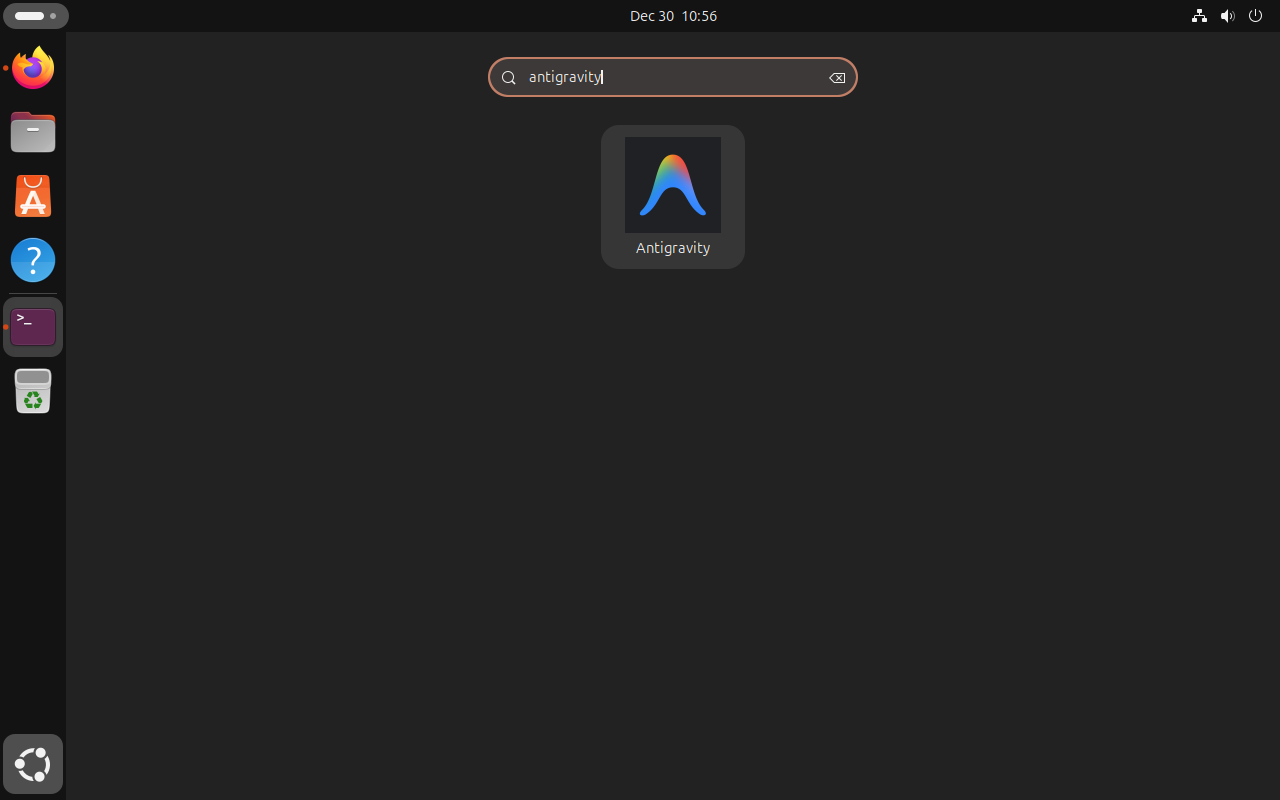

Open Antigravity IDE on Ubuntu
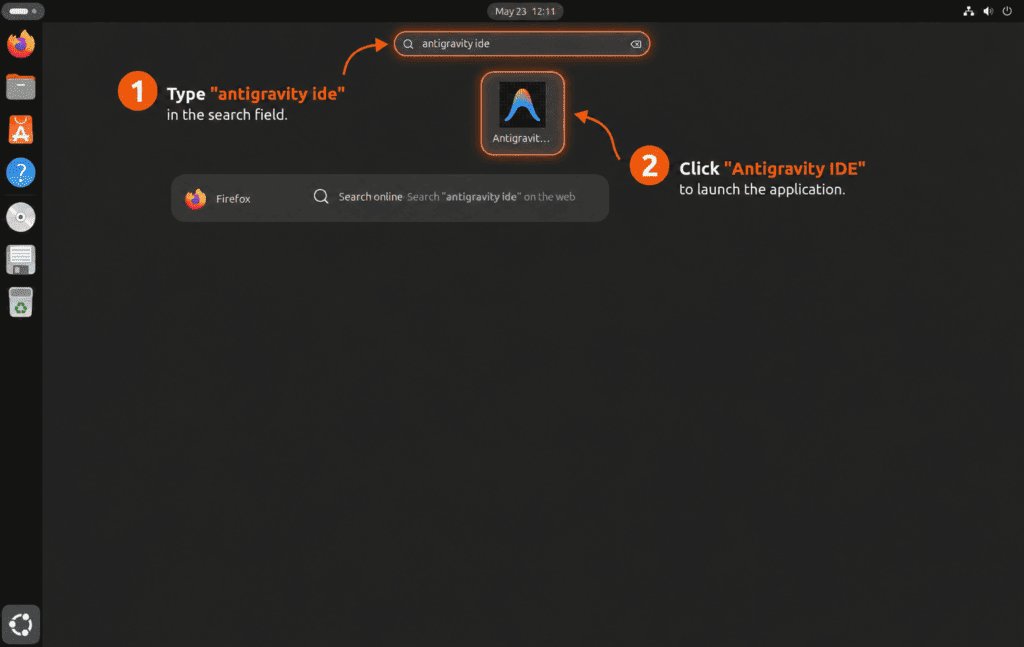
The IDE helper creates a separate Antigravity IDE launcher for editor-first work.
- Open Activities.
- Search for Antigravity IDE.
- Select the Antigravity IDE launcher to open the editor.
A desktop terminal can start the same IDE launcher directly:
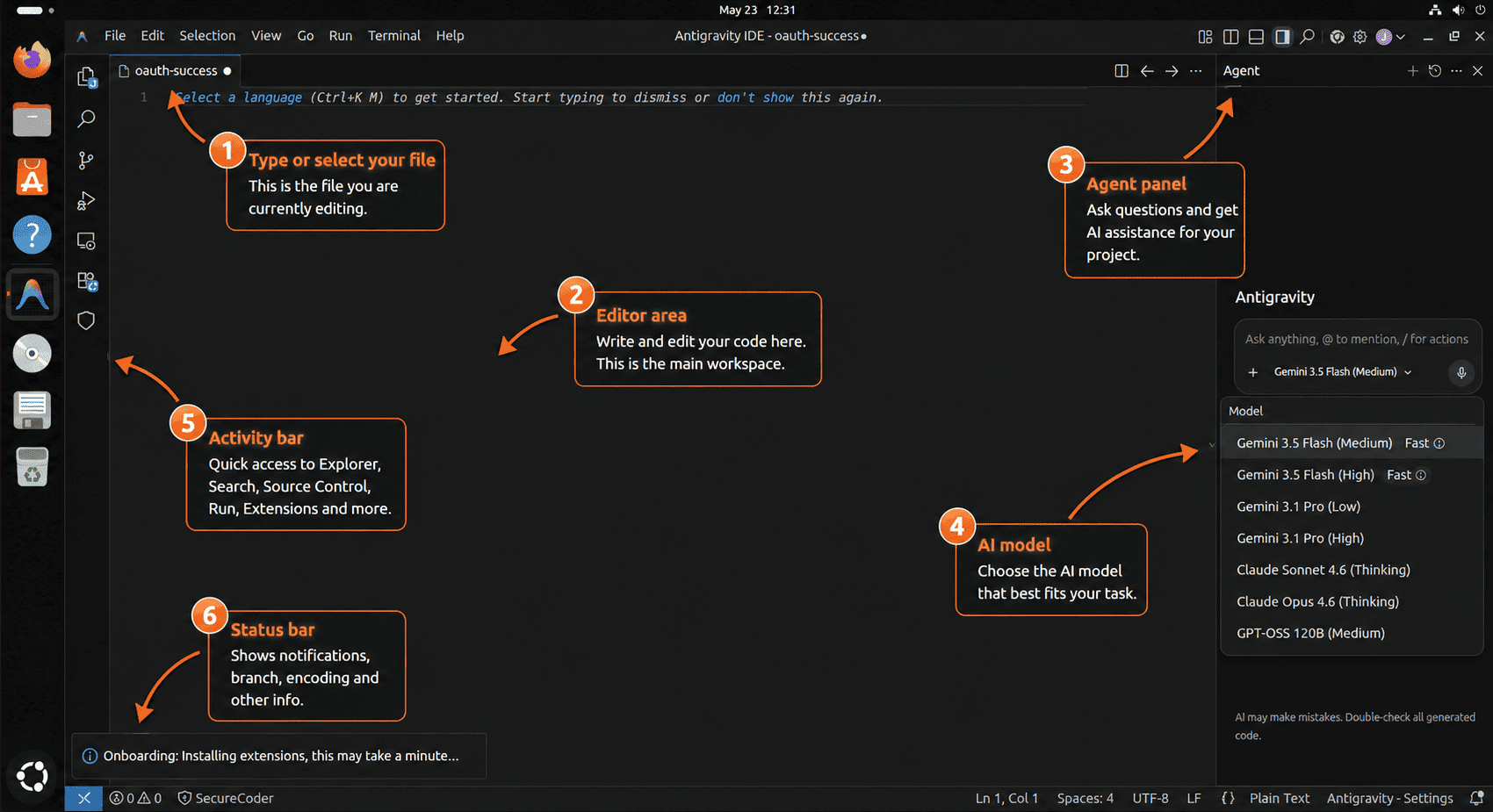
antigravity-ideThe IDE is the right surface when you want normal file editing, tab completion, code commands, and the agent manager in one editor window. Use the Antigravity 2.0 desktop app instead when you want the standalone project and scheduled-task surface.
Start Antigravity CLI from a terminal
Run agy from a project directory when you want the terminal interface. The CLI uses the current directory as the main workspace unless you add more paths with --add-dir.
export PATH="$HOME/.local/bin:$PATH"
agy
Authenticate Antigravity CLI on Ubuntu
When no saved session is available, Antigravity CLI uses a browser-backed sign-in flow. On a local Ubuntu desktop, agy can open the browser sign-in page. In an SSH session, it prints an authorization URL for your local browser and asks you to paste the returned code into the terminal.
To clear saved CLI credentials later, open agy and run /logout from the prompt.
Run first Antigravity CLI commands
The CLI can run interactively or answer a single non-interactive prompt. Start with a project directory so the agent has the right file context:
cd ~/Projects/example-project
agy --print "Summarize this project and list the safest next setup step."
Use --prompt-interactive when you want to seed the first message and continue the conversation in the terminal UI:
agy --prompt-interactive "Review this repository and ask before changing files."Add another directory when the work spans more than one local folder:
agy --add-dir ../shared-library --prompt-interactive "Use both folders as context for this task."Use the sandbox flag for a session where local command execution should start from stricter containment:
agy --sandbox --print "Run a read-only project health check and report findings."Use Antigravity CLI features
Several CLI controls are typed directly into the agy prompt. These are useful after the first launch:
| CLI control | Use |
|---|---|
? | Open inline help and available slash commands. |
@ | Trigger path suggestions when referencing files. |
! | Start a terminal command prompt from inside the CLI. |
/config or /settings | Open the settings panel for behavior, safety, and interface options. |
/permissions | Set how much review the agent needs before actions. |
/agents | Open the subagents panel to monitor parallel agent work. |
/tasks | Monitor, inspect, or stop background tasks. |
/skills | Browse available local and global skills. |
/mcp | Configure Model Context Protocol servers. |
/resume | Resume or switch conversations. |
/rewind | Roll back conversation history to an earlier point. |
/logout | Sign out and clear saved CLI credentials. |
If this Ubuntu workstation still needs Git, install Git on Ubuntu first, then configure Git username and email before you start cloning repositories inside Antigravity.
For Python projects, Antigravity uses the interpreter and virtual environments available in the workspace. If that toolchain is not ready yet, install the Python branch you need or create a dedicated environment with the guide to create a Python virtual environment on Ubuntu.
Official Google Antigravity resources
- Google Antigravity 2.0 overview explains the standalone agent platform.
- Google Antigravity IDE product page explains the editor surface, agent manager, and artifact review workflow.
- Google Antigravity getting started docs cover first launch, project setup, and core desktop workflow concepts.
- Google Antigravity CLI docs cover
agysettings, commands, and keybindings. - Google Antigravity CLI getting started docs cover installation and sign-in behavior.
- Google Antigravity CLI features explain plugins, terminal sandboxing, slash commands, subagents, and the
/agentspanel. - Google Antigravity downloads list the current desktop, CLI, SDK, and IDE downloads.
- Google Antigravity releases collect release notes and product changes.
- Google Antigravity changelog tracks recent Antigravity build and feature changes.
- Google Antigravity support collects official help resources.
Update Google Antigravity on Ubuntu
Update Antigravity 2.0 desktop app
The desktop helper performs the same download-page check during updates. If the installed helper-managed version is already current, it stops before downloading the tarball again. When a newer release is available, it leaves the previous install under /opt/antigravity.previous so you can inspect or remove the old copy after a successful upgrade.
If sudo update-antigravity reports that Antigravity 2.0.6 is already installed or fails from the old updater endpoint, the local helper is stale. Recreate /usr/local/bin/update-antigravity with the current desktop helper definition, then rerun the update command.
sudo update-antigravityAntigravity 2.1.4 is already installed at /opt/antigravity/Antigravity-x64
Update Antigravity IDE
The IDE helper checks the current download page and keeps the previous copy under /opt/antigravity-ide.previous after a successful replacement:
sudo update-antigravity-ideAntigravity IDE 2.1.1 is already installed at /opt/antigravity-ide/Antigravity-IDE
Update Antigravity CLI
Use the helper when you want one command that handles first install and later updates:
update-antigravity-cliAfter agy is installed, the direct updater works too. As with the helper, the live updater can include terminal decorations around these stable lines:
agy updateChecking for updates... (current version 1.0.10) You are already on the latest version.
If you installed all three current Antigravity surfaces, update them in order from your normal Ubuntu account. The desktop and IDE helpers need sudo because they update files under /opt, while the CLI helper updates ~/.local/bin/agy under your home directory:
sudo update-antigravity && sudo update-antigravity-ide && update-antigravity-cliUpdate the legacy Antigravity IDE APT package
APT can update the legacy package if Google publishes another build to the APT repository:
sudo apt update
sudo apt install --only-upgrade antigravity
For regular workstation maintenance, update the whole Ubuntu system so APT-managed packages move together:
sudo apt update
sudo apt upgrade
If you prefer unattended package maintenance for APT-managed software, the guide to configure unattended upgrades on Ubuntu covers the background update path.
Troubleshoot Google Antigravity on Ubuntu
Antigravity APT still shows version 1.23.2
A 1.23.2 result means APT is reading the legacy repository, not the current Antigravity 2.0 desktop or IDE download paths. Use sudo update-antigravity for the desktop app, sudo update-antigravity-ide for the current IDE, or rerun apt-cache policy antigravity later if Google starts publishing 2.x APT packages.
Desktop helper reports Antigravity 2.0.6 or fails from the old updater
That message, or a repeatable failure from the old updater endpoint, means the local desktop helper is an older saved copy. The current desktop path resolves the Linux tarball from Google’s download page instead.
if [ -f /usr/local/bin/update-antigravity ] && grep -Fq 'antigravity-auto-updater-974169037036' /usr/local/bin/update-antigravity; then
  echo "Old desktop helper detected"
elif [ -f /usr/local/bin/update-antigravity ]; then
  echo "Current download-page helper or a different helper is installed"
else
  echo "No desktop helper is installed"
fi
If the old helper is detected, overwrite /usr/local/bin/update-antigravity with the current desktop helper definition and run sudo update-antigravity again.
Desktop or IDE helper fails with a download or 404 error
A download 404 usually means Google’s download page changed or an old helper built an invalid download URL. Check whether the download page still exposes a JavaScript bundle:
curl -fsSL --compressed https://antigravity.google/download | grep -o 'main-[^"]*\.js' | head -n 1If the command prints a bundle name, replace the affected helper with the current helper definition and rerun the update. If it prints nothing, check Google’s download, release, and support pages before retrying.
Desktop or IDE helper fails because /tmp is too small
The helpers stage archives under /var/tmp by default because some desktops keep /tmp on a smaller temporary filesystem. If you intentionally set TMPDIR, make sure that location has enough free space for the archive and extracted app:
if [ -n "${TMPDIR:-}" ]; then
  df -h /var/tmp "$TMPDIR"
else
  df -h /var/tmp
fi
Antigravity desktop or IDE version check fails over SSH
The Antigravity desktop and IDE executables initialize graphical components. On a headless SSH session, antigravity --version or antigravity-ide --version can fail with a missing $DISPLAY or X server error. Verify the install with the matching update helper, readlink -f command, sandbox mode check, and desktop launcher instead.
Unlock the Ubuntu login keyring prompt
On autologin desktops or sessions where GNOME Keyring is still locked, Antigravity can show an Authentication required prompt before the Google sign-in screen. Enter your Ubuntu account password to unlock the local login keyring, then continue with Google sign-in. This is Ubuntu’s local credential store, not your Google password.
Fix Antigravity IDE installed under the old path with a space
Older copies of the IDE helper installed Google’s archive directory as /opt/antigravity-ide/Antigravity IDE. If the IDE launcher does nothing or closes immediately and the command link still resolves to that path, recreate /usr/local/bin/update-antigravity-ide from the current helper definition and run sudo update-antigravity-ide first.
readlink -f /usr/local/bin/antigravity-ide/opt/antigravity-ide/Antigravity IDE/antigravity-ide
If you need to repair an existing install without downloading the tarball again, move only the old helper-managed directory, relink the command, and reset the Chromium sandbox helper:
old_dir="/opt/antigravity-ide/Antigravity IDE"
new_dir="/opt/antigravity-ide/Antigravity-IDE"

if [ -d "$old_dir" ] && [ ! -e "$new_dir" ]; then
  sudo mv "$old_dir" "$new_dir"
fi

if [ -d "$new_dir" ]; then
  sudo ln -sfn "$new_dir/antigravity-ide" /usr/local/bin/antigravity-ide
  if [ -f "$new_dir/chrome-sandbox" ]; then
    sudo chown root:root "$new_dir/chrome-sandbox"
    sudo chmod 4755 "$new_dir/chrome-sandbox"
  fi
else
  printf 'Antigravity IDE install directory not found. Rerun sudo update-antigravity-ide.\n' >&2
fi
If you previously created the optional /etc/apparmor.d/antigravity-ide profile, recreate it with the IDE crash AppArmor command so the profile attaches to the normalized Antigravity-IDE path.
Fix a black Antigravity desktop or IDE window
A black desktop window is usually a Chromium or Electron GPU-rendering problem under the active graphics session. Launch the affected Antigravity surface from a desktop terminal with GPU acceleration disabled first:
antigravity --disable-gpu
antigravity-ide --disable-gpu
If the window still stays black on a Wayland session, test an Xwayland fallback with the same GPU workaround:
ELECTRON_OZONE_PLATFORM_HINT=x11 antigravity --disable-gpu
ELECTRON_OZONE_PLATFORM_HINT=x11 antigravity-ide --disable-gpu
If the desktop app command works, create a separate fallback launcher so the normal Antigravity launcher remains unchanged:
sudo cp /usr/share/applications/antigravity.desktop /usr/share/applications/antigravity-x11.desktop
sudo sed -i \
  -e 's/^Name=.*/Name=Antigravity (X11 fallback)/' \
  -e 's#^Exec=.*#Exec=env ELECTRON_OZONE_PLATFORM_HINT=x11 /usr/local/bin/antigravity --disable-gpu %U#' \
  /usr/share/applications/antigravity-x11.desktop
sudo update-desktop-database /usr/share/applications
If the IDE command works with the same fallback, create a separate IDE fallback launcher:
sudo cp /usr/share/applications/antigravity-ide.desktop /usr/share/applications/antigravity-ide-x11.desktop
sudo sed -i \
  -e 's/^Name=.*/Name=Antigravity IDE (X11 fallback)/' \
  -e 's#^Exec=.*#Exec=env ELECTRON_OZONE_PLATFORM_HINT=x11 /usr/local/bin/antigravity-ide --disable-gpu %U#' \
  /usr/share/applications/antigravity-ide-x11.desktop
sudo update-desktop-database /usr/share/applications
Remove the fallback launchers later if a Google update or Ubuntu graphics update fixes the black window:
sudo rm -f /usr/share/applications/antigravity-x11.desktop
sudo rm -f /usr/share/applications/antigravity-ide-x11.desktop
sudo update-desktop-database /usr/share/applications
Check AppArmor before changing sandbox settings
If Antigravity reports a sandbox or permission error, check the matching sandbox helper before changing AppArmor or kernel settings. The desktop and IDE helpers should keep chrome-sandbox root-owned with mode 4755:
stat -c '%U %G %a %n' /opt/antigravity/Antigravity-*/chrome-sandbox
stat -c '%U %G %a %n' "/opt/antigravity-ide/Antigravity-IDE/chrome-sandbox"
sysctl -n kernel.apparmor_restrict_unprivileged_userns 2>/dev/null || echo MISSING
sudo journalctl -k --no-pager | grep -i 'apparmor.*antigravity' | tail -n 20
If a sandbox helper is missing the 4755 mode, rerun the matching helper: sudo update-antigravity for the desktop app or sudo update-antigravity-ide for the IDE. Do not make --no-sandbox your normal launcher unless Google documents that as a required workaround and you accept the reduced browser-process isolation.
On Ubuntu 24.04 and 26.04, the desktop app can log userns_create and capname="sys_admin" entries for comm="antigravity" while the window continues running normally. Do not create a desktop AppArmor profile for those entries alone. The IDE crash fix applies when fresh logs name antigravity-ide and the IDE exits or traps.
Fix Antigravity IDE crash on Ubuntu 24.04 or 26.04
On Ubuntu 24.04 and 26.04, the IDE can close immediately if AppArmor moves the Electron process into the restricted unprivileged user namespace profile. Confirm that symptom before changing AppArmor:
sudo journalctl -k --since "10 minutes ago" --no-pager | grep -iE 'apparmor.*antigravity-ide|trap.*antigravity-ide'If the log shows profile="unprivileged_userns", comm="antigravity-ide", and a matching trap, create an executable-specific named AppArmor profile for the IDE. This keeps AppArmor enabled globally and avoids a persistent --no-sandbox launcher:
sudo install -d -m 0755 /etc/apparmor.d/local

if [ -f /etc/apparmor.d/abi/5.0 ]; then
  apparmor_abi="5.0"
elif [ -f /etc/apparmor.d/abi/4.0 ]; then
  apparmor_abi="4.0"
else
  echo "No supported AppArmor ABI file found for this Antigravity IDE profile." >&2
fi

if [ -n "${apparmor_abi:-}" ]; then
  sudo tee /etc/apparmor.d/local/antigravity-ide > /dev/null <<'EOF'
# Site-specific Antigravity IDE AppArmor additions.
EOF

  sudo tee /etc/apparmor.d/antigravity-ide > /dev/null <<EOF
# This profile allows everything and only exists to give Antigravity IDE
# a named AppArmor profile with user namespace access on Ubuntu.

abi <abi/${apparmor_abi}>,
include <tunables/global>

profile antigravity-ide "/opt/antigravity-ide/Antigravity-IDE/antigravity-ide" flags=(unconfined) {
  userns,
  "/opt/antigravity-ide/Antigravity-IDE/antigravity-ide" mr,

  # Site-specific additions and overrides.
  include if exists <local/antigravity-ide>
}
EOF

  sudo apparmor_parser -r /etc/apparmor.d/antigravity-ide
fi
Ubuntu 22.04 usually does not need this AppArmor branch because the unprivileged user namespace restriction can be inactive there. If the ABI check prints no supported ABI file, do not force a profile; keep the helper-managed chrome-sandbox state and use the current IDE helper instead.
Launch the IDE again from Activities or a desktop terminal. If the same denial returns after reloading the profile, remove the profile and check Google’s release notes before trying a different sandbox workaround.
Fix agy command not found
The CLI installer writes agy to ~/.local/bin. Open a new terminal, or add that directory to the current shell before trying again:
export PATH="$HOME/.local/bin:$PATH"
command -v agy
Fix Antigravity CLI sign-in on SSH
If agy cannot open a browser from an SSH session, use the authorization URL it prints in the terminal. Open that URL in a local browser, sign in, then paste the returned code back into the SSH terminal when the CLI asks for it.
Fix Antigravity sign-in opening Text Editor
If an Antigravity sign-in URL opens in GNOME Text Editor as raw HTML instead of Firefox, Ubuntu’s user-level URL and HTML handlers are misregistered. Check the current handlers first:
xdg-mime query default x-scheme-handler/https
gio mime text/html | sed -n '1,6p'
On a standard Ubuntu desktop with Firefox installed as a Snap, register Firefox locally and set it as the default handler for web URLs and HTML files:
mkdir -p "$HOME/.local/share/applications"
cp /var/lib/snapd/desktop/applications/firefox_firefox.desktop "$HOME/.local/share/applications/firefox_firefox.desktop"
chmod 0644 "$HOME/.local/share/applications/firefox_firefox.desktop"
update-desktop-database "$HOME/.local/share/applications" >/dev/null 2>&1 || true

for mime in x-scheme-handler/http x-scheme-handler/https text/html application/xhtml+xml application/xml text/xml; do
  gio mime "$mime" firefox_firefox.desktop
  xdg-mime default firefox_firefox.desktop "$mime"
done

xdg-settings set default-web-browser firefox_firefox.desktop
Retry the sign-in button after the defaults point to firefox_firefox.desktop. If you installed Firefox from a non-Snap package, use that package’s Firefox desktop file instead.
Fix legacy APT source or key conflicts
If older Antigravity repository examples left duplicate source files or keyrings behind, remove the known legacy paths, recreate the current DEB822 source, and refresh APT:
sudo rm -f /etc/apt/sources.list.d/antigravity.list /usr/share/keyrings/google-antigravity.gpg
sudo apt update
Remove Google Antigravity from Ubuntu
Remove Antigravity 2.0 desktop app
Delete the tarball-managed desktop app, previous copy, command link, helper, desktop launcher, and icon files:
This removes the helper-managed desktop app under
/opt/antigravity, including the saved previous copy. Antigravity user profiles, IDE settings, and CLI state are handled separately so you can keep account and workspace data if you still need it.
if [ -L /usr/local/bin/antigravity ] && readlink /usr/local/bin/antigravity | grep -q '^/opt/antigravity/'; then
  sudo rm -f /usr/local/bin/antigravity
fi
sudo rm -rf /opt/antigravity /opt/antigravity.previous /opt/antigravity.new
sudo rm -f /usr/local/bin/update-antigravity /usr/share/applications/antigravity.desktop /usr/share/applications/antigravity-x11.desktop /usr/share/applications/google-antigravity-2.desktop /usr/share/applications/google-antigravity-2-x11.desktop
sudo rm -f /usr/share/icons/hicolor/512x512/apps/antigravity.png /usr/share/icons/hicolor/scalable/apps/antigravity.svg
if command -v update-desktop-database >/dev/null 2>&1; then
  sudo update-desktop-database /usr/share/applications >/dev/null 2>&1 || true
fi
if command -v gtk-update-icon-cache >/dev/null 2>&1; then
  sudo gtk-update-icon-cache -q /usr/share/icons/hicolor 2>/dev/null || true
fi
hash -r
if [ ! -e /usr/local/bin/antigravity ]; then
  echo "Antigravity 2.0 command link is removed"
fi
Remove Antigravity IDE
Delete the tarball-managed IDE, previous copy, command link, helper, desktop launcher, icon file, and optional AppArmor profile:
sudo rm -rf /opt/antigravity-ide /opt/antigravity-ide.previous /opt/antigravity-ide.new
sudo rm -f /usr/local/bin/antigravity-ide \
  /usr/local/bin/update-antigravity-ide \
  /usr/share/applications/antigravity-ide.desktop \
  /usr/share/applications/antigravity-ide-x11.desktop \
  /usr/share/icons/hicolor/512x512/apps/antigravity-ide.png
if [ -f /etc/apparmor.d/antigravity-ide ]; then
  sudo apparmor_parser -R /etc/apparmor.d/antigravity-ide 2>/dev/null || true
fi
sudo rm -f /etc/apparmor.d/antigravity-ide /etc/apparmor.d/local/antigravity-ide
if command -v update-desktop-database >/dev/null 2>&1; then
  sudo update-desktop-database /usr/share/applications >/dev/null 2>&1 || true
fi
if command -v gtk-update-icon-cache >/dev/null 2>&1; then
  sudo gtk-update-icon-cache -q /usr/share/icons/hicolor 2>/dev/null || true
fi
hash -r
test ! -e /usr/local/bin/antigravity-ide && echo "Antigravity IDE command link is removed"
Remove Antigravity CLI
Remove the user-local CLI binary and update helper:
rm -f "$HOME/.local/bin/agy" "$HOME/.local/bin/update-antigravity-cli"
hash -r
command -v agy || echo "agy command is removed"
Remove the legacy Antigravity IDE APT package
Purge the legacy APT package and remove the Google Antigravity source and keyring files:
sudo apt purge antigravity
sudo rm -f /etc/apt/sources.list.d/google-antigravity.sources /etc/apt/sources.list.d/antigravity.list
sudo rm -f /etc/apt/keyrings/antigravity-repo-key.gpg /usr/share/keyrings/google-antigravity.gpg
sudo apt update
Confirm the package and source file are gone:
dpkg-query -W -f='${db:Status-Abbrev} ${binary:Package}\n' antigravity 2>/dev/null | grep -q '^ii' || echo "antigravity APT package is not installed"
test ! -e /etc/apt/sources.list.d/google-antigravity.sources && echo "google-antigravity.sources is removed"
Delete Antigravity user data
User-data cleanup permanently deletes Antigravity desktop settings, IDE settings, CLI state, cached files, and updater data from your home directory. Keep a backup first if you may need the profile later.
Review matching Antigravity paths before deleting anything:
find "$HOME/.config" "$HOME/.cache" "$HOME/.gemini" "$HOME/.antigravity-ide" -maxdepth 2 \( -iname '*Antigravity*' -o -iname '*antigravity*' \) -print 2>/dev/nullRemove the known desktop, IDE, and CLI profile paths when you are ready to discard them:
rm -rf "$HOME/.config/Antigravity" \
  "$HOME/.config/Antigravity IDE" \
  "$HOME/.antigravity-ide" \
  "$HOME/.cache/antigravity" \
  "$HOME/.cache/antigravity-updater" \
  "$HOME/.gemini/antigravity-cli"
Conclusion
Ubuntu now has a clear Antigravity split: use the tarball helpers for the current Antigravity 2.0 desktop app and Antigravity IDE, use agy for the terminal CLI, and keep the APT repository only for the legacy 1.x IDE path. If you want to round out the workstation, install GitHub Desktop on Ubuntu for a GUI Git workflow or install Docker on Ubuntu for disposable test environments.


EStou tendo este erro e qualquer linux que instalo o Antigravity:
STARTUP FAILED
Language server exited unexpectedly (code=null, signal=SIGILL)
Aparece esta janela apos clicar ou executar o Antigravity, e qualquer distribuicao que eu instalo.
qual o problema?
Thank you for your scripts; they make updating much easier. They’re better thought than my own solution.
I’m probably a bit late in mentioning this, but you can migrate your conversations and extensions (Antigravity says you can, but doesn’t actually let you).
#!/usr/bin/env bash
set -euo pipefail
# 1. Migrate IDE global state and workspaces
mkdir -p “$HOME/.config/Antigravity IDE/User/globalStorage”
if [ -f “$HOME/.config/Antigravity/User/globalStorage/state.vscdb” ]; then
cp “$HOME/.config/Antigravity/User/globalStorage/state.vscdb” “$HOME/.config/Antigravity IDE/User/globalStorage/state.vscdb”
fi
if [ -d “$HOME/.config/Antigravity/User/workspaceStorage” ]; then
cp -r “$HOME/.config/Antigravity/User/workspaceStorage” “$HOME/.config/Antigravity IDE/User/”
fi
# 2. Migrate Gemini chat trajectories (.pb files)
mkdir -p “$HOME/.gemini/antigravity-ide/conversations”
if [ -d “$HOME/.gemini/antigravity/conversations” ]; then
cp -r “$HOME/.gemini/antigravity/conversations”/* “$HOME/.gemini/antigravity-ide/conversations/” 2>/dev/null || true
fi
# 3. Migrate IDE extensions
mkdir -p “$HOME/.antigravity-ide/extensions”
if [ -d “$HOME/.antigravity/extensions” ]; then
cp -r “$HOME/.antigravity/extensions”/* “$HOME/.antigravity-ide/extensions/” 2>/dev/null || true
fi
echo “Migration completed successfully!”
[sorry I didn’t find how to edit my first post]
If you don’t want to create a script, you can just copy-paste this :
(

# 1. Migrate IDE global state and workspaces

mkdir -p "$HOME/.config/Antigravity IDE/User/globalStorage"

[ -f "$HOME/.config/Antigravity/User/globalStorage/state.vscdb" ] && cp "$HOME/.config/Antigravity/User/globalStorage/state.vscdb" "$HOME/.config/Antigravity IDE/User/globalStorage/state.vscdb"

[ -d "$HOME/.config/Antigravity/User/workspaceStorage" ] && cp -r "$HOME/.config/Antigravity/User/workspaceStorage" "$HOME/.config/Antigravity IDE/User/"
# 2. Migrate Gemini chat trajectories (.pb files)
mkdir -p "$HOME/.gemini/antigravity-ide/conversations"
[ -d "$HOME/.gemini/antigravity/conversations" ] && cp -r "$HOME/.gemini/antigravity/conversations"/* "$HOME/.gemini/antigravity-ide/conversations/" 2>/dev/null || true
# 3. Migrate IDE extensions
mkdir -p "$HOME/.antigravity-ide/extensions"
[ -d "$HOME/.antigravity/extensions" ] && cp -r "$HOME/.antigravity/extensions"/* "$HOME/.antigravity-ide/extensions/" 2>/dev/null || true
echo "Migration completed successfully!"
)
I installed Antigravity on my Kali using the repository, and i have been doing a sudo apt update and it says i am up to date but when i open Antigravity it is always prompting to update, in my terminal it always says: Hit:14 https://us-central1-apt.pkg.dev/projects/antigravity-auto-updater-dev antigravity-debian InRelease
could you help me update it?
Emmanuel, that update prompt is expected when Antigravity came from the legacy APT repository. I rechecked the Ubuntu APT metadata today, and the repository still publishes
antigravity1.23.2, sosudo apt updatecan be fully current while the app still asks for a newer Antigravity release.For the current 2.x desktop app, remove the legacy APT package/source first, then recreate the
/usr/local/bin/update-antigravityhelper from the article and runsudo update-antigravity. Kali is outside this Ubuntu guide’s tested scope, but the version mismatch is the same repository limitation.Hi! your tutorial helps me a lot! the only error i have and i don’t know is a common issue but when i installed the V2 Antigravity IDE wont open at all, i see because of white space in opt directory for fix this i did this:
1. sudo mv “/opt/antigravity-ide/Antigravity IDE” “/opt/antigravity-ide/Antigravity-IDE”
2. sudo ln -sfn “/opt/antigravity-ide/Antigravity-IDE/antigravity-ide” /usr/local/bin/antigravity-ide
3. sudo chown root:root “/opt/antigravity-ide/Antigravity-IDE/chrome-sandbox”
4. sudo chmod 4755 “/opt/antigravity-ide/Antigravity-IDE/chrome-sandbox”
After this all works fine.
Thanks for the tutorial 🙂
Solid workaround, Sebastian. You found a real edge case in the IDE tarball path, so I updated the helper to install the IDE under
/opt/antigravity-ide/Antigravity-IDE, recreate theantigravity-idecommand link, and resetchrome-sandboxtoroot:rootwith mode4755.For an existing install, recreate
/usr/local/bin/update-antigravity-idefrom the updated article and runsudo update-antigravity-ide. If you already used your manual move and link commands, you should be in the same final state. Thanks for reporting it.