
Large local music libraries are harder to manage when the player treats everything like a disposable stream instead of a collection you actually maintain. That is what makes it useful to install Strawberry Music Player on Linux Mint, because Strawberry focuses on library management, MusicBrainz lookups, smart playlists, and bit-perfect playback for FLAC, MP3, and other local formats.
Strawberry is an open-source Clementine fork, which explains why that older name still shows up in searches and forum threads. Linux Mint 22 packages Strawberry 1.0.23 in the default repositories, while Linux Mint 21 needs the Strawberry PPA or Flatpak. The official Strawberry site also lists Linux downloads, but the package-managed routes are easier to update and remove cleanly on Linux Mint.
Install Strawberry on Linux Mint
Three installation paths make sense on current Linux Mint releases. The default Linux Mint package is the shortest APT workflow on Mint 22.x, the stable Strawberry PPA keeps APT on a newer branch, and Flatpak gives you the same Flathub-managed Strawberry release on both Mint bases.
| Method | Source or Channel | Current Version | Update Behavior | Best For |
|---|---|---|---|---|
| Linux Mint repositories | Ubuntu noble/universe | Mint 22.x: Strawberry 1.0.23; Mint 21.x: Not packaged | APT-managed updates | The shortest APT workflow on Mint 22.x |
| Strawberry PPA | Jonas Kvinge Launchpad PPA | Mint 22.x: Strawberry 1.2.19; Mint 21.x: Strawberry 1.1.3 | APT-managed updates | Users who want a newer APT build than Mint 22’s default package |
| Flatpak | Flathub | Mint 22.x and 21.x: Strawberry 1.2.19 | Flatpak app and runtime updates | The same current release on both Mint bases |
- Use Linux Mint repositories on 22.x when you want the shortest APT install.
- Use the Strawberry PPA when you want an APT-managed build and can accept that Mint 21.x stays on Strawberry 1.1.3.
- Use Flatpak when you want Strawberry 1.2.19 on both Mint 22.x and 21.x or prefer a Flathub-managed app lifecycle.
Linux Mint 22.x includes Strawberry in the default repositories, while Linux Mint 21.x does not ship a default package. The stable PPA works on both Mint bases, but jammy remains on Strawberry 1.1.3, so Flatpak is the only verified 1.2.19 path on Mint 21.x. All three methods install from a terminal, but Strawberry still needs an active graphical session to launch the desktop interface.
Update Linux Mint before installing Strawberry
Open a terminal from the applications menu or with the shortcut configured on your Mint desktop, then refresh APT before you add or install anything else.
sudo apt update && sudo apt upgradeThese commands use
sudofor root privileges. If your account does not have sudo access yet, follow the guide to create and add users to sudoers on Linux Mint before continuing.
Install Strawberry from Linux Mint repositories
This is the simplest APT path on Linux Mint 22.x. Linux Mint 21.x does not package Strawberry in the default repositories, so use the PPA or Flatpak method if your system is based on Ubuntu 22.04.
Check the package policy first so you can confirm whether your Mint release exposes a default candidate.
apt-cache policy strawberrystrawberry: Installed: (none) Candidate: 1.0.23-1build3 Version table: 1.0.23-1build3 500 500 http://archive.ubuntu.com/ubuntu noble/universe amd64 Packages
On Linux Mint 21.x, the same command does not return a default Strawberry candidate, which is your cue to use the PPA or Flatpak method instead.
Install Strawberry on Linux Mint 22 with APT when the policy check shows the default repository candidate.
sudo apt install strawberry -yVerify both the package version and the application version after APT finishes.
dpkg-query -W strawberry && strawberry --versionstrawberry 1.0.23-1build3 Strawberry 1.0.23
Install Strawberry from the PPA on Linux Mint
The stable PPA is the APT option when you want Strawberry 1.2.19 on Linux Mint 22.x or need Strawberry at all on Linux Mint 21.x. Standard Mint desktop installs already include add-apt-repository, and trimmed installs can add Mint’s repository helper first if the command is missing.
Install the helper only if your shell returns add-apt-repository: command not found.
command -v add-apt-repository >/dev/null 2>&1 || sudo apt install mintsourcesAdd the stable Strawberry PPA maintained by Jonas Kvinge.
sudo add-apt-repository ppa:jonaski/strawberry -yRefresh APT so the new Launchpad source and package index are in place before you install Strawberry.
sudo apt updateRelevant output includes:
Get:10 https://ppa.launchpadcontent.net/jonaski/strawberry/ubuntu noble InRelease [17.8 kB]
Get:11 https://ppa.launchpadcontent.net/jonaski/strawberry/ubuntu noble/main amd64 Packages [788 B]
Reading package lists...
Run a policy check before installing so you can see which Strawberry build your Mint base will select.
apt-cache policy strawberrystrawberry: Installed: (none) Candidate: 1.2.19-noble Version table: 1.2.19-noble 500 500 https://ppa.launchpadcontent.net/jonaski/strawberry/ubuntu noble/main amd64 Packages 1.0.23-1build3 500 500 http://archive.ubuntu.com/ubuntu noble/universe amd64 Packages
On Linux Mint 21.x, the same command shows Candidate: 1.1.3-jammy from the PPA and no default-repository fallback underneath it.
Install Strawberry once the policy output shows the PPA candidate you want.
sudo apt install strawberry -yVerify both the package version and the application version string after installation.
dpkg-query -W strawberry && strawberry --versionstrawberry 1.2.19-noble Strawberry 1.2.19
On Linux Mint 21.x, the stable PPA currently installs strawberry 1.1.3-jammy and prints Strawberry 1.1.3.
Install Strawberry from Flatpak on Linux Mint
Flatpak is the easiest way to keep the same Strawberry release on Linux Mint 22.x and 21.x. Standard Linux Mint desktop installs already include Flatpak with Flathub at system scope, so start by confirming that the remote is present.
flatpak remotes --columns=name,options | grep -E '^flathub[[:space:]]'flathub system
If that command prints nothing because Flathub was removed from a customized install, restore it at the same system scope before you install Strawberry.
sudo flatpak remote-add --if-not-exists flathub https://dl.flathub.org/repo/flathub.flatpakrepoFlathub currently labels Strawberry as potentially unsafe. Its metadata grants access to xdg-music, /media, /mnt, and /run/media, along with broad device access for desktop audio and removable-media workflows. Treat the Flatpak method as a packaging and update choice, not as a strong isolation boundary.
Install Strawberry from Flathub using the system scope that Linux Mint already uses.
sudo flatpak install flathub org.strawberrymusicplayer.strawberry -yConfirm the installed app ID, version, and scope after the install finishes.
flatpak info org.strawberrymusicplayer.strawberryRelevant output includes:
ID: org.strawberrymusicplayer.strawberry
Ref: app/org.strawberrymusicplayer.strawberry/x86_64/stable
Arch: x86_64
Branch: stable
Version: 1.2.19
Origin: flathub
Installation: system
Runtime: org.kde.Platform/x86_64/6.10
The Flathub build currently matches the Mint 22 PPA at Strawberry 1.2.19, and it is newer than the 1.1.3 jammy PPA on Linux Mint 21.x.
Launch Strawberry on Linux Mint
Strawberry is a desktop application, so it still needs an active graphical session even if you installed it from a remote shell. Once you are back at the Linux Mint desktop, use the command or menu entry that matches your install method.
Launch Strawberry from the applications menu on Linux Mint
For daily use, the simplest approach is launching from your desktop environment’s application menu. The exact path depends on your Mint edition:
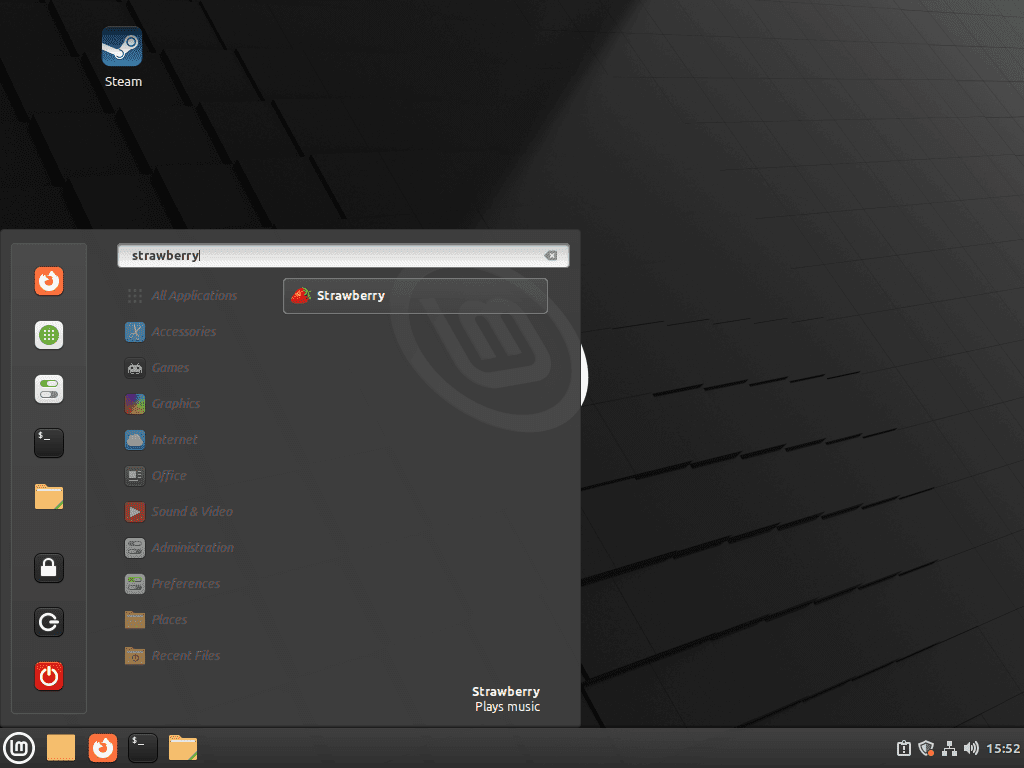
- Cinnamon: Click the Menu button, then type “Strawberry” in the search box, or navigate to Sound & Video > Strawberry
- MATE: Applications > Sound & Video > Strawberry
- Xfce: Applications Menu > Multimedia > Strawberry
Launch Strawberry from the terminal on Linux Mint
APT and PPA installs use the regular launcher name, while Flatpak uses the application ID through flatpak run.
For APT or PPA installations:
strawberryFor Flatpak installations:
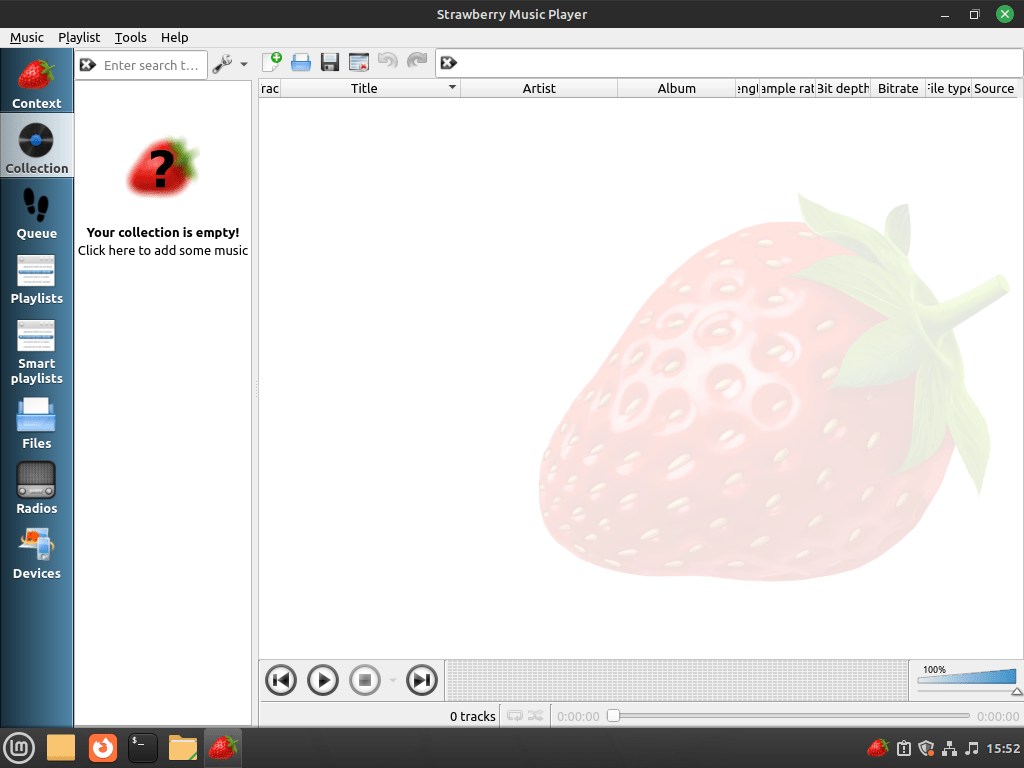
flatpak run org.strawberrymusicplayer.strawberryAfter the first launch, point Strawberry at your music folders and let it build the library before you start testing playlists, tags, or streaming integrations.
Update or Remove Strawberry on Linux Mint
The update and removal path depends on whether Strawberry came from APT or Flatpak. Keep package removal separate from optional source or data cleanup so you can see what changed.
Update an APT-installed Strawberry package on Linux Mint
Use APT to refresh package metadata, then upgrade only Strawberry without pulling unrelated package updates.
sudo apt update && sudo apt install --only-upgrade strawberry -yUpdate the Strawberry Flatpak on Linux Mint
Use the same system scope you used during installation when you update the Flatpak build. If you also want a broader Flatpak maintenance routine, see the guide on upgrading Flatpak on Linux Mint.
sudo flatpak update org.strawberrymusicplayer.strawberry -yRemove an APT-installed Strawberry package on Linux Mint
Remove the package first. This step is the same whether Strawberry came from Linux Mint’s own repositories or from the PPA.
sudo apt remove strawberryIf APT reports dependencies that are no longer required, review the proposed cleanup before accepting it. Shared desktops can have old autoremovable packages that did not come from Strawberry.
sudo apt autoremoveVerify that the package itself is gone before you clean up the optional PPA source.
dpkg-query -W -f='${db:Status-Abbrev} ${binary:Package}\n' strawberry 2>/dev/null | grep '^ii' || echo "strawberry package not installed"strawberry package not installed
If you used the stable PPA, remove the source afterward and refresh APT so Linux Mint 22 falls back to its own package candidate.
sudo add-apt-repository --remove ppa:jonaski/strawberry -y
sudo apt update
Check the package policy again after the PPA cleanup.
apt-cache policy strawberrystrawberry: Installed: (none) Candidate: 1.0.23-1build3 Version table: 1.0.23-1build3 500 500 http://archive.ubuntu.com/ubuntu noble/universe amd64 Packages
On Linux Mint 21.x, the same command returns no default Strawberry candidate once the PPA is gone, which is normal because the default repositories still do not ship the package there.
Remove the Strawberry Flatpak on Linux Mint
If you added a user-level Flatpak override for a custom music folder, reset Strawberry’s overrides before removing the app. This resets all user overrides for Strawberry, not only the filesystem path.
flatpak override --user --reset org.strawberrymusicplayer.strawberryUse Flatpak’s data-removal flag when you want the app and its Flatpak profile removed together.
The data-removal flag can delete Strawberry settings, caches, and Flatpak profile data for the account running the command. Back up playlists or configuration you want to keep before using it.
Remove the Flathub app from the system installation.
sudo flatpak uninstall --delete-data org.strawberrymusicplayer.strawberryCheck the installed-app list afterward instead of relying on flatpak info, which is less helpful after the app has already been removed.
flatpak list --system --app --columns=application | grep -Fx org.strawberrymusicplayer.strawberry || echo "Flatpak app not installed"Flatpak app not installed
Because Strawberry may not create user-data directories until you actually launch the desktop app, inspect the common config and data roots before deleting anything else.
find "$HOME/.config" "$HOME/.cache" "$HOME/.local/share" "$HOME/.var/app" -maxdepth 3 \( -iname "strawberry" -o -path "$HOME/.var/app/org.strawberrymusicplayer.strawberry" \) -print 2>/dev/nullIf that command prints nothing, there is nothing else to remove for that account. If it does print a path, delete only the directories you recognize as Strawberry data.
Troubleshoot Strawberry on Linux Mint
Start with the branch that matches your install method. The checks keep APT source problems, Flatpak remote problems, and Flatpak permission problems separate.
No APT package candidate appears for Strawberry
Check the package policy again when APT cannot find Strawberry.
apt-cache policy strawberryNo output is expected on Linux Mint 21.x before you add the PPA, because the Ubuntu 22.04 package base does not provide Strawberry. Use the PPA method for an APT-managed install, or use Flatpak if you want Strawberry 1.2.19 on Mint 21.x.
Flathub is missing or disabled
If the Flatpak install cannot find the Flathub remote, include disabled remotes in the check.
flatpak remotes --show-disabled --columns=name,options | grep -E '^flathub[[:space:]]'flathub system
If that command prints nothing, restore Flathub and repeat the Strawberry Flatpak install.
sudo flatpak remote-add --if-not-exists flathub https://dl.flathub.org/repo/flathub.flatpakrepo
sudo flatpak install flathub org.strawberrymusicplayer.strawberry
The Flatpak cannot see a custom music folder
Check Strawberry’s Flatpak filesystem permissions when your library lives outside the Music folder or common removable-media paths.
flatpak info --show-permissions org.strawberrymusicplayer.strawberry | grep '^filesystems='filesystems=/media;xdg-music;xdg-config/kdeglobals:ro;/mnt;/run/media;
Grant a per-user override only for the folder that stores your library, then launch Strawberry again. Change $HOME/Audio to the directory that holds your music files.
flatpak override --user --filesystem="$HOME/Audio" org.strawberrymusicplayer.strawberry
flatpak run org.strawberrymusicplayer.strawberry
Conclusion
Strawberry is installed on Linux Mint and ready for local libraries, tag cleanup, and lossless playback. Keep the Mint package when stability matters, or stay on the newer PPA or Flatpak build when you want faster updates. If you want a lighter same-distro alternative, install DeaDBeeF on Linux Mint.


I can easily log into Spotify and load my playlists, but playback is not possible: “There is no URI handler implemented for “spotify.”
../gst/playback/gsturisourcebin.c(1708): gen_source_element (): /GstPlayBin3:pipeline-3-pipeline/GstURIDecodeBin3:uridecodebin3/GstURISourceBin:urisourcebin2
How exactly I do that now? THX for help
Hi!
It looks like Spotify support for Strawberry is still in development. The issue you’re seeing with the “no URI handler for ‘spotify'” is related to the fact that Spotify integration isn’t fully polished yet. There’s been ongoing work to integrate it using the GStreamer Spotify plugin, but some bugs and limitations (like authentication and song-switching lag) still exist.
If you’re interested in following the progress, check out this thread: https://forum.strawberrymusicplayer.org/topic/118/support-for-spotify.
For now, using the official Spotify client might be the best option until these issues are resolved.
Let me know if you have any other questions!