
Wike gives the GNOME desktop a cleaner way to search, read, and bookmark Wikipedia articles when a browser tab feels like overkill. You can install Wike on Ubuntu through Flathub, Ubuntu’s Universe repository, Snap, or a community PPA, depending on how closely you want updates tied to the rest of the system.
If you are looking for the official Wike app download for Linux, start with the Flathub package that upstream labels official. Ubuntu also carries a distro package on supported releases, but Wike does not publish a separate upstream Ubuntu .deb file.
Install Wike on Ubuntu
Each installation path makes a different trade-off between version freshness, update handling, and Ubuntu integration. Flatpak and Snap stay more independent from Ubuntu’s release cadence, while the APT-based options fit better if you want Wike managed alongside the rest of the system.
| Method | Source | Channel | Updates | Best Fit |
|---|---|---|---|---|
| Flatpak | Flathub | Official stable package | flatpak update | Readers who want Wike’s upstream-recommended Linux package across Ubuntu releases |
| APT | Ubuntu Universe | Distro package on Ubuntu 26.04 and 24.04 | apt upgrade | Users who want Wike handled by Ubuntu’s own package manager |
| Snap | Snap Store | Community-maintained stable channel | snap refresh | Users who already rely on snapd and accept community packaging |
| Launchpad PPA | Archisman Panigrahi’s PPA | APT packages for Ubuntu 24.04 and 22.04 | apt upgrade | Readers who specifically need an APT package on Ubuntu 22.04 or a newer APT build on Ubuntu 24.04 |
- Use Flatpak if you want Wike’s official package and the current Flathub stable build on Ubuntu 26.04, 24.04, or 22.04.
- Use Ubuntu’s own package when you prefer distro-managed APT updates and the release in your repository is recent enough for your needs.
- Use the Snap only if you already manage desktop apps with snapd and are comfortable with a community-maintained package.
- Use the PPA only when you specifically need an APT-based install on Ubuntu 22.04 or want a newer APT build on Ubuntu 24.04.
Flatpak is the best default because Wike’s upstream project calls it the official package. Ubuntu 26.04 currently ships Wike 3.2.0-1, Ubuntu 24.04 ships 2.1.0-1, and Ubuntu 22.04 does not package Wike in its default repositories. The Snap and Launchpad PPA are both maintained outside the main Wike project, and the PPA is notably behind current releases on Ubuntu 22.04.
Install Wike via Flatpak on Ubuntu
Wike’s upstream README points Linux users to Flathub and labels the Flatpak build as the official package. It is the cleanest way to stay on the current Wike stable release across Ubuntu 26.04, 24.04, and 22.04.
Set Up Flatpak and Flathub for Wike
Ubuntu does not ship Flatpak by default, so install it first if your system does not already have it. Start with Install Flatpak on Ubuntu, then add the Flathub remote for Wike.
sudo flatpak remote-add --if-not-exists flathub https://dl.flathub.org/repo/flathub.flatpakrepoThe --if-not-exists flag keeps the command safe to rerun. Confirm that the system-scope Flathub entry exists before you install Wike:
flatpak remotes --columns=name,options | grep -E '^flathub[[:space:]]'flathub system
Install Wike from Flathub on Ubuntu
With Flathub available, install Wike and let Flatpak pull the GNOME runtime it needs automatically.
sudo flatpak install flathub com.github.hugolabe.Wike -yAfter the install finishes, confirm the app ID, branch, and installed version. Relevant lines from the current Flatpak package look like this:
flatpak info com.github.hugolabe.WikeHugo Olabera - Search and read Wikipedia articles
ID: com.github.hugolabe.Wike
Ref: app/com.github.hugolabe.Wike/x86_64/stable
Arch: x86_64
Branch: stable
Version: 3.2.1
License: GPL-3.0-or-later
Origin: flathub
Collection: org.flathub.Stable
Installation: system
Runtime: org.gnome.Platform/x86_64/50
Install Wike via Snap on Ubuntu
The Snap package is simple to install and updates through snapd, but it is published by a third-party maintainer rather than the main Wike project. Use it when you already manage desktop apps with snapd and do not need the official Flatpak build.
If
snapis missing on a minimal or customized Ubuntu installation, install it withsudo apt install snapdbefore proceeding.
Install Wike from Snapcraft on Ubuntu
Install the Snap package from the Snap Store with the standard snapd workflow.
sudo snap install wikeAfter the install finishes, confirm the installed channel and publisher:
snap list wikeName Version Rev Tracking Publisher Notes wike 3.1.0 83 latest/stable soumyadghosh* -
Install Wike from Ubuntu Repositories
Ubuntu packages Wike in the Universe repository on 26.04 and 24.04, while Ubuntu 22.04 does not include it at all. This is the most natural option when you want APT to handle updates, but the version gap matters: Ubuntu 26.04 ships 3.2.0-1, and Ubuntu 24.04 still ships 2.1.0-1.
If your package search cannot find Wike on 26.04 or 24.04, enable Universe first with Enable Universe and Multiverse in Ubuntu. Only Universe is required for Wike.
Refresh Ubuntu Package Metadata for Wike
Refresh APT metadata before you install the Ubuntu package.
sudo apt updateThese commands use
sudofor system changes. If your account cannot run sudo yet, follow how to add a new user to sudoers on Ubuntu first.
Install Wike from the Universe Repository on Ubuntu
Check the release-specific candidate before installing. This example shows Ubuntu 26.04.
apt-cache policy wikewike:
Installed: (none)
Candidate: 3.2.0-1
Version table:
3.2.0-1 500
500 http://au.archive.ubuntu.com/ubuntu resolute/universe amd64 Packages
Install Wike with APT once Universe is available on your system.
sudo apt install wike -yAfter the package finishes installing, confirm the installed state with dpkg -l:
dpkg -l wike | grep '^ii'ii wike 3.2.0-1 all Wikipedia reader for the GNOME Desktop
On Ubuntu 24.04, the same installed-state check reports 2.1.0-1. On Ubuntu 22.04, apt-cache policy wike returns no result because Jammy does not package Wike.
Install Wike from the Launchpad PPA on Ubuntu
The Launchpad PPA maintained by Archisman Panigrahi is the only APT-based option for Ubuntu 22.04, but it is not the freshest Wike source. The PPA currently publishes 3.0.1 for Ubuntu 24.04, 1.8.2 for Ubuntu 22.04, and no resolute metadata for Ubuntu 26.04.
Ubuntu 26.04 cannot use this PPA because Launchpad does not publish a
resoluteRelease file for it. Use the Ubuntu repository, Flatpak, or Snap on 26.04 instead.
Refresh APT Metadata Before Adding the Wike PPA
Refresh APT metadata before you add the PPA.
sudo apt updateInstall the add-apt-repository Helper for Wike
Install software-properties-common if your system does not already provide add-apt-repository.
sudo apt install software-properties-common -yAdd the Wike PPA on Ubuntu
Add the PPA with a codename guard so unsupported releases do not write a dead Launchpad source. When the release is supported, Ubuntu’s repository helper imports the signing key and refreshes APT metadata automatically.
. /etc/os-release
case "${VERSION_CODENAME:-}" in
noble|jammy)
sudo add-apt-repository ppa:apandada1/wike -y
;;
*)
printf 'The Wike PPA does not currently publish packages for this Ubuntu release.\n'
;;
esacIf the guard reports that your release is unsupported, skip the rest of this PPA method. On Ubuntu 26.04, use the Ubuntu repository, Flatpak, or Snap path instead.
Install Wike from the PPA on Ubuntu
Install Wike from the new PPA source only after the guard adds the repository. On Ubuntu 24.04 this upgrades the Ubuntu package, while Ubuntu 22.04 installs Wike for the first time.
sudo apt install wike -yVerify the installed version and package source after the install finishes:
apt-cache policy wikeUbuntu 24.04 output:
wike:
Installed: 3.0.1-2~202403301418~ubuntu24.04.1
Candidate: 3.0.1-2~202403301418~ubuntu24.04.1
Version table:
*** 3.0.1-2~202403301418~ubuntu24.04.1 500
500 https://ppa.launchpadcontent.net/apandada1/wike/ubuntu noble/main amd64 Packages
100 /var/lib/dpkg/status
2.1.0-1 500
500 http://au.archive.ubuntu.com/ubuntu noble/universe amd64 Packages
Ubuntu 22.04 output:
wike:
Installed: 1.8.2-0~202211211115~ubuntu22.04.1
Candidate: 1.8.2-0~202211211115~ubuntu22.04.1
Version table:
*** 1.8.2-0~202211211115~ubuntu22.04.1 500
500 https://ppa.launchpadcontent.net/apandada1/wike/ubuntu jammy/main amd64 Packages
100 /var/lib/dpkg/status
Launch Wike on Ubuntu
Wike is a desktop application, so the install commands can run from any terminal but the interface itself still needs an active graphical session. Once the package is installed, open it from the applications menu or use the launcher command that matches your package format.
Launch Wike from the Applications Menu on Ubuntu
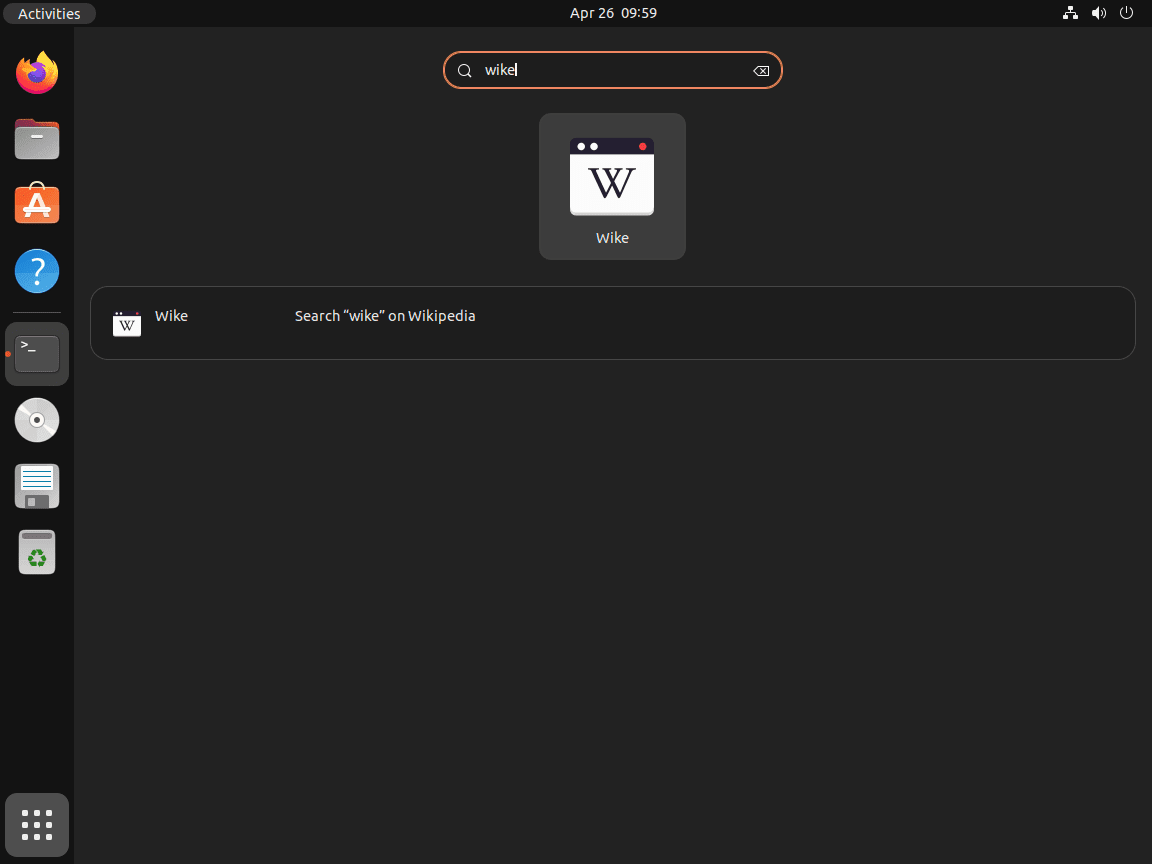
Open your desktop’s application launcher, search for Wike, and start the app from there. GNOME shows it in Activities, while other desktop environments place it in their normal application menu.
Launch Wike from the Terminal on Ubuntu
Use the launcher that matches the package format you installed.
APT and PPA installs add the wike launcher to your PATH.
wikeFlatpak launches Wike through its application ID.
flatpak run com.github.hugolabe.WikeSnap uses the usual snap run wrapper.
snap run wike
Update or Remove Wike on Ubuntu
Wike updates through whichever package format you installed. Keep the Flatpak, Snap, and APT commands separate so you update or remove only the Wike package format you chose.
Update Wike on Ubuntu
Use the command that matches the package format you chose.
APT and PPA installs update through the normal APT package workflow.
sudo apt install --only-upgrade wikeFlatpak can update just Wike instead of every Flatpak app on the system.
sudo flatpak update com.github.hugolabe.Wike -ySnap refreshes can also target just the Wike package.
sudo snap refresh wikeRemove Wike on Ubuntu
Use the removal path that matches the package format you installed.
Remove the Ubuntu repository or PPA package first:
sudo apt remove wikeConfirm that Wike is no longer installed. This check uses the grep command in Linux to filter for the installed ii package state:
dpkg -l wike 2>/dev/null | grep '^ii' || echo NOT_INSTALLEDNOT_INSTALLED
If APT reports leftover dependencies after removal, preview the cleanup before running it because old kernels, desktop helpers, or unrelated packages can also be autoremovable on reused systems:
sudo apt autoremove --dry-runRun the real cleanup only if the preview list is expected:
sudo apt autoremoveIf Wike came from the Launchpad PPA, remove the source afterward. Ubuntu 22.04 can leave Wike’s old trusted.gpg.d key files behind, so the cleanup targets those exact PPA key filenames before refreshing APT metadata.
sudo add-apt-repository --remove -y ppa:apandada1/wike
sudo rm -f /etc/apt/trusted.gpg.d/apandada1-ubuntu-wike.gpg /etc/apt/trusted.gpg.d/apandada1-ubuntu-wike.gpg~
sudo apt updateUbuntu repository candidate after package removal on Ubuntu 26.04:
wike:
  Installed: (none)
  Candidate: 3.2.0-1
  Version table:
     3.2.0-1 500
        500 http://au.archive.ubuntu.com/ubuntu resolute/universe amd64 Packages
PPA source cleanup check on Ubuntu 24.04:
wike:
  Installed: (none)
  Candidate: 2.1.0-1
  Version table:
     2.1.0-1 500
        500 http://au.archive.ubuntu.com/ubuntu noble/universe amd64 Packages
On Ubuntu 22.04, rerunning apt-cache policy wike prints no output after the package and the PPA are removed because Jammy does not ship Wike.
Remove the Flatpak build first. Per-user data cleanup is handled separately after the package is gone.
sudo flatpak uninstall com.github.hugolabe.Wike -yThen confirm that the Flatpak app ID is gone. The check uses the grep command in Linux with -Fx so only the exact Wike app ID counts as a match:
flatpak list --app --columns=application | grep -Fx com.github.hugolabe.Wike || echo NOT_INSTALLEDNOT_INSTALLED
Remove the Snap package with --purge when you do not need snapd to save a recovery snapshot first:
sudo snap remove --purge wikeThen confirm that the snap is no longer installed:
snap list wike || echo NOT_INSTALLEDerror: no matching snaps installed NOT_INSTALLED
If you launched Wike before removing it and want to clear saved data too, inspect your home directory first instead of deleting guessed paths:
find "$HOME" -maxdepth 4 \( -path "$HOME/.var/app/com.github.hugolabe.Wike" -o -path "$HOME/snap/wike" -o -iname "*wike*" \) -print 2>/dev/nullIf that command prints nothing, there is no extra Wike data under that account. If it does print results, delete only the paths you recognize as Wike data.
Conclusion
Wike is now installed on Ubuntu as a cleaner way to read and bookmark Wikipedia without living in a browser tab. Flatpak is the strongest default when you want the official cross-release package, while Ubuntu’s own repositories, Snap, and the Launchpad PPA still cover cases where tighter APT or snapd integration matters more than the newest build.


Formatting tips for your comment
You can use basic HTML to format your comment. Useful tags currently allowed in published comments:
<code>command</code>command<strong>bold</strong><em>italic</em><a href="https://example.com">link</a><blockquote>quote</blockquote>