
When you want a fast music player that stays out of the way, Audacious is a better fit than a full media library manager. On Ubuntu 26.04 LTS, 24.04 LTS, and 22.04 LTS, install it from the Ubuntu repository for the simplest maintenance path, use the UbuntuHandbook PPA for the current APT build, or choose Flatpak or Snap when those package formats already fit your desktop.
Audacious focuses on local music collections, internet streams, Winamp-style skins, common audio formats such as MP3 and AAC, and lossless formats such as FLAC and OGG. If you meant the audio editor instead of the music player, use the separate Audacity on Ubuntu guide; the two projects have similar names but different workflows.
The official Audacious download page publishes source tarballs and notes that Linux distributions usually package the player. It does not provide a universal Ubuntu DEB or AppImage, so avoid unofficial AppImage mirrors unless you have a specific reason to audit them. The supported choices below stay with Ubuntu packages, the UbuntuHandbook PPA, Flathub, or Snap Store metadata you can inspect before installing.
Install Audacious on Ubuntu
These commands cover Ubuntu 26.04 LTS (Resolute Raccoon), 24.04 LTS (Noble Numbat), and 22.04 LTS (Jammy Jellyfish). Version availability differs by method, so compare the channels before choosing a non-default package source.
Update Ubuntu Package Index
Refresh APT metadata before installing desktop packages:
sudo apt updateIf your account cannot use
sudo, configure administrator access with the Ubuntu sudoers guide before continuing.
Compare Audacious Install Methods
Four installation paths are available. Pick one unless you are deliberately comparing packages, because multiple methods can create duplicate launchers and separate configuration paths.
| Method | Source | Package behavior | Best fit |
|---|---|---|---|
| Ubuntu repository | Ubuntu Universe | 26.04 ships 4.5.1, 24.04 ships 4.3.1, and 22.04 ships 4.1. | Most users who want the simplest APT-managed install. |
| UbuntuHandbook PPA | Launchpad PPA | Publishes Audacious 4.6.1 packages for 26.04, 24.04, and 22.04 from a third-party PPA that should be pinned. | Users who want the current Audacious build through APT and accept a non-Ubuntu package source. |
| Snap | Snap Store | Community-maintained latest/stable channel at 4.5.1, published by Sameer Sharma (sameersharma2006). | Users who already prefer Snap packages and accept slower Audacious updates. |
| Flatpak | Flathub | Audacious 4.6.1 app ID org.atheme.audacious; developed by Audacious developers, unverified on Flathub, and labeled Medium Risk. | Users who already use Flatpak and Flathub for desktop apps. |
Install Audacious from Ubuntu Repository
The Ubuntu repository method is the best default because it uses standard APT updates and avoids extra package sources. Install Audacious with its plugin package:
sudo apt install audacious audacious-pluginsCheck the installed version after APT finishes:
audacious --versionUbuntu 26.04 reports the current repository build like this:
Audacious 4.5.1 (Ubuntu package)
Audacious is in Ubuntu’s Universe repository. If APT cannot locate the package on a minimal or customized installation, enable Universe with the Ubuntu Universe and Multiverse guide, then rerun
sudo apt update.
Install Audacious from UbuntuHandbook PPA
The UbuntuHandbook PPA publishes newer Audacious packages for Ubuntu 26.04, 24.04, and 22.04. Audacious’ own download page points Debian, Ubuntu, and Mint users to distribution packages and the UbuntuHandbook PPA for newer builds, but the Launchpad source is still a third-party archive maintained outside Ubuntu, so pin it before installing.
Install the repository helper if your system does not already have it:
sudo apt install software-properties-commonAdd the PPA:
sudo add-apt-repository ppa:ubuntuhandbook1/apps -yThe PPA contains more than Audacious, so add a narrow APT pin before installing. The first rule keeps unrelated PPA packages below Ubuntu’s normal priority, while the second rule lets Audacious and its matching libraries come from the PPA.
sudo tee /etc/apt/preferences.d/ubuntuhandbook1-audacious > /dev/null <<'EOF'
Package: *
Pin: release o=LP-PPA-ubuntuhandbook1-apps
Pin-Priority: 100

Package: audacious* libaud*
Pin: release o=LP-PPA-ubuntuhandbook1-apps
Pin-Priority: 700
EOF
Refresh APT metadata and confirm the PPA candidate appears with the higher Audacious-specific priority:
sudo apt update
apt-cache policy audacious
On Ubuntu 26.04, the relevant policy lines should show the PPA version above the Ubuntu repository package:
Candidate: 4.6.1-0build3~ubuntu2604
4.6.1-0build3~ubuntu2604 700
4.5.1-1 500
Install Audacious from the pinned PPA:
sudo apt install audacious audacious-pluginsVerify the installed PPA build:
audacious --versionAudacious 4.6.1 (Ubuntu package)
Install Audacious via Snap
The Snap package is a community-maintained Snap Store build, not an upstream-published package from the Audacious project. The current latest/stable Snap channel reports Audacious 4.5.1, so it trails the current PPA and Flathub builds. Use this method when Snap confinement and automatic Snap refreshes are already part of your desktop setup.
Install Audacious from the Snap Store:
sudo snap install audaciousaudacious 4.5.1 from Sameer Sharma (sameersharma2006) installed
Confirm the installed Snap package, channel, and publisher:
snap list audaciousName Version Rev Tracking Publisher Notes audacious 4.5.1 231 latest/stable sameersharma2006 -
If Snap is missing on a minimal or customized Ubuntu installation, install the Snap service with
sudo apt install snapd, then sign out and back in before opening newly installed Snap desktop launchers.
Install Audacious via Flatpak
Flatpak installs Audacious 4.6.1 from Flathub with the app ID org.atheme.audacious. The listing names the Audacious developers but is not marked with a verified publisher badge, and Flathub labels it Medium Risk because the app uses normal desktop permissions such as network, audio, graphics, and media-folder access. Treat it as the current Flathub packaging option rather than a stronger sandboxing or trust guarantee.
Need the base setup first? Use the Flatpak on Ubuntu guide, then return here to install the Audacious app.
Install the Flatpak command if your Ubuntu system does not already have it:
sudo apt install flatpakAdd Flathub at system scope if the remote is not already present:
sudo flatpak remote-add --if-not-exists flathub https://dl.flathub.org/repo/flathub.flatpakrepoConfirm the remote is available:
flatpak remotesName Options flathub system
Install Audacious from Flathub:
sudo flatpak install flathub org.atheme.audaciousVerify the installed Flatpak app:
flatpak info org.atheme.audaciousAudacious - Lightweight audio player
ID: org.atheme.audacious
Ref: app/org.atheme.audacious/x86_64/stable
Arch: x86_64
Branch: stable
Version: 4.6.1
Origin: flathub
Installation: system
Launch Audacious
After installation, launch Audacious from the terminal or the applications menu. If a Snap or Flatpak launcher does not appear immediately, sign out and back in so the desktop session reloads application entries.
Launch from Terminal
Use the command that matches your installation method.
APT or PPA installation:
audaciousSnap installation:
snap run audaciousFlatpak installation:
flatpak run org.atheme.audaciousLaunch from Applications Menu
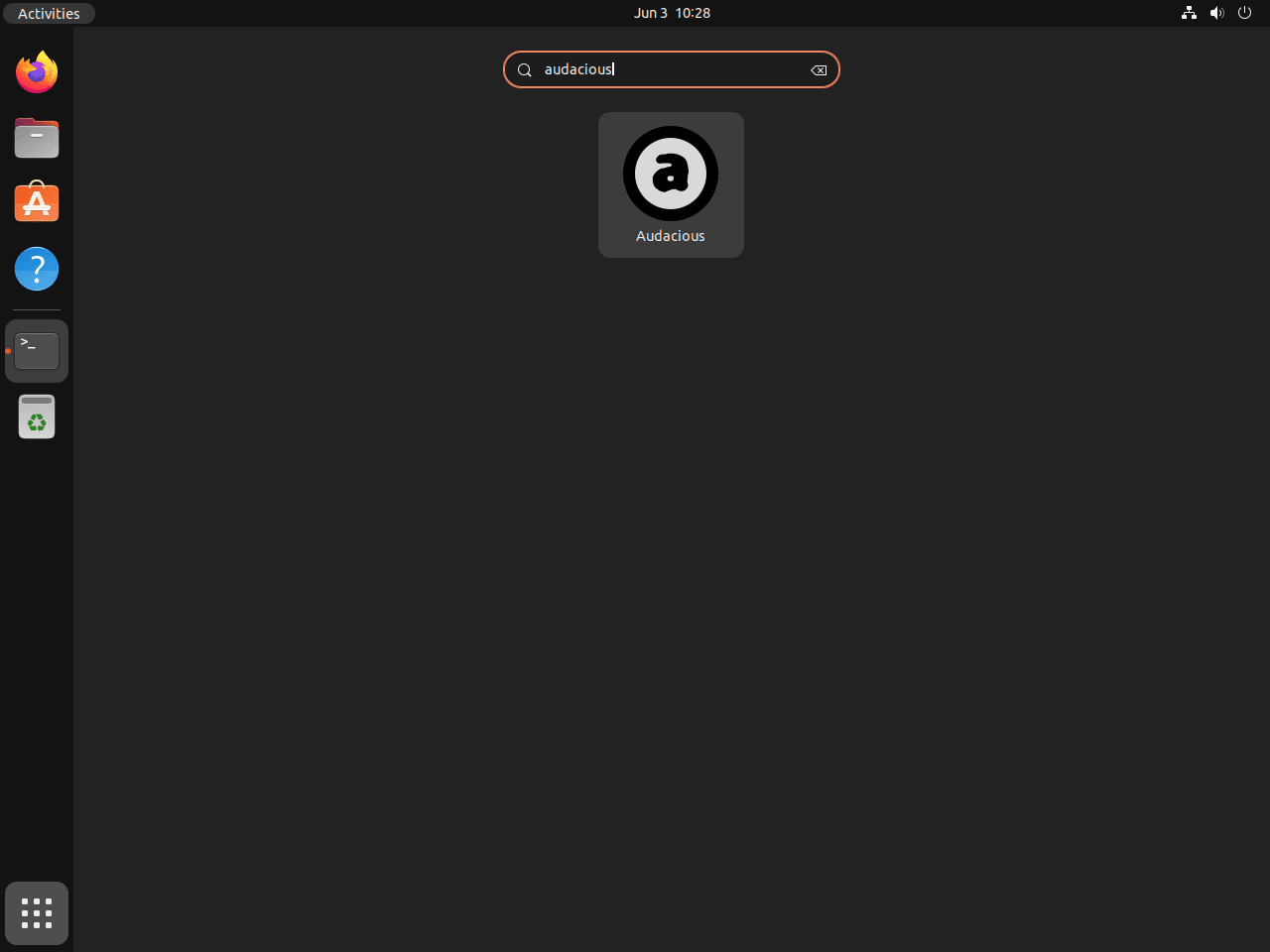
Open Activities, search for Audacious, and click the application icon. APT and PPA installs create a standard desktop launcher, while Snap and Flatpak installs use their package-specific launcher entries.
Configure Audacious
Audacious works immediately after installation, but a few settings make it easier to match the player to your desktop and audio setup. The Ubuntu repository and PPA install audacious-plugins beside the main package, while Snap and Flatpak bundle plugin support inside the application package.
Switch Interface Modes
Audacious supports a modern desktop interface and a classic Winamp-style interface with skin support. Use the interface or appearance options in the application settings if you want a compact playlist view, a skinned player layout, or a desktop-themed window.
Configure Equalizer and Effects
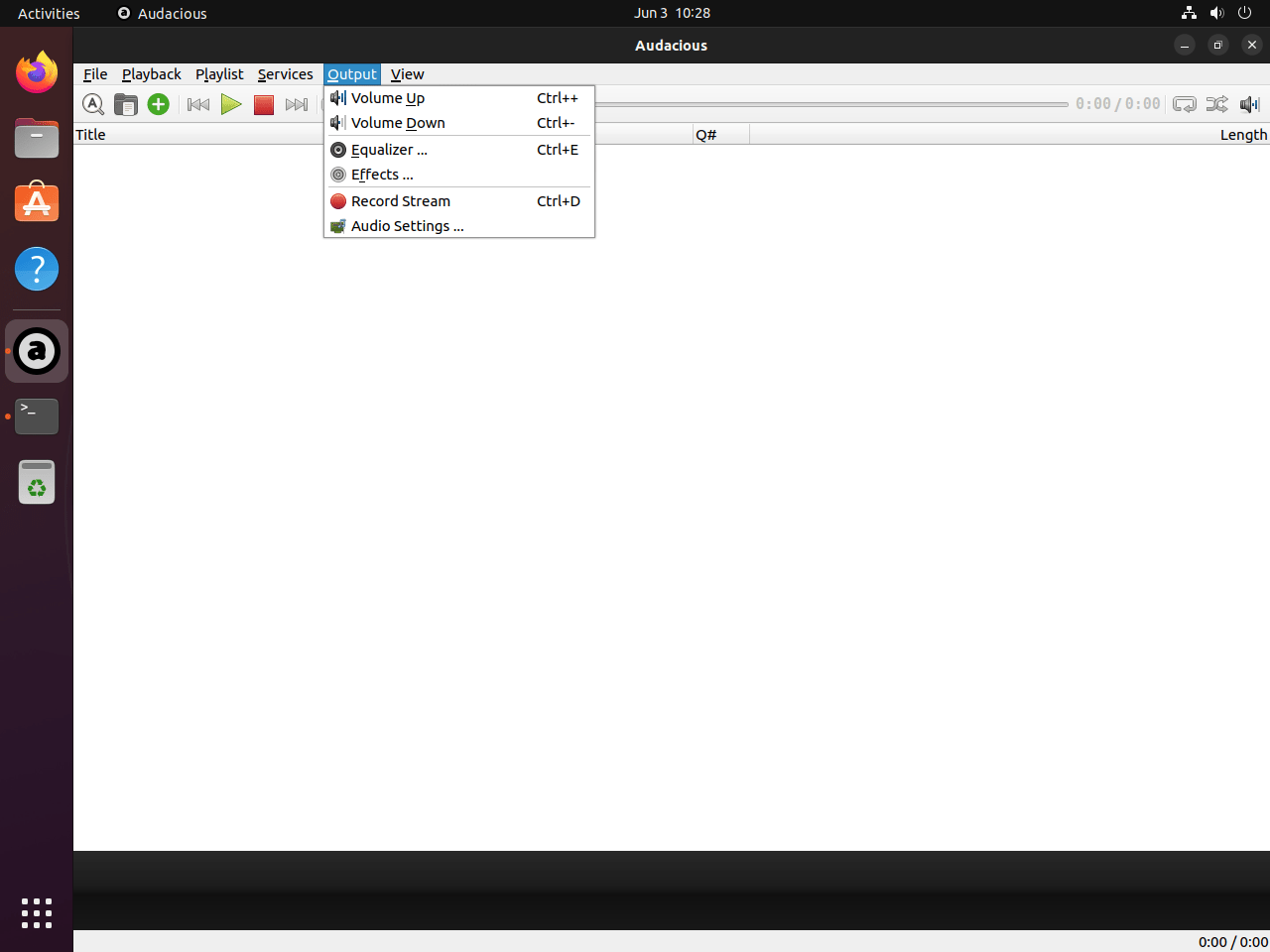
Open the equalizer from the Audacious menus to adjust frequency bands, enable presets, or tune playback for specific speakers and headphones. Plugin availability can vary by package source, so check the plugin settings if you need extra input formats, visualizations, lyric support, or desktop integration features.
Check Playback Shortcuts
The current Audacious interface lists playback shortcuts in the Playback menu. Common defaults include:
Ctrl+Returnstarts playback.Ctrl+,pauses playback.Ctrl+.stops playback.Alt+Upmoves to the previous track.Alt+Downmoves to the next track.Ctrl+Rtoggles repeat playback.Ctrl+Stoggles shuffle playback.Ctrl+Iopens song information.
If you need desktop-wide media keys, check the plugin settings for the global hotkey plugin and confirm the shortcuts do not conflict with your desktop environment.
Update Audacious
Use the updater that matches your installation method. APT and PPA packages follow system package upgrades, while Snap and Flatpak use their own refresh commands.
APT and PPA Updates
sudo apt update
sudo apt install --only-upgrade audacious audacious-plugins
Snap Updates
sudo snap refresh audaciousFlatpak Updates
sudo flatpak update org.atheme.audaciousRemove Audacious
Remove Audacious with the package manager that installed it. If you tested more than one method, repeat the matching removal command for each package source.
Remove APT or PPA Installation
Remove the APT packages:
sudo apt remove audacious audacious-pluginsPreview unused dependencies before removing them:
sudo apt autoremove --dry-runIf the preview only lists packages you no longer need, run the cleanup:
sudo apt autoremoveIf you added the UbuntuHandbook PPA, remove the Audacious pin and the PPA source. For broader source cleanup and rollback behavior, use the remove a PPA from Ubuntu guide before deleting other package sources.
sudo rm -f /etc/apt/preferences.d/ubuntuhandbook1-audacious
sudo add-apt-repository --remove ppa:ubuntuhandbook1/apps -y
sudo apt update
Remove Snap Installation
sudo snap remove --purge audaciousConfirm the Snap package is gone:
snap list audacious 2>/dev/null || echo "audacious not installed"Remove Flatpak Installation
sudo flatpak uninstall org.atheme.audacious
sudo flatpak uninstall --unused
Confirm the Flatpak app is gone:
flatpak list --app --columns=application | grep -Fx org.atheme.audacious || echo "org.atheme.audacious not installed"Remove User Configuration
Package removal does not always delete user preferences, playlists, skins, equalizer settings, or per-app Flatpak and Snap data. These paths are personal data, so list them first and only delete the ones you no longer need.
Preview the Audacious paths that exist in your home directory:
for path in "$HOME/.config/audacious" "$HOME/.var/app/org.atheme.audacious" "$HOME/snap/audacious"; do
  [ -e "$path" ] && printf '%s\n' "$path"
done
The next command permanently deletes the listed Audacious preferences, playlists, skins, and per-package app data. Do not run it if you want to keep any of those files.
rm -rf -- "$HOME/.config/audacious" \
          "$HOME/.var/app/org.atheme.audacious" \
          "$HOME/snap/audacious"
Conclusion
Audacious is now installed with a matching update and removal path. Use the Ubuntu repository for the lowest-maintenance setup, choose the pinned UbuntuHandbook PPA when you want the current Audacious build through APT, prefer Flatpak when Flathub is already part of your desktop workflow, and use Snap only when its community-maintained channel is acceptable.


Formatting tips for your comment
You can use basic HTML to format your comment. Useful tags currently allowed in published comments:
<code>command</code>command<strong>bold</strong><em>italic</em><a href="https://example.com">link</a><blockquote>quote</blockquote>